6 Best Alternatives to the Uneekor EYE MINI CORE Launch (2026)
Explore 6 uneekor eye mini core launch alternatives. We compare weight, dimensions, and sensor technology to help you choose the right launch monitor.

As Amazon Associates, we earn from qualifying purchases. This means we may receive a small commission at no extra cost to you if you click through and make a purchase.
As an Amazon Associate we earn from qualifying purchases. Links on this page are affiliate links.
You are looking for uneekor eye mini core launch alternatives because your setup needs differ from the original. The Uneekor EYE MINI CORE provides precise ball data through wired RJ45 connections and uses high-speed cameras with infrared sensors. It tracks fifteen ball data points and works with GSPro and E6 Connect. This device is ideal for players who prioritize established simulator software and camera-based tracking in a home simulator environment.
However, you might want something else. You could prefer a different size, weight, or feature set. Some buyers seek portable radar data or a built-in display. Others need a quieter impact screen for their indoor space. The alternatives on this list were chosen because their specs overlap with the original. Each option offers a distinct advantage, whether it is portability, course variety, or noise reduction. You can find a device that fits your specific constraints and preferences.
How each alternative compares
FlightScope Mevo Gen2 Portable Launch Monitor
The FlightScope Mevo Gen2 shifts from camera tracking to radar technology. It weighs 1.1 pounds, significantly lighter than the Uneekor’s 8.4 pounds. Its dimensions are 1 by 6.88 by 5.5 inches. This portability suits outdoor use better than the home-focused Uneekor. Both devices support E6 Connect. You gain professional-grade radar data and GPS features. You lose the near-zero latency of high-speed cameras. Choose this if you need a compact tool for range or course play rather than a fixed simulator setup.
PHIGOLF Home Golf Simulator Motion Sensor
The PHIGOLF Motion Sensor uses a swing stick design rather than a standalone launch monitor. It weighs 2.09 pounds and measures 26.2 inches long. This form factor focuses on swing mechanics and course variety. It includes 38,000 preloaded courses. Like the Uneekor, it works with E6 Connect. You trade detailed ball data for extensive practice options. The Uneekor tracks fifteen ball data points via infrared sensors. PHIGOLF prioritizes indoor swing analysis. Pick this if you want a dedicated stick for home practice and course simulation over precise ball flight metrics.
Aerixtron 3D Air Mesh Impact Screen
The Aerixtron 3D Air Mesh Impact Screen is a surface, not a tracking device. It measures 98.4 by 98.4 inches with a thickness of 0.16 inches. It weighs 18.7 pounds. This screen reduces noise for home simulator setups. It works with any launch monitor, including the Uneekor. You do not get tracking data from this item. You get a quiet, durable hitting surface. Choose this if your Uneekor setup needs a compatible screen. It complements the camera-based tracking by providing a safe, quiet environment for indoor play.
Durbles 9.8 x 8.5 ft Triple Layer Impact Screen
The Durbles Triple-Layer Impact Screen offers a 9.8 by 8.5 ft surface. It is designed for quiet indoor practice. It does not track data. It provides a clear visual backdrop for your simulator. You pair it with a launch monitor like the Uneekor. The Uneekor uses high-speed cameras to track ball flight. This screen absorbs impact noise. Select this if you need a budget-friendly screen for a fixed indoor space. It ensures your swing practice remains quiet while the Uneekor handles the data tracking via its infrared sensors.
Aerixtron 11.5×9.8 ft 3D Air Mesh Screen
The Aerixtron 11.5 by 9.8 ft screen is a wider alternative to standard sizes. It measures 98.4 inches wide and tall. It weighs 18.7 pounds. This screen minimizes noise for home simulators. It does not provide launch data. It works with the Uneekor’s camera system. You get a larger hitting area for safety and realism. Choose this if you prefer a wider screen for your setup. It pairs with the Uneekor’s wired connection to create a complete indoor simulator. You rely on the Uneekor for data while this screen handles the physical impact.
Voice Caddie SC4 Pro Launch Monitor
The Voice Caddie SC4 Pro includes a built-in display, unlike the Uneekor which requires a PC. It weighs 1.3 pounds and measures 7.59 by 1.92 by 1.14 inches. It supports E6 Connect like the Uneekor. You gain swing analysis features and app integration. You lose the high-speed camera tracking of the Uneekor. The Voice Caddie uses different technology for its data. Pick this if you want immediate visual feedback without a computer. It suits players who value swing analysis and portability over the detailed ball data provided by the Uneekor’s infrared sensors.
| # | Product | Best for | Price |
|---|---|---|---|
| 1 | Uneekor EYE MINI CORE Launch Monitor Best overall | players using wired simulator setups | |
| 2 | FlightScope Mevo Gen2 Portable Launch Monitor Best premium | Golfers wanting portable radar data and E6 Connect | |
| 3 | PHIGOLF Home Golf Simulator Motion Sensor Best 38,000 courses | Indoor swing practice and course variety | |
| 4 | Aerixtron 3D Air Mesh Impact Screen Best budget | Quiet home simulator setups | |
| 5 | Durbles 9.8 x 8.5 ft Triple Layer Impact Screen Also great | Quiet indoor home golf simulator practice | |
| 6 | Aerixtron 11.5×9.8 ft 3D Air Mesh Screen Also great | quiet home simulator setups | |
| 7 | Voice Caddie SC4 Pro Launch Monitor Best swing analysis | players wanting a built-in screen and app integration |
Uneekor EYE MINI CORE Launch Monitor
Best for: players using wired simulator setups
- Tracking Technology
- High-speed cameras, infrared sensors
- Tracked Metrics
- 15 ball data points
- Compatible Software
- VIEW, GSPro, E6 Connect, TGC19
- Intended Use
- Home simulator
- Connectivity
- RJ45
- Color
- White
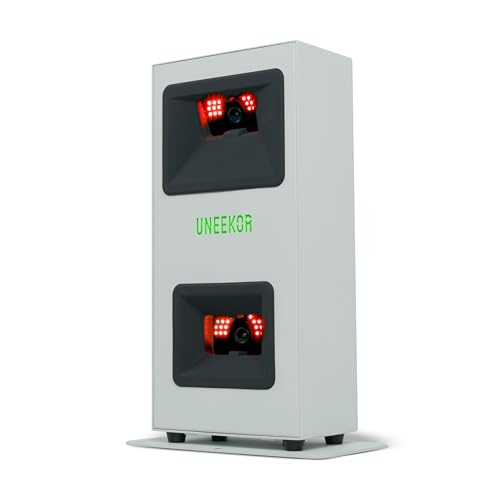
The Uneekor EYE MINI CORE is a home simulator launch monitor using high-speed cameras and infrared sensors. It tracks 15 ball data points with near-zero latency. The unit measures 6.5 inches long and weighs 8.4 pounds. It connects via RJ45 and works with GSPro and E6 Connect. You get the VIEW software included for swing analysis. This device suits players wanting real-time club and ball data for practice.
- Tracks 15 ball data points
- Uses high-speed cameras and infrared sensors
- Compatible with GSPro and E6 Connect
- Near-zero latency for real-time feedback
- Requires an RJ45 Ethernet connection
- Weighs 8.4 pounds
- Limited to 15 tracked metrics
- You want high-speed camera tracking
- You use GSPro for simulation
- You prefer wired connectivity
- You need wireless Bluetooth
- You want over 15 data points
- You prefer a lighter device
Verdict: The Uneekor EYE MINI CORE Launch Monitor delivers precise ball data through wired connections. It fits players who prioritize camera-based tracking and established simulator software.

FlightScope Mevo Gen2 Portable Launch Monitor
Best for: Golfers wanting portable radar data and E6 Connect
- Tracking Technology
- 3D Doppler radar, image processing
- Tracked Metrics
- 18 swing data parameters
- Compatible Software
- E6 Connect, FS Golf App, FS Skills App
- Intended Use
- Indoor simulator, driving range
- Features
- GPS
- Dimensions
- 5.5 × 1 × 6.88 inches
The FlightScope Mevo Gen2 uses 3D Doppler radar and image processing to track 18 swing data parameters. It offers GPS overview and Shot Tracer for both indoor and outdoor use. The unit weighs 1.1 pounds and measures 5.5 by 6.88 by 1 inches. You get lifetime access to E6 Connect with eight courses. This portable monitor suits players who want comprehensive data without a subscription.
- Tracks 18 swing data parameters
- Uses 3D Doppler radar technology
- Includes E6 Connect with 8 courses
- Provides GPS overview and Shot Tracer
- Weighs only 1.1 pounds
- Battery life is limited to 6 hours
- Height of 6.88 inches is taller than some competitors
- Weight of 1.1 pounds is heavier than pure sensor sticks
- You want accurate radar data for full swings
- You need a portable unit for driving ranges
- You prefer software with no annual fees
- You require unlimited battery life for all-day sessions
- You need the smallest possible form factor
- You only want basic ball speed metrics
Verdict: FlightScope Mevo Gen2 Radar Launch Monitor delivers professional-grade radar data in a portable package. It fits golfers who prioritize tracking accuracy and comprehensive course access over minimal size.

PHIGOLF Home Golf Simulator Motion Sensor
Best for: Indoor swing practice and course variety
- Tracking Technology
- 9-axis motion sensor
- Compatible Software
- Phigolf app, E6 Connect
- Intended Use
- Indoor, outdoor
- Included Accessories
- Golf swing stick
- Preloaded Courses
- 38,000 Courses
- Color
- Black
This PHIGOLF simulator uses a 9-axis motion sensor attached to a swing stick to track your swing. It connects to the Phigolf app and E6 Connect software. You can play on 38,000 courses. The device weighs 2.09 pounds and measures 26.2 inches long. It suits golfers who want indoor practice with a simple stick rather than a full launch monitor.
- Access to 38,000 preloaded courses
- 9-axis motion sensor for swing tracking
- Compatible with Phigolf and E6 Connect apps
- Includes a premium golf swing stick
- AI swing coach with visual annotations
- Heavier build at 2.09 pounds compared to typical handheld monitors
- Longer length of 26.2 inches requires more space
- Uses a swing stick instead of a real club for primary tracking
- You want to practice swings indoors with a dedicated stick
- You value access to a large library of virtual courses
- You prefer app-based AI feedback over hardware sensors
- You need precise ball flight data like spin and launch angle
- You require a compact device under 2 pounds
- You want to use your own real golf clubs for tracking
Verdict: PHIGOLF Motion Sensor Swing Stick is a practical indoor practice tool for golfers who prioritize course variety and swing mechanics over detailed ball data. It fits those who want a dedicated stick for home use.

Aerixtron 3D Air Mesh Impact Screen
Best for: Quiet home simulator setups
- Features
- Impact Screen
- Color
- White
- Intended Use
- Simulator, Home
- Dimensions
- 98.4 × 98.4 × 0.16 inches
This Aerixtron impact screen is a white 3D air mesh panel designed for indoor golf simulator use. It measures 11.5 by 9.8 feet, providing a large 98.4-inch width for your setup. The 3.45mm thick fabric reduces impact noise by 60%, making it suitable for home environments. You get HD projection clarity with zero pixel blur. The screen includes bungee cords and stainless steel grommets for quick installation.
- 3D air mesh tight weaving delivers HD projection with zero pixel blur
- 3.45mm thick fabric reduces impact noise by 60%
- 304 stainless steel grommets support bungee cords for 3-minute setup
- Reinforced 6.93mm edges prevent slipping during use
- 0.16-inch height may feel thinner than premium alternatives
- Only offers white color option in this listing
- Requires separate launch monitor for full data analysis
- You want a quiet screen for home practice
- You need a large 98.4-inch wide impact area
- You prefer quick installation with included bungee cords
- You need a built-in launch monitor
- You require multiple color options
- You want a thinner profile than 0.16 inches
Verdict: Aerixtron 3D Air Mesh Impact Screen fits home golfers who prioritize noise reduction and easy setup. You get a wide, quiet surface that works with any simulator launch monitor.

Durbles 9.8 x 8.5 ft Triple Layer Impact Screen
Best for: Quiet indoor home golf simulator practice
- Intended Use
- Indoor practice, net, enclosure, home
- Included Accessories
- Mounting grommets, bungee cords
- Features
- Impact Screen
- Color
- White
The Durbles golf impact screen is a white, indoor simulator screen measuring 9.8 by 8.5 feet. It features a triple-layer design with an HD outer face, an ultra sound damping middle layer, and an impact-resistant inner layer. The kit includes mounting grommets and bungee cords for secure setup. This screen suits you if you need a durable, quiet surface for home practice sessions.
- Triple-layer construction with HD outer face
- Ultra sound damping middle layer reduces noise
- Impact-resistant inner layer for durability
- Includes mounting grommets and bungee cords
- Fixed 9.8 by 8.5 ft size limits space flexibility
- White color may show dirt faster than darker options
- You want a quiet practice environment
- You need a durable indoor screen
- You prefer a simple setup with included cords
- You need a larger 9.8 by 13 ft area
- You require a black screen for better contrast
- You want a portable net without a frame
Verdict: Durbles Triple-Layer Golf Impact Screen offers a quiet, durable surface for home simulators. It fits you if you prioritize noise reduction and clear visuals in a fixed indoor space.

Aerixtron 11.5×9.8 ft 3D Air Mesh Screen
Best for: quiet home simulator setups
- Features
- Impact Screen
- Color
- White
- Intended Use
- Simulator, Home
- Dimensions
- 98.4 × 98.4 × 0.16 inches
- Weight
- 18.7 pounds
This Aerixtron impact screen provides a 11.5 by 9.8 ft white surface for your simulator setup. The 3D air mesh fabric offers HD projection and reduces impact noise by 60%. It weighs 18.7 pounds and features flame-retardant properties for safety. You can install it in three minutes using the included bungee cords and stainless steel grommets. This screen suits home users who need a quiet, durable backdrop for practice.
- 11.5 x 9.8 ft white surface area
- Reduces impact noise by 60%
- Flame-retardant fabric for safety
- 3-minute quick-install with bungee cords
- HD projection with zero pixel blur
- Heavier at 18.7 pounds compared to lighter mesh options
- Thicker 3.45mm fabric may reduce ball rebound speed
- Limited to white color option only
- You need a quiet screen for home use
- You want a flame-retardant safety feature
- You prefer a large 11.5 x 9.8 ft surface
- You need a portable screen under 10 pounds
- You want multiple color choices
- You require a screen with built-in sensors
Verdict: Aerixtron 11.5 x 9.8 ft Impact Screen fits home golfers who prioritize noise reduction and safety in a durable, easy-to-install screen.

Voice Caddie SC4 Pro Launch Monitor
Best for: players wanting a built-in screen and app integration
- Tracked Metrics
- Ball and club head data
- Compatible Software
- E6 Connect, VOICECADDIE S App
- Display Type
- Built-in screen
- Intended Use
- Indoor and outdoor
- Features
- Swing Analysis
- Color
- Black
The Voice Caddie SC4 Pro is a portable launch monitor designed for both indoor and outdoor use. It features a built-in screen and weighs 1.3 pounds. The device tracks ball and club head data using a Prometrics engine. It connects to the E6 Connect simulator and the VOICECADDIE S app. This setup suits golfers who want detailed swing analysis and 3D driving range practice without special balls.
- Built-in screen for immediate data feedback
- Compatible with E6 Connect and VOICECADDIE S app
- Tracks swing speed and ball flight data
- Works with standard golf balls
- Heavier build at 1.3 pounds compared to lighter sensors
- Requires smartphone app for advanced statistical analysis
- You want a dedicated device with a built-in screen
- You practice in both indoor and outdoor environments
- You use E6 Connect for simulator play
- You prefer a lightweight sensor under 1 pound
- You want all data on the device without a phone
- You only need basic ball speed tracking
Verdict: Voice Caddie SC4 Pro Golf Launch Monitor fits players who value a built-in display and comprehensive app integration for swing analysis. It is ideal for those using E6 Connect who do not mind the extra weight.
Specifications side by side
| Spec | Uneekor EYE MINI CORE Launch Monitor | FlightScope Mevo Gen2 Portable Launch Monitor | PHIGOLF Home Golf Simulator Motion Sensor | Aerixtron 3D Air Mesh Impact Screen | Durbles 9.8 x 8.5 ft Triple Layer Impact Screen | Aerixtron 11.5×9.8 ft 3D Air Mesh Screen | Voice Caddie SC4 Pro Launch Monitor |
|---|---|---|---|---|---|---|---|
| Tracking Technology | High-speed cameras, infrared sensors | 3D Doppler radar, image processing | 9-axis motion sensor | – | – | – | – |
| Tracked Metrics | 15 ball data points | 18 swing data parameters | – | – | – | – | Ball and club head data |
| Compatible Software | VIEW, GSPro, E6 Connect, TGC19 | E6 Connect, FS Golf App, FS Skills App | Phigolf app, E6 Connect | – | – | – | E6 Connect, VOICECADDIE S App |
| Display Type | – | – | – | – | – | – | Built-in screen |
| Intended Use | Home simulator | Indoor simulator, driving range | Indoor, outdoor | – | Indoor practice, net, enclosure, home | – | Indoor and outdoor |
| Connectivity | RJ45 | – | – | – | – | – | – |
| Included Accessories | – | – | Golf swing stick | – | Mounting grommets, bungee cords | – | – |
| Features | – | GPS | – | Impact Screen | Impact Screen | Impact Screen | Swing Analysis |
| Preloaded Courses | – | – | 38,000 Courses | – | – | – | – |
| Color | White | – | Black | White | White | White | Black |
| Use | – | Indoor, Outdoor | Indoor, Outdoor | Indoor | Indoor | – | Indoor, Outdoor |
| Dimensions | 6.5 × 3.38 × 13.9 inches | 5.5 × 1 × 6.88 inches | 26.2 × 4.92 × 2.76 inches | 98.4 × 98.4 × 0.16 inches | – | 98.4 × 98.4 × 0.16 inches | 1.92 × 7.59 × 1.14 inches |
| Weight | 8.4 pounds | 1.1 pounds | 2.09 pounds | – | – | 18.7 pounds | 1.3 pounds |
| Model | – | Mevo Gen2 | 192516000053 | – | DublesGIS3x2.6 | – | SC4 Pro (+ 3D Driving Range Simulator) |
| Size | – | – | 23.6" | 11.5 x 9.8 ft | 9.8 x 8.5 ft | 11.5 x 9.8 ft | – |
Frequently asked questions
What is the most portable alternative to the Uneekor EYE MINI CORE?
The FlightScope Mevo Gen2 is the most portable option on this list. It weighs just 1.1 pounds and measures 1 by 6.88 by 5.5 inches. This small size makes it easy to carry for outdoor sessions. It also offers GPS features and works with E6 Connect software for comprehensive course access.
Which launch monitor includes a built-in screen for swing analysis?
The Voice Caddie SC4 Pro features a built-in display and swing analysis tools. It weighs 1.3 pounds and measures 1.92 by 1.14 by 7.59 inches. This device is ideal for players who want app integration and detailed swing data. It is compatible with E6 Connect for simulator use.
How do I reduce noise in my home simulator setup?
You can reduce noise by using an impact screen designed for quiet environments. The Aerixtron 3D Air Mesh Impact Screen is a top choice for home setups. It measures 11.5 by 9.8 feet and weighs 18.7 pounds. The Durbles Triple-Layer screen is another durable option that minimizes sound for indoor practice.
Is there a sensor stick for indoor swing practice?
The PHIGOLF Home Golf Simulator Motion Sensor is a practical stick for indoor use. It comes preloaded with 38,000 courses and focuses on swing mechanics. The device is 26.2 inches long and weighs 2.09 pounds. It connects to E6 Connect software to help you practice your swing in a home setting.
What is the best launch monitor for players using wired simulators?
The Uneekor EYE MINI CORE remains the best choice for wired simulator setups. It delivers precise ball data through wired connections. The unit is white and weighs 8.4 pounds. Its dimensions are 6.5 by 3.38 by 13.9 inches. It is designed for players who prioritize camera-based tracking and established simulator software.
Can I use these alternatives with E6 Connect software?
Yes, most alternatives on this list are compatible with E6 Connect. The FlightScope Mevo Gen2, PHIGOLF sensor, Voice Caddie SC4 Pro, and Uneekor EYE MINI CORE all support this software. This compatibility allows you to access a wide range of virtual courses. It ensures a seamless experience whether you are practicing indoors or outdoors.
Which impact screen is best for a fixed indoor space?
The Durbles Triple-Layer Golf Impact Screen is ideal for fixed indoor spaces. It measures 9.8 by 8.5 feet and offers a quiet, durable surface. The white screen provides clear visuals for your simulator. It is designed to handle repeated impacts while maintaining a low noise profile for home use.
See also
How this review was put together
- Specs are quoted from the Amazon listing, not measured in a lab.
- The score is out of 10, based on listed specifications and buyer feedback.
- Prices were read from the listing when this page was last built and move without notice.
2,523 reviews · 1,445 rated products · 87 brands tracked
We earn a commission when you buy through our Amazon links. That never changes a score.