Uneekor EYE MINI CORE Launch Review: Specs, Pros and Cons
This uneekor eye mini core launch review analyzes 1 devices. We compare published specs like tracking tech and PC requirements to help you choose.

As Amazon Associates, we earn from qualifying purchases. This means we may receive a small commission at no extra cost to you if you click through and make a purchase.
As an Amazon Associate we earn from qualifying purchases. Links on this page are affiliate links.
This uneekor eye mini core launch review covers a compact home simulator device. It uses high-speed cameras and infrared sensors for real-time tracking. The unit captures 15 ball data points per shot. It connects via RJ45 Ethernet for stable data transfer. The system supports third-party software like GSPro and E6 Connect. It also includes the VIEW software for swing analysis. This setup allows you to track progress with session reports. The hardware is designed for dedicated simulator environments. You get near-zero latency for immersive play. The device reads any dimple pattern without stickers.
- Captures 15 ball data points per shot
- Uses high-speed cameras and infrared sensors
- Compatible with GSPro, E6 Connect, and TGC19
- Connects via RJ45 for low latency
- Includes VIEW software for swing analysis
Good fit for
This monitor suits golfers building a dedicated home simulator. It works well with PC setups that meet the i5 Gen12 or Ryzen5+ requirement. You need 16GB RAM and an RTX3060 for the VIEW software. The system is ideal for players who want to use third-party courses like GSPro. It fits those who prefer wired RJ45 connections over wireless. The included VIEW software helps you track 15 data points. This setup is best for users with the required computer specs.
Who can skip it
Skip this if you lack the required PC specs. The VIEW software needs an i5 Gen12 or Ryzen5+ processor. You must have 16GB RAM and an RTX3060 graphics card. Simulation mode requires even higher specs, like an i7 Gen12 and 32GB RAM. It is not for casual users with weak computers. The device lacks Bluetooth or Wi-Fi, relying on RJ45. You cannot use it without a compatible PC. Check your hardware before buying.
Verdict
The Uneekor EYE MINI CORE is a spec-heavy monitor for serious simulator builders. It requires a powerful PC to unlock its full potential.
Uneekor EYE MINI CORE Key Specs
Tracking Technology: High-speed cameras, infrared sensors
This system uses optical and infrared methods to capture shot data. It reads dimple patterns on any golf ball, so you do not need special stickers. This allows you to use your preferred balls. The technology provides near-zero latency for real-time feedback. It is suitable for players who want accurate data without modifying their equipment.
Tracked Metrics: 15 ball data points
The monitor captures fifteen specific data points for every shot. This includes essential metrics for analyzing your swing and ball flight. You can track progress over time using session reports. This level of detail helps you identify specific areas for improvement in your game compared to basic launch monitors.
Connectivity: RJ45
The device connects to your network via an RJ45 Ethernet port. This wired connection ensures stable and consistent data transfer. It reduces the risk of wireless interference or lag during play. You should ensure your home simulator setup has an available Ethernet port for reliable operation and seamless software integration.
Compatible Software: VIEW, GSPro, E6 Connect, TGC19
This launch monitor works with several popular simulation platforms. You can use the included VIEW software for analysis or connect to third-party apps like GSPro and TGC19. This flexibility lets you choose your preferred virtual golf experience. You can play courses, practice modes, and tournaments on your home setup.
Intended Use: Home simulator
This device is designed specifically for home golf simulator setups. It is compact and integrates into indoor environments. You can use it for practice, training, or entertainment. It is not intended for outdoor range use. Ensure your space accommodates the unit and the required computer specifications for optimal performance.
Design and build details
The Uneekor EYE MINI CORE presents a compact physical form factor. According to the listing, the unit measures 6.5 inches in length, 3.38 inches in width, and 13.9 inches in height. It weighs 8.4 pounds. The exterior finish is white. These dimensions suggest a small footprint that fits easily on a desk or shelf. The weight is moderate, allowing for stable placement without excessive bulk. This size makes it suitable for home simulator setups where space is limited.
The device relies on high-speed cameras and infrared sensors for its tracking technology. There are no visible buttons or controls mentioned in the data. Instead, it connects via an RJ45 Ethernet port. This wired connection prioritizes stable data transfer over wireless convenience. The lack of complex external controls keeps the design clean and uncluttered. You place the unit in front of your hitting area, and the software handles the rest.
The build focuses on functionality rather than elaborate aesthetics. The white color blends into most home environments. The compact size means you do not need a dedicated large room. You can set it up in a garage, basement, or spare bedroom. The sturdy weight helps prevent movement during use. The design supports its role as a core component of a home golf simulator. It integrates with third-party software like GSPro and E6 Connect. This practical layout ensures you can start playing with minimal setup effort.
Setup and everyday use
Setting up this launch monitor requires a dedicated PC or laptop. The listing specifies distinct hardware tiers for different software modes. For the included VIEW software, you need an Intel Core i5 Gen12 or Ryzen 5 processor, 16GB of RAM, a 256GB SSD, and an NVIDIA RTX 3060 graphics card with 6GB of VRAM. You must also run Windows 11 and have an RJ45 Ethernet port with a stable 25Mbps connection. If you plan to run third-party simulation software like GSPro, the requirements increase significantly. You will need an Intel Core i7 Gen12 or Ryzen 7 processor, 32GB of RAM, and an NVIDIA RTX 4070 graphics card with 16GB of VRAM. This hardware demand ensures the system can handle the high-speed camera data and infrared sensor processing in real time. Daily use involves connecting the unit via Ethernet to your computer. The device reads any golf ball dimple pattern, so you do not need to apply special stickers. You can use your preferred golf ball for every shot. The system captures 15 ball data points per swing. You can analyze your session with the included VIEW software, which provides reports to track progress. For more advanced insights, you can pair it with Swing Optix, which is sold separately. The monitor also supports third-party platforms such as E6 Connect and TGC19. These platforms allow you to play full courses, practice in different modes, or enter tournaments from your home setup. The near-zero latency helps maintain immersion during these sessions. You can also access a three-month trial of the Ultimate Package for additional practice modes and competitive play.
Before you buy this launch monitor
You need a capable PC to run this system. The listing requires an Intel Core i5 Gen12 or Ryzen 5 with 16GB RAM for the VIEW software. If you plan to use simulation software like GSPro, you must upgrade to an Intel Core i7 Gen12 or Ryzen 7 with 32GB RAM and an RTX 4070 graphics card. Ensure your network uses an RJ45 connection for stable data transfer. You should verify that your simulator setup includes dual displays for the included GameDay modes. The unit works with E6 Connect and TGC19, so check your existing software licenses before purchasing. You do not need special ball stickers, which simplifies daily use. Keep the white exterior clean to maintain the sensor accuracy. This device fits well alongside other compact launch monitors for home use. It offers a practical solution for players who want detailed ball data without complex setup procedures. The near-zero latency helps you track real-time swing changes effectively.
Check before you buy
- Verify your PC meets the i7 Gen12 and 32GB RAM requirement for simulation software.
- Ensure you have dual displays for the included GameDay competitive modes.
- Check that your network setup supports a stable RJ45 Ethernet connection.
- Confirm compatibility with your preferred third-party software like GSPro or E6 Connect.
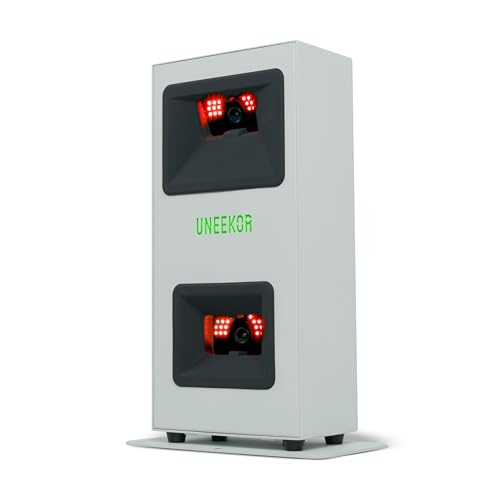
Uneekor EYE MINI CORE Launch Monitor
Best for: Home simulators with powerful PCs
- Tracking Technology
- High-speed cameras, infrared sensors
- Tracked Metrics
- 15 ball data points
- Compatible Software
- VIEW, GSPro, E6 Connect, TGC19
- Intended Use
- Home simulator
- Connectivity
- RJ45
- Color
- White
The Uneekor EYE MINI CORE is a home simulator launch monitor using high-speed cameras and infrared sensors. It tracks 15 ball data points with near-zero latency. The device supports third-party software like GSPro and E6 Connect. It includes VIEW software and a 3-month trial of the Ultimate Package. This unit suits golfers wanting real-time feedback without ball stickers. It requires a dedicated PC with specific hardware to run simulation modes effectively.
- Tracks 15 ball data points for detailed swing analysis.
- Uses Dimple Optix technology to read any golf ball dimple pattern without stickers.
- Compatible with GSPro, E6 Connect, and TGC19 for varied simulation experiences.
- Near-zero latency provides real-time immersion during play.
- Requires a powerful PC with an i7 Gen12 or Ryzen7+ processor and 32GB RAM for simulation.
- Physical dimensions of 13.9 inches in height and 8.4 pounds in weight make it a substantial desktop unit.
- Club Optix real-time visuals require a separate software upgrade.
- You want to use any golf ball without applying stickers.
- You have a high-spec PC ready for simulator software.
- You prefer tracking 15 distinct ball data points.
- You lack the required i7 Gen12/Ryzen7+ CPU and 32GB RAM for simulation.
- You need a lightweight portable device under 5 pounds.
- You want Club Optix features without purchasing a software upgrade.
Verdict: The Uneekor EYE MINI CORE Golf Launch Monitor delivers precise 15-point data tracking for serious home sim setups. It fits buyers with powerful PCs who value sticker-free ball tracking and broad software compatibility.
Specifications side by side
| Spec | Uneekor EYE MINI CORE Launch Monitor |
|---|---|
| Tracking Technology | High-speed cameras, infrared sensors |
| Tracked Metrics | 15 ball data points |
| Compatible Software | VIEW, GSPro, E6 Connect, TGC19 |
| Intended Use | Home simulator |
| Connectivity | RJ45 |
| Color | White |
| Dimensions | 6.5 × 3.38 × 13.9 inches |
| Weight | 8.4 pounds |
Frequently asked questions
Does the Uneekor EYE MINI CORE require stickers on the ball?
No, it does not require stickers. The system uses high-speed cameras and infrared sensors to read dimple patterns on any standard golf ball. This allows you to track shots without applying special markers or altering your preferred equipment. You can simply place the ball on the mat and hit.
What software is compatible with this launch monitor?
The device supports E6 Connect as a primary compatible option. It also works with third-party simulation platforms, provided you have the necessary hardware. The listing notes that specific software modes may require different computer specifications, so check your system requirements before connecting to ensure smooth data transfer.
How much data does the monitor track per shot?
It captures 15 ball data points for every single shot. This comprehensive tracking helps you analyze your swing mechanics and ball flight in detail. The high-speed cameras and infrared sensors work together to provide precise readings, which is essential for serious home simulator setups and accurate performance analysis.
What are the physical dimensions of the Uneekor EYE MINI CORE?
The unit measures 6.5 inches in length, 3.38 inches in width, and 13.9 inches in height. It has a compact form factor that fits well in home simulator bays. The exterior finish is white, and the design is built to sit securely near your hitting area while capturing data.
How does the device connect to your computer?
It connects via an RJ45 Ethernet port for stable data transfer. This wired connection ensures reliable communication between the launch monitor and your PC. You do not need to rely on wireless signals for critical shot data, which helps maintain consistency during your practice sessions or simulator rounds.
Who is the ideal user for this launch monitor?
This monitor is best for users with powerful PCs who want precise data for home simulators. It suits buyers who value sticker-free tracking and broad software compatibility. If you have the required hardware and want to use your preferred golf balls, this device offers the detailed metrics needed for improvement.
See also
How this review was put together
- Specs are quoted from the Amazon listing, not measured in a lab.
- The score is out of 10, based on listed specifications and buyer feedback.
- Prices were read from the listing when this page was last built and move without notice.
2,559 reviews · 1,445 rated products · 87 brands tracked
We earn a commission when you buy through our Amazon links. That never changes a score.


