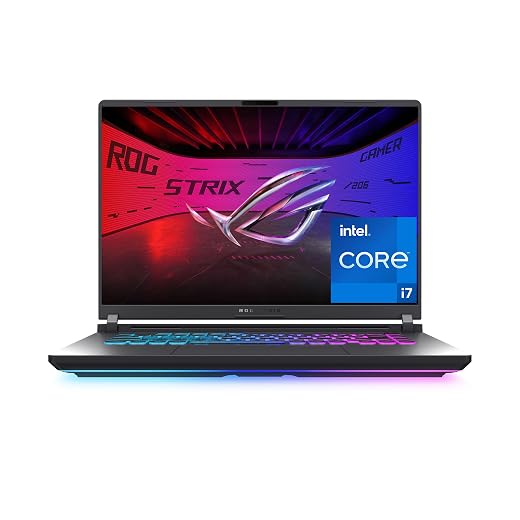
Acer Nitro 5 17.3 Gaming Laptop: Reliability and Hardware Breakdown
The Acer Nitro 5 17.3 gaming laptop (model AN517-51-76V6) pairs a six-core 9th Generation Intel Core i7-9750H processor with dedicated NVIDIA GeForce RTX 2060 graphics inside an expansive desktop-replacement footprint. Serving as a mainstream big-screen gaming rig, this hardware configuration delivers dependable 1080p rendering across competitive esports titles and mid-range creative workloads. Our detailed acer…

As Amazon Associates, we earn from qualifying purchases. This means we may receive a small commission at no extra cost to you if you click through and make a purchase.
The Acer Nitro 5 17.3 gaming laptop (model AN517-51-76V6) pairs a six-core 9th Generation Intel Core i7-9750H processor with dedicated NVIDIA GeForce RTX 2060 graphics inside an expansive desktop-replacement footprint. Serving as a mainstream big-screen gaming rig, this hardware configuration delivers dependable 1080p rendering across competitive esports titles and mid-range creative workloads. Our detailed acer nitro 5 an517-51-76v6 review reveals a system that emphasizes high-refresh display responsiveness and exceptional drive expandability, making it a compelling option for tinkerers, even if its cooling system requires attentive maintenance to avoid performance bottlenecks over time.
This portable powerhouse suits stationary home gamers, simulation enthusiasts, and productivity multitaskers who value a spacious 144Hz display and internal drive flexibility over lightweight mobility. Buyers looking to run several high-capacity storage drives inside a single chassis will appreciate the physical internal layout. However, competitive players demanding ultra-quiet acoustics, modern multi-gigabit wireless standards, or featherweight travel convenience should evaluate newer platforms such as the acer nitro 17 gaming laptop or the more compact acer nitro v15 gaming laptop instead.
Acer Nitro 5 17.3 spec sheet
| Processor | Intel Core i7-9750H (6 cores, 12 threads, up to 4.5GHz) |
|---|---|
| Dedicated Graphics | NVIDIA GeForce RTX 2060 (6 GB GDDR6 VRAM) |
| Display Panel | 17.3-inch Full HD Widescreen IPS LED-backlit (1920 x 1080) |
| Refresh & Response Rate | 144Hz refresh rate, 3ms response time |
| System Memory | 16GB DDR4 2666MHz (Listing spec table also notes 64 GB capacity) |
| Primary Solid State Storage | 256GB NVMe SSD |
| Storage Expansion Bays | 2 x PCIe M.2 slots (1 open) plus 1 available hard drive bay |
| Wireless & Networking | Intel Wireless-AC 9560 802.11ac Gigabit WiFi 5, Gigabit Ethernet LAN |
| Audio & Keyboard | HD Audio, integrated backlit keyboard |
| Operating System & Color | Windows 10 Home, Gray chassis finish |
Every field from the listing (40)
| 0 | Color, Gray |
|---|---|
| 1 | Hard-Drive Size, 256 GB |
| 2 | Operating System, Windows 10 Home |
| 3 | Other Special Features of the Product, HD Audio |
| 4 | Graphics Description, Dedicated |
| 5 | Graphics Coprocessor, NVIDIA GeForce RTX 2060 |
| 6 | Hard Disk Description, SSD |
| 7 | Item Weight, 5.7 pounds |
| 8 | Video Processor, NVIDIA |
| 9 | Specific Uses For Product, Gaming, Multimedia, Personal |
| 10 | Graphics Card Ram, 6 GB |
| 11 | Automatic Backup Software Included, Webcam |
| 12 | Form Factor, Laptop |
| 13 | Hard Disk Interface, Solid State |
| 14 | Voltage, 240 volts |
| 15 | Graphics Ram Type, GDDR6 |
| 16 | Compatible Devices, External displays, mice, keyboards, storage devices, printers, and other USB, HDMI, Bluetooth, or Wi-Fi compatible devices |
| 17 | Warranty Type, International |
| 18 | Item Dimensions L x W x Thickness, 14.19"L x 10.67"W x 1.02"Th |
| 19 | Chipset Type, HM370 or HM470 |
| 20 | Optical Storage Device, No Optical Drive |
| 21 | Power Device, AC Adapter |
| 22 | Video Output, HDMI |
| 23 | Operating System Family, Windows |
| 24 | Screen Size, 17.3 inches |
| 25 | Resolution, 1080p |
| 26 | Native Resolution, 1920 x 1080 pixels |
| 27 | Display Type, LED |
| 28 | Display Resolution Maximum, 2560×1440 pixels |
| 29 | Display Technology, LED |
| 30 | Display Refresh Rate in Hertz, 144 |
| 31 | Maximum Display Brightness, 300 nit |
| 32 | Touch Screen Type, No Touchscreen |
| 33 | Display Maximum Resolution, 1920 x 1080 pixels |
| 34 | Connectivity Technology, Bluetooth, Ethernet, USB, Wi-Fi |
| 35 | Wireless Technology, Bluetooth |
| 36 | Wireless Compability, 801.11ac |
| 37 | Cellular Technology, Wifi |
| 38 | Bluetooth Version, 5 |
| 39 | LAN Port Bandwidth, 1 Gbps |
Quoted from the product listing. We did not measure these figures.
01Processing Power and Dedicated Gaming Performance
At the center of the hardware array sits the 9th Generation Intel Core i7-9750H processor. Built with 6 physical cores and capable of boosting up to 4.5GHz, this CPU handles multi-threaded workloads, simulation calculations, and background operating system services with ease. In competitive gaming scenarios, processor clock speeds directly influence minimum frame thresholds. Having six full performance cores ensures that background voice applications or browser tabs do not produce micro-stutter while running modern titles.
Graphic rendering duties fall to the acer nitro 5 17.3 rtx 2060 configuration, which carries 6 GB of dedicated GDDR6 VRAM. This graphics card supports hardware ray tracing and AI-driven tensor operations, unlocking modern visual features in mainstream titles at native 1080p resolution. While the 6 GB video memory ceiling means users must thoughtfully configure high-resolution texture packs, the dedicated GPU maintains steady frame pacing when driving fast-paced shooters. The acer nitro 5 17.3 gaming performance benefits substantially from this dedicated silicon, avoiding the memory bandwidth limitations common to entry-level graphics configurations.
Feeding this hardware pairing is a dual-channel 16GB DDR4 memory configuration running at 2666MHz. While newer platforms run faster memory clocks, this allotment delivers adequate throughput for modern gaming libraries and multi-tab browsing sessions. The listing specifications note an installed memory threshold up to 64 GB, giving power users who render video or run local virtual environments a clear pathway to upgrade internal memory down the road.
02Thermal Cooling Architecture and Heat Dissipation
Thermal management is the single most critical factor in long-term laptop durability. High-wattage silicon packaged within a mobile footprint generates intense thermal energy during prolonged gaming sessions. The acer nitro 5 17.3 thermal cooling setup utilizes Acer CoolBoost technology, combining twin internal fans with dual exhaust ports to expel heated air from the chassis. When high computational loads push temperatures upward, CoolBoost increases fan RPM beyond standard profiles to accelerate airflow across internal heatsinks.
Because the Intel Core i7-9750H operates with high boost clocks, sustained processing demands naturally push core temperatures close to thermal throttling thresholds. Long-term acer nitro 5 17.3 reliability depends on the user maintaining unobstructed airflow around the twin exhaust vents. Allowing dust accumulation inside the fin stacks or running the unit on soft bedding obstructs intake channels, quickly triggering thermal management downclocking to protect internal components.
Potential buyers should understand that high-velocity cooling comes with distinct acoustic trade-offs. When CoolBoost engages full fan speeds during intensive render cycles or extended gaming matches, acoustic output increases significantly. Users planning to operate this laptop in quiet office spaces or communal bedrooms will want to adjust performance profiles within software or pair the device with an external gaming headset to isolate ambient fan turbulence.
03Storage Expandability and Internal Upgrade Options
One of the most persistent owner frustrations with mainstream laptops is restrictive storage capacity. The base configuration arrives with a modest 256GB NVMe SSD, which fills rapidly once Windows 10 Home and two or three contemporary gaming installations are completed. Fortunately, the chassis architecture excels in long-term serviceability, providing class-leading acer nitro 5 17.3 upgrade options that extend the machine’s viable lifespan far beyond factory constraints.
The motherboard layout incorporates two dedicated PCIe M.2 slots, with one slot arriving unoccupied from the factory for easy solid-state drive additions. Furthermore, the chassis houses an available 2.5-inch hard drive bay, providing three distinct physical storage locations inside a single portable machine. This triple-drive configuration allows owners to reserve the factory 256GB NVMe SSD strictly for the operating system while installing high-capacity solid-state or mechanical drives for expansive media archives and auxiliary gaming installations.
Maintaining access to these internal bays requires basic technical comfort with chassis disassembly. Opening the bottom panel reveals direct access to the storage headers and memory slots without needing proprietary technician tools. For buyers planning multi-year ownership, this accessible layout protects your investment by enabling progressive hardware enhancements as individual storage requirements grow.
04Chassis Durability, Display Quality, and Port Selection
A primary selling point of this machine is the physical viewing area. The 17.3-inch Full HD Widescreen display features an IPS LED-backlit panel running at a 144Hz refresh rate with a rapid 3ms response time. Fast-motion clarity in first-person titles is markedly superior to standard 60Hz panels, virtually eliminating visual ghosting during erratic camera pans. The expansive screen real estate provides immersive gameplay without mandating an external screen, though stationary users can easily expand their desk setup with an external desktop display like the acer nitro kg241y for a dedicated dual-monitor command center.
Chassis construction features a utilitarian gray plastic finish paired with an integrated backlit keyboard for low-light input accuracy. Given the expansive 17.3-inch footprint, structural rigidity requires deliberate handling. Users should open the display lid from the center rather than twisting the panel from the upper corners, preventing uneven stress on the hinge assemblies. While the listing does not specify total machine weight, a 17.3-inch format naturally commands more desk space and demands a reinforced backpack for transport.
Physical connectivity remains versatile for stationary gaming configurations. Network traffic is managed by an Intel Wireless-AC 9560 Wi-Fi 5 module supporting gigabit wireless bandwidth, backed by a dedicated 10/100/1000 Gigabit Ethernet RJ-45 LAN port. Competitive online players can plug directly into home routers to bypass wireless interference entirely. Integrated HD Audio completes the peripheral foundation, ensuring functional out-of-the-box communication for voice chat and casual listening.
05Diagnosing Common Problems and Failure Prevention
Understanding potential failure points empowers owners to prevent downtime before it interrupts gaming sessions. Among reported acer nitro 5 17.3 common problems, baseline storage starvation ranks highest due to the small factory 256GB drive. When an operating system drive fills beyond ninety percent capacity, Windows updates can fail, background caching falters, and overall responsiveness degrades. Adding a second drive in the open M.2 slot immediately resolves this limitation.
Thermal accumulation represents another operational challenge over extended ownership periods. Over months of regular use, the dual-fan assembly inevitably draws environmental dust into the interior heat pipes. Without regular compressed-air cleaning, elevated temperatures force the Core i7-9750H to throttle its operating frequencies, reducing in-game frame rates. Establishing a biannual maintenance habit to clear external vents preserves factory clock speeds.
Finally, peripheral care plays an important role in overall longevity. The integrated backlit keyboard features membrane-based key switches that benefit from gentle actuation rather than aggressive striking during tense gameplay. Keeping the keyboard deck free of debris and avoiding resting heavy objects on the closed display lid protects both the switch mechanisms and the IPS panel from unnecessary mechanical wear.
The verdict
Acer Nitro 5 17.3
8.8/10
Our score
Very positive
Scores are out of 10, based on listed specifications and buyer feedback.
When assessing whether the acer nitro 5 17.3 worth it for your setup, the machine represents a practical, utilitarian approach to large-format gaming. It balances capable processing hardware in the Intel Core i7-9750H with dedicated RTX 2060 graphics, producing fluid 1080p frame output on an expansive 144Hz IPS panel. While modern AAA titles require moderate graphical settings to maintain high frame targets, the fundamental computing power remains competent for gaming and content consumption.
The primary compromises involve the modest 256GB factory solid-state drive and the loud acoustics generated by the CoolBoost twin-fan system when dissipating heavy thermal loads. If you are willing to install an inexpensive secondary storage drive and clean the cooling vents regularly, the Acer Nitro 5 17.3 delivers dependable desktop replacement utility backed by excellent internal serviceability.
Pros
- Spacious 17.3-inch 144Hz 3ms IPS display
- Dedicated NVIDIA GeForce RTX 2060 graphics
- Dual M.2 slots plus 2.5-inch drive bay
- Twin fans with Acer CoolBoost technology
- Gigabit Ethernet LAN alongside Wi-Fi 5
Cons
- Modest 256GB factory solid-state storage
- Audible fan noise under sustained computational load
- Bulky chassis footprint limits travel portability
Buy it if
- You want a large 17.3-inch 144Hz 3ms IPS display for desktop replacement gaming without demanding an external desktop monitor.
- You need exceptional internal storage expandability, leveraging two PCIe M.2 slots and an available 2.5-inch hard drive bay.
- You play competitive multiplayer titles that benefit from dedicated NVIDIA GeForce RTX 2060 graphics and low-latency Gigabit Ethernet LAN connectivity.
- You feel comfortable performing basic hardware upgrades such as adding extra solid-state storage and expanding system memory over time.
Skip it if
- You expect multi-terabyte factory storage out of the box without purchasing additional solid-state drives.
- You require whisper-quiet fan acoustics under peak system loads during long render sessions or intense gaming matches.
- You need an ultra-thin, highly portable laptop chassis for frequent daily commuting and extended unplugged mobile productivity.
See it on AmazonAffiliate link. Price and stock change at Amazon, not here.
Questions buyers ask
What storage upgrade options are available on this model?
The chassis includes two PCIe M.2 slots (with one slot open from the factory) alongside one available 2.5-inch hard drive bay. This lets you add both an additional NVMe solid-state drive and a traditional 2.5-inch hard drive or SATA SSD alongside the primary 256GB boot drive.
How does Acer CoolBoost technology work during intensive workloads?
Acer CoolBoost technology provides manual and automatic management over the twin internal cooling fans. When intensive rendering or gaming causes internal temperatures to spike, CoolBoost increases maximum fan speeds beyond standard operating profiles to force more air through the dual exhaust ports.
What display specifications are featured on the Acer Nitro 5 17.3?
The system features a 17.3-inch Full HD (1920 x 1080) widescreen IPS LED-backlit display. It provides a 144Hz refresh rate combined with a fast 3ms response time to reduce motion blur during fast-paced competitive gameplay.
Does the RTX 2060 graphics card support hardware ray tracing?
Yes, the dedicated NVIDIA GeForce RTX 2060 includes 6 GB of dedicated GDDR6 VRAM and incorporates dedicated RT cores for real-time ray tracing calculations as well as Tensor cores for artificial intelligence rendering workloads.
What network connectivity options come standard on this laptop?
Networking is handled by an Intel Wireless-AC 9560 module providing 802.11ac Gigabit WiFi 5 capabilities. For stationary environments requiring maximum latency stability, the chassis also includes an integrated 10/100/1000 Gigabit Ethernet RJ-45 port.
How this review was put together
- Specs are quoted from the Amazon listing, not measured in a lab.
- The score is out of 10, based on listed specifications and buyer feedback.
- Prices were read from the listing when this page was last built and move without notice.
2,605 reviews · 1,445 rated products · 87 brands tracked
We earn a commission when you buy through our Amazon links. That never changes a score.