Aerixtron vs Certified Brands: Golf Launch Monitors Compared by Specs
Compare the Aerixtron Gray impact screen against Certified Brands launch monitors. We analyze published specs to help you choose the right tool for your simulator.

As Amazon Associates, we earn from qualifying purchases. This means we may receive a small commission at no extra cost to you if you click through and make a purchase.
As an Amazon Associate we earn from qualifying purchases. Links on this page are affiliate links.
When comparing aerixtron vs certified brands golf launch monitor options, you are looking at two very different tools. Both serve golfers who want to improve their game, but they operate in distinct categories. One is a large physical screen designed to stop balls and display projections. The other is a portable electronic device that tracks swing data. Understanding these fundamental differences helps you choose the right equipment for your specific practice needs and space constraints.
Product Type
Impact Screen
Launch Monitor
Tracking Technology
Not listed
Doppler radar
Display
Not listed
5.3" LCD display
Weight
13.8 pounds
15.4 ounces
Dimensions
9.8 x 9.8 ft
6.5 x 4.7 x 1.1 inches
Color
Gray
Black
Choose the first if
- You need a large surface to stop golf balls during indoor or outdoor practice.
- You want a flame-retardant screen that reduces impact noise by 60%.
- You require a gray surface with low light reflectivity for clear projection.
Choose the second if
- You want real-time data on distance, smash factor, and launch angle.
- You prefer a portable device that fits in your hand and weighs under one pound.
- You want voice output and app connectivity for instant shot analysis.
Verdict
Choose the Aerixtron screen if you need a physical barrier for your simulator setup that handles ball impact and projection quality. Pick the Certified Brands launch monitor if you prioritize portable data tracking and radar-based swing metrics without the bulk of a screen.
Screen Versus Launch Monitor Specs
Primary Function
Edge: Tie
You need to decide what tool fits your setup. The Aerixtron Gray is an impact screen made to catch golf balls and display projected images. It uses 3D air mesh to absorb sound and resist tears from repeated strikes. The Certified Brands unit is a launch monitor. It uses Doppler radar to track ball flight. It measures carry distance, ball speed, and launch angle. One stops the ball; the other analyzes the shot. You cannot use the screen to get swing data, and the monitor cannot catch the ball. They serve opposite roles in a simulator bay.
Data Tracking
Edge: Voice Caddie SC300i Launch Monitor
The Certified Brands SC300i provides specific numerical feedback. It tracks distance, smash factor, and launch angle. It uses Doppler radar to ensure accuracy within plus or minus three percent for ball speed. It also connects to the MySwingCaddie app for iOS and Android. This lets you view real-time shot data and club statistics on your phone. The Aerixtron screen provides no data tracking. It is a passive physical barrier. It has no sensors, no radar, and no software integration. It simply reflects the projector image. If you need numbers to improve your swing, only one option works here.
Display and Feedback
Edge: Voice Caddie SC300i Launch Monitor
The Certified Brands device includes a 5.3-inch LCD display. It shows data instantly on the unit itself. It also features voice output to tell you your stats aloud. This allows for quick feedback without looking at a screen. The Aerixtron product has no display. It relies entirely on an external projector for visual feedback. It does not generate images or sound. It only serves as a backdrop for that projected image. You get immediate on-device feedback with the monitor, but you need a separate projector and screen setup for the Aerixtron to work visually.
Physical Size
Edge: Tie
Size requirements differ greatly between these two items. The Aerixtron screen is massive, measuring 9.8 by 9.8 feet. It weighs 13.8 pounds and is 0.28 inches thick. It requires significant wall space or a frame to hang. The Certified Brands launch monitor is compact. It measures 6.5 by 4.7 by 1.1 inches. It weighs only 15.4 ounces. You can hold it in one hand or place it on a cart. The screen dominates a room, while the monitor fits in a bag. Choose based on your available space.
Noise Reduction
Edge: Aerixtron Gray 9.8×9.8 ft Impact Screen
Sound management is critical for indoor practice. The Aerixtron screen is designed to suppress noise. It uses 3.45mm thick fabric and reinforced edges to reduce impact noise by 60 percent. This helps prevent disturbing family members or neighbors during full swings. The Certified Brands launch monitor does not mention noise reduction. It is an electronic device that emits sound via voice output. It does not dampen the sound of the golf ball impact. If quiet practice is your priority, the screen offers a specific acoustic benefit that the monitor does not provide.
Safety Features
Edge: Aerixtron Gray 9.8×9.8 ft Impact Screen
The Aerixtron screen includes flame-retardant fabric. This design protects indoor spaces like garages or basements from fire risks. It blocks accidental sparks and slows flame spread. This adds a layer of safety for home installations near projectors or electronics. The Certified Brands launch monitor does not list any fire-retardant or safety materials in its specifications. It is a standard electronic device. While safe to use, it lacks the specific fire-resistant construction of the screen. If fire safety is a primary concern for your home setup, the screen has a documented advantage.
Which Golf Tool Fits Your Setup
You need a large screen for projector use
Our pick: Aerixtron Gray 9.8×9.8 ft Impact Screen
The Aerixtron Gray impact screen measures 9.8 by 9.8 feet. Its 3D air mesh absorbs sound and resists tears. The gray color reduces light reflection for better projection. It includes stainless steel grommets and bungee cords for quick setup. This screen handles repeated ball strikes while keeping your practice area quiet and safe.
You want real-time ball data tracking
Our pick: Voice Caddie SC300i Launch Monitor
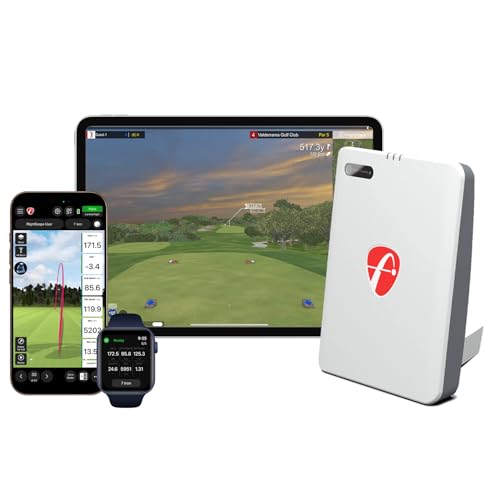
The Voice Caddie SC300i uses Doppler radar to track distance and ball speed. It provides instant feedback via a 5.3-inch LCD display and voice output. The device connects to the MySwingCaddie app for detailed analysis. It measures smash factor and launch angle to help you adjust your swing with precise, real-time metrics.
You need a compact portable device
Our pick: Voice Caddie SC300i Launch Monitor
The Voice Caddie SC300i weighs only 15.4 ounces and fits in your pocket. Its small dimensions allow you to carry it anywhere. You can use it indoors or outdoors without bulky equipment. The portable design lets you gather data on the course or in the garage without setting up a large frame or screen.

Aerixtron Gray 9.8×9.8 ft Impact Screen
Best for: Indoor golf simulators needing flame retardancy
- Features
- Impact Screen
- Color
- Gray
- Intended Use
- Simulator, Indoor and Outdoor, Home
- Dimensions
- 98.4 × 98.4 × 0.28 inches
- Weight
- 13.8 pounds
This Aerixtron impact screen measures 9.8 by 9.8 feet with a 13.8-pound weight. The 3.45mm thick gray fabric offers low light reflectivity and flame-retardant safety. It includes 304 stainless steel grommets and bungee cords for quick setup. You get a durable mesh designed for repeated ball strikes. It suits home simulators or commercial venues needing a reliable barrier.
- Flame-retardant fabric for indoor safety
- 3.45mm thick mesh reduces impact noise
- Low light reflectivity improves projection
- Stainless steel grommets aid quick setup
- 13.8-pound weight adds bulk to the setup
- 9.8 by 9.8 ft size limits smaller spaces
- 0.28-inch height may restrict vertical clearance
- You need a flame-retardant screen for indoor use
- You want a gray mesh to boost contrast
- You have space for a 9.8 ft width
- You require a screen smaller than 9.8 feet
- You prefer a lighter setup under 10 pounds
- You need a white screen for high brightness
Verdict: Aerixtron 9.8 ft Gray Impact Screen fits golfers needing a durable, flame-retardant barrier for home or commercial simulators. It delivers stable performance for repeated strikes without requiring extra tools.

Voice Caddie SC300i Launch Monitor
Best for: Golfers seeking voice feedback and app integration
- Tracking Technology
- Doppler radar
- Tracked Metrics
- distance, smash factor, launch angle
- Compatible Software
- MySwingCaddie App
- Display Type
- 5.3" LCD display
- Intended Use
- indoor and outdoor
- Included Accessories
- Signature Series Power Bundle
This Doppler radar launch monitor tracks distance, smash factor, and launch angle. It features a 5.3-inch LCD screen and voice output for real-time feedback. The device connects to the MySwingCaddie app for iOS and Android. It measures ball speed within plus or minus 3% accuracy. You can use it indoors or outdoors. The unit weighs 15.4 ounces and includes a power bundle.
- Doppler radar technology for accurate data collection
- 5.3-inch LCD display with voice output
- Connects to MySwingCaddie app for iOS and Android
- Tracks distance, smash factor, and launch angle
- Carry distance accuracy is plus or minus 5% in practice mode
- Weighs 15.4 ounces which adds portability weight
- You want real-time voice feedback on your shots
- You need a device for both indoor and outdoor use
- You prefer tracking smash factor and launch angle
- You require higher than plus or minus 3% ball speed accuracy
- You prefer a lighter device under 15 ounces
- You do not want to use a companion app
Verdict: Voice Caddie SC300i Golf Launch Monitor suits players who value immediate voice feedback and app integration for detailed swing analysis. It is ideal for golfers practicing in varied environments who prioritize tracked metrics like smash factor.
Specifications side by side
| Spec | Aerixtron Gray 9.8×9.8 ft Impact Screen | Voice Caddie SC300i Launch Monitor |
|---|---|---|
| Tracking Technology | – | Doppler radar |
| Tracked Metrics | – | distance, smash factor, launch angle |
| Compatible Software | – | MySwingCaddie App |
| Display Type | – | 5.3" LCD display |
| Intended Use | – | indoor and outdoor |
| Included Accessories | – | Signature Series Power Bundle |
| Features | Impact Screen | GPS |
| Color | Gray | Black |
| Use | Indoor, Outdoor | Indoor, Outdoor |
| Dimensions | 98.4 × 98.4 × 0.28 inches | 6.5 × 4.7 × 1.1 inches |
| Weight | 13.8 pounds | 15.4 ounces |
| Size | 9.8 x 9.8 ft | – |
| Model | – | SC300i |
Frequently asked questions
Is the Aerixtron screen suitable for outdoor use?
Yes, the Aerixtron Gray 9.8×9.8 ft Impact Screen is designed for both indoor and outdoor environments. Its construction supports repeated strikes without requiring extra tools for setup. This makes it a versatile barrier for home simulators or commercial setups where weather resistance and durability are necessary for long-term use.
Does the Voice Caddie SC300i work indoors?
Yes, the Voice Caddie SC300i is intended for use in both indoor and outdoor settings. It provides voice feedback and app integration to help you analyze your swing metrics. This flexibility allows you to practice in varied environments, whether you are on the range or in a dedicated indoor bay.
What are the dimensions of the Aerixtron impact screen?
The Aerixtron Gray screen measures 9.8 by 9.8 feet, which equals 98.4 inches in width and length. The height is listed as 0.28 inches. These dimensions provide a substantial surface area to catch golf balls and display projected images effectively for your simulator setup.
How heavy is the Voice Caddie SC300i launch monitor?
The Voice Caddie SC300i weighs 15.4 ounces. Its physical dimensions are 6.5 inches in length, 4.7 inches in width, and 1.1 inches in height. This compact size and moderate weight make it easy to carry to the range or store in your golf bag when not in use.
Can I use the Aerixtron screen with a projector?
Yes, the Aerixtron Gray impact screen is designed to display projected images. Its gray color helps reduce light reflection, which improves visibility for your simulator. This feature ensures that your virtual course looks clear and accurate during indoor or outdoor play sessions.
Does the Voice Caddie SC300i offer real-time feedback?
Yes, the Voice Caddie SC300i provides immediate voice feedback on your performance. It also integrates with an app for detailed swing analysis. You can track specific metrics like smash factor, which helps you understand your ball striking efficiency and adjust your technique accordingly.
What is the weight of the Aerixtron impact screen?
The Aerixtron Gray 9.8×9.8 ft Impact Screen weighs 13.8 pounds. This weight contributes to its stability during repeated strikes. You do not need extra tools to secure it, making it a straightforward addition to your home or commercial simulator setup.
See also
How this review was put together
- Specs are quoted from the Amazon listing, not measured in a lab.
- The score is out of 10, based on listed specifications and buyer feedback.
- Prices were read from the listing when this page was last built and move without notice.
2,753 reviews · 1,445 rated products · 87 brands tracked
We earn a commission when you buy through our Amazon links. That never changes a score.