Alienware AW2725DF OLED Analysis: 360Hz Speed Versus Long-Term Reliability
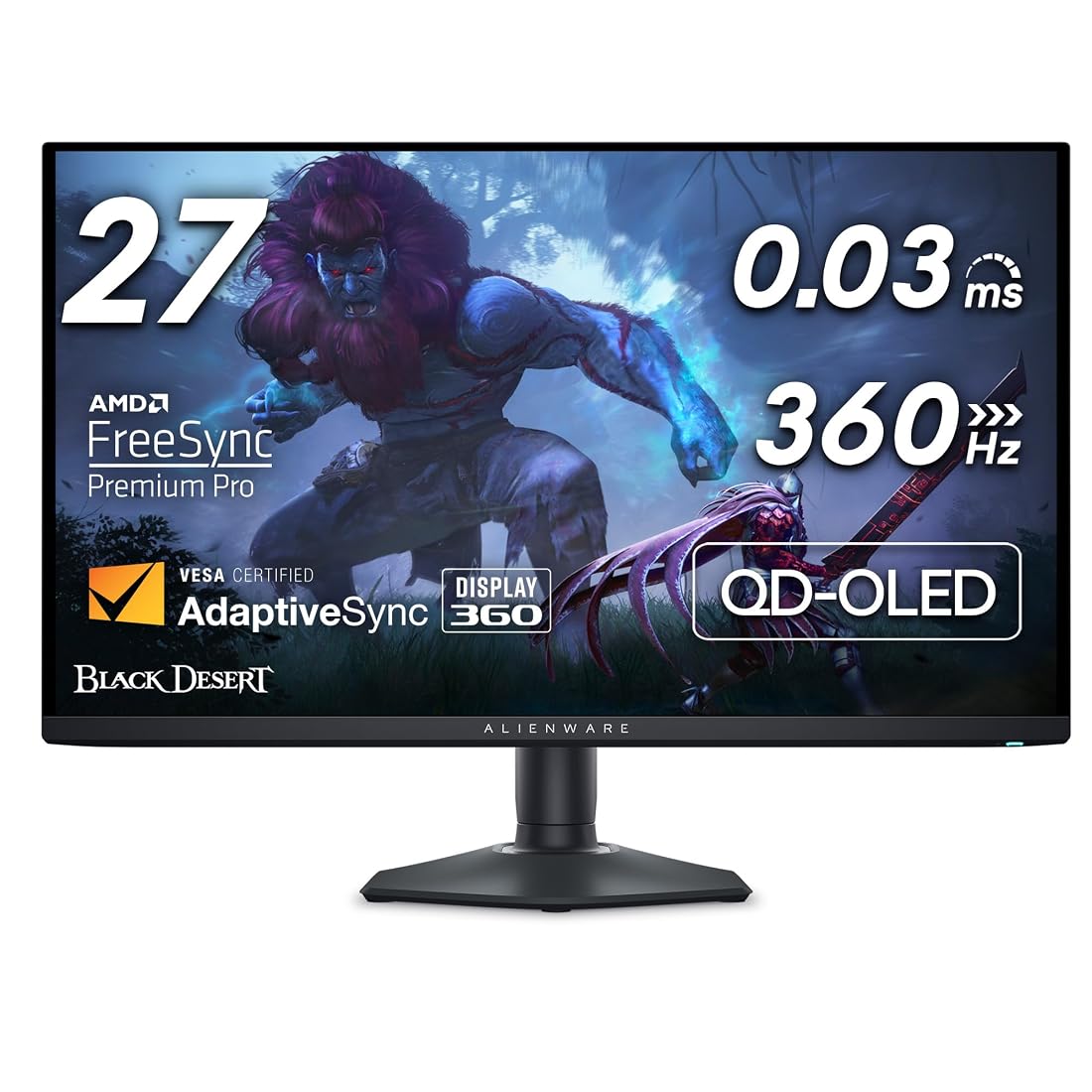
The Alienware AW2725DF enters the competitive gaming arena as a groundbreaking 26.7-inch QD-OLED display, combining a crisp 2560×1440 QHD resolution with an ultra-high 360Hz refresh rate and a near-instantaneous 0.03 ms response time. Our comprehensive assessment reveals that this monitor sets an extraordinary benchmark for esports fluidity and vibrant contrast, backed by the critical safety…
As Amazon Associates, we earn from qualifying purchases. This means we may receive a small commission at no extra cost to you if you click through and make a purchase.
The Alienware AW2725DF enters the competitive gaming arena as a groundbreaking 26.7-inch QD-OLED display, combining a crisp 2560×1440 QHD resolution with an ultra-high 360Hz refresh rate and a near-instantaneous 0.03 ms response time. Our comprehensive assessment reveals that this monitor sets an extraordinary benchmark for esports fluidity and vibrant contrast, backed by the critical safety net of Dell’s three-year Advanced Exchange Service warranty that directly addresses long-term panel retention concerns.
This premium display directly targets competitive tournament enthusiasts and demanding action gamers who want uncompromised motion clarity alongside the visual richness of self-emissive pixels. However, everyday office workers and users seeking a general-purpose productivity screen may want to look elsewhere due to inherent OLED subpixel rendering nuances and static image wear vulnerabilities. If you are pairing this screen with a dedicated esports rig such as the alienware aurora r16, understanding the operational boundaries of this high-speed panel is essential before making an investment.
Alienware AW2725DF spec sheet
| Screen Size and Panel Type | 26.7-inch Quantum-Dot OLED (QD-OLED) |
|---|---|
| Native Resolution | QHD Wide 1440p (2560 x 1440) |
| Refresh Rate | 360Hz Native |
| Gray-to-Gray Response Time | 0.03 ms Minimum |
| Contrast Ratio | 1.5 Million:1 (Infinite Contrast, VESA DisplayHDR True Black 400) |
| Color Performance | DCI-P3 99.3% Coverage, Delta E < 2 Factory Accuracy |
| Adaptive Sync Technology | AMD FreeSync Premium Pro, VESA AdaptiveSync |
| Screen Finish | Matte Anti-Glare Coating |
| Stand Adjustability | Height, Tilt, Swivel, and Pivot Adjustability |
| Manufacturer Warranty | Three-Year Advanced Exchange Service |
Every field from the listing (40)
| 0 | Aspect Ratio, 16:10 |
|---|---|
| 1 | Screen Finish, Matte |
| 2 | Contrast Ratio, 1.5 million:1 (at SDR and HDR) |
| 3 | Refresh Rate, 360 hertz |
| 4 | Display Type, OLED |
| 5 | Display Technology, OLED |
| 6 | Viewing Angle, 178 degrees |
| 7 | Brightness, 1000 |
| 8 | Pixel Pitch, 111 |
| 9 | Picture Quality Enhancement Technology, QD-OLED, DCI-P3 99.3% color coverage, Delta E |
| 10 | Screen Size, 27 inches |
| 11 | Item Dimensions D x W x H, 9.59"D x 23.98"W x 15.99"H |
| 12 | Item Weight, 13.9 pounds |
| 13 | Resolution, QHD Wide 1440p |
| 14 | Display Resolution Maximum, 2560 x 1440 |
| 15 | Native Resolution, 2560×1440 |
| 16 | Power Consumption, 27.6 watts |
| 17 | Voltage, 240 volts_of_alternating_current |
| 18 | Connectivity Technology, DisplayPort, HDMI, USB 3.2 Gen1 |
| 19 | Hardware Connectivity, Bluetooth, DisplayPort, Ethernet, HDMI, Solid State Drive, Thunderbolt 4, USB |
| 20 | Adaptive Sync, FreeSync |
| 21 | Additional Features, Anti Glare Screen, Flicker-Free, Height Adjustment, Pivot Adjustment, Swivel Adjustment, Tilt Adjustment |
| 22 | Specific Uses For Product, Desktop, Gaming, Photo Video Editing |
| 23 | Color, Black |
| 24 | Mounting Type, Desk Mount |
| 25 | Warranty Type, 3 Years Warranty |
| 26 | Shape, rectangular prism |
| 27 | Brand, Alienware |
| 28 | Model Number, AW2725DF |
| 29 | Model Name, Alienware 27 360Hz QD-OLED Gaming Monitor – AW2725DF |
| 30 | Warranty Description, 3-Year Advanced Exchange Service and Premium Panel Exchange (Including coverage for OLED burn in) |
| 31 | UPC, 884116463283 |
| 32 | Manufacturer, Dell |
| 33 | Unit Count, 1 Count |
| 35 | Best Sellers Rank, #2,140 in Electronics (See Top 100 in Electronics) #77 in Computer Monitors |
| 36 | ASIN, B0CZSGWLD5 |
| 37 | Customer Reviews, 4.4 4.4 out of 5 stars (425) 4.4 out of 5 stars |
| 38 | Response Time, 0.03 milliseconds |
| 39 | Total Number of HDMI Ports, 1 |
| 40 | Total Usb Ports, 5 |
Quoted from the product listing. We did not measure these figures.
01360Hz Motion Clarity and Competitive Gaming Performance
Evaluating the Alienware AW2725DF for competitive gaming requires looking closely at how its 360Hz refresh rate interacts with organic self-emissive technology. Traditional LCD gaming screens, even fast IPS panels operating at comparable refresh rates, rely on liquid crystals physically twisting to transition between color states. This physical process inevitably produces minor ghosting or overshoot artifacts when pixels struggle to keep pace with the refresh cycle. The AW2725DF bypasses this fundamental limitation through a 0.03 ms gray-to-gray minimum response time, allowing pixel color transitions to finish almost instantaneously before the next frame is presented.
The resulting alienware aw2725df 360hz motion clarity provides an undeniable tracking advantage in twitch-heavy tactical shooters and fast-paced battle royales. Fast panning movements remain remarkably sharp, allowing opponents to stay perfectly defined rather than blurring into smeary silhouettes against high-contrast backgrounds. Supported by both AMD FreeSync Premium Pro and VESA AdaptiveSync certification, the monitor maintains flawless frame pacing across dynamic frame rate swings, preventing screen tearing and input stutter without adding latency penalties. For players who frequently examine alternative options like the asus rog swift oled 27 1440p, the jump to 360Hz here yields visibly smoother motion trajectories during extreme target tracking.
Alienware also integrates specialized gaming overlays through its AlienVision hardware menu, providing players with distinct on-screen tactical visual aids to sharpen contrast in darker map zones. The monitor chassis features a minimal hexagonal base engineered specifically to leave ample desk surface for wide mouse sweeps, accommodating low-sensitivity esports players who need unrestricted mousepad real estate. Combined with fully customizable 3-zone AlienFX lighting, the external build focuses heavily on tournament ergonomics while keeping peripheral distractions to an absolute minimum.
02QD-OLED Panel Quality and Visual Reproduction
Beyond competitive speed, the core visual appeal of this display relies on its Quantum Dot OLED panel architecture. Unlike conventional White-OLED panels that pass light through standard color filters, QD-OLED channels blue light through a quantum-dot layer to produce pure red and green primary colors. The official alienware aw2725df specs document a wide color gamut covering 99.3% of the DCI-P3 space, alongside factory-calibrated color accuracy certified at a Delta E of less than 2. This ensures that colors appear rich, punchy, and true to life directly out of the box without requiring manual user calibration.
Contrast performance is practically limitless thanks to per-pixel illumination. With an official contrast ratio rating of 1.5 million to one and VESA DisplayHDR True Black 400 certification, pixels shut off completely when rendering pure black, eliminating the distracting edge bleed and haloing common to traditional backlights. In scenes featuring stark contrast, such as bright streetlamps against a midnight sky, bright highlights stand out sharply without washing out nearby shadows. The listing specifies a peak brightness capability of 1000, ensuring specular HDR highlights retain substantial impact during dynamic cinematic sequences.
One notable engineering decision highlighted in the product specifications is the application of a matte screen finish. While glossy coatings typically maximize perceptual black depth in light-controlled rooms, matte treatments diffuse direct ambient reflections across the surface layer. This coating helps maintain visibility under ambient indoor lighting, though buyers should ensure overhead fixtures do not reflect directly onto the screen to maintain deep black levels during daytime play sessions.
03Long-Term Reliability, Burn-In Mitigation, and Warranty Coverage
The primary concern for any buyer evaluating an OLED panel is longevity, specifically the risk of alienware aw2725df oled burn in. Burn-in occurs when static graphic elements, such as operating system taskbars, game heads-up displays, or streaming software interfaces, degrade individual organic subpixels unevenly over hundreds of hours of cumulative display time. Because organic light-emitting diodes wear down based on luminance and operating temperature, running static high-brightness elements continuously presents a tangible risk to alienware aw2725df qd-oled reliability over a multi-year ownership cycle.
To directly address buyer apprehension, Dell provides a comprehensive three-year Advanced Exchange Service warranty that covers panel burn-in alongside standard hardware failures. Under this advanced exchange structure, if an alienware aw2725df warranty coverage claim is approved for image retention or hardware defects, a replacement unit is dispatched directly to the customer before the defective display must be packaged and sent back. This level of manufacturer backing significantly reduces consumer risk compared to brands that treat OLED image retention as normal customer-induced wear and tear excluded from standard warranties.
Potential owners must still exercise practical maintenance habits to minimize alienware aw2725df issues and problems over the monitor’s lifespan. Taking basic precautions, such as setting the Windows taskbar to auto-hide, using cycling wallpaper backgrounds, establishing reasonable screen-timeout sleep timers, and allowing internal automated pixel maintenance cycles to complete unhindered, will prolong subpixel health. Drawing an average power consumption of 27.6 watts, the monitor manages thermal output efficiently, but proper ventilation around the rear casing remains critical to safeguarding panel lifespan.
04Text Clarity, Desktop Ergonomics, and Daily Usability
While the monitor excels at fast motion and gaming entertainment, daily productivity reveals distinct design trade-offs. The display presents a 2560×1440 resolution across a 26.7-inch viewing area, producing a pixel density metric listed at 111 pixel pitch. While this pixel density delivers sharp gaming environments, alienware aw2725df text clarity can exhibit minor color fringing along fine text boundaries in productivity software. Because QD-OLED panels utilize a unique triangular subpixel structure rather than a traditional in-line RGB stripe, font smoothing engines in desktop operating systems can create subtle color shadows on high-contrast black-on-white text.
Users who plan to spend long workdays reading spreadsheets, composing code, or editing technical documents should evaluate whether this minor subpixel fringing causes eye fatigue. For users running mixed workloads from an external performance device, such as the alienware area 51 laptop, scaling text slightly or working in dark mode noticeably softens the visual impact of subpixel alignment. Nonetheless, buyers primarily focused on extensive text editing rather than gaming will find standard high-resolution IPS panels better optimized for day-to-day desktop typography.
From an ergonomic standpoint, the physical stand offers comprehensive adjustment options. Users can fine-tune height, tilt, swivel, and 90-degree pivot orientation to match their preferred seating posture without purchasing external monitor arms. Connectivity on the unit includes HDMI, DisplayPort, and USB 3.2 Gen1 connectivity according to the manufacturer listing, allowing straightforward cabling to contemporary graphics cards and high-speed desktop peripherals. The compact hexagonal stand design ensures the display remains stable while leaving ample clearance for desktop audio gear and mouse surfaces.
The verdict
Alienware AW2725DF
8.8/10
Buyer score
Very positive
Average star rating left by Amazon buyers, doubled to a 10-point scale. It is not a score we gave the product.
When asking whether the Alienware AW2725DF is worth it, the answer depends squarely on how you spend your screen time. For competitive esports players, tactical shooter fans, and visual fidelity enthusiasts, this monitor is an outstanding technological achievement. The pairing of a 360Hz refresh rate with the instantaneous 0.03 ms response time of QD-OLED creates a tier of motion clarity that traditional LCD gaming monitors simply cannot match, all while delivering stunning colors and infinite contrast that make modern HDR games look extraordinary.
Pragmatic shoppers must still respect the operational characteristics inherent to self-emissive organic displays. The specialized triangular subpixel layout requires expectations to be tempered for fine text rendering, and static workspace elements require attentive habits to avoid long-term wear. Fortunately, Dell’s robust three-year Advanced Exchange Service warranty directly removes much of the long-term reliability anxiety, making the AW2725DF a premier recommendation for gamers seeking top-tier competitive performance.
Pros
- Blistering 360Hz refresh rate for esports
- Instantaneous 0.03 ms gray-to-gray response time
- Vibrant QD-OLED with 99.3% DCI-P3 color
- Three-year Advanced Exchange warranty with burn-in coverage
- Infinite contrast with DisplayHDR True Black 400
- Fully adjustable stand with minimal hexagonal base
Cons
- Inherent risk of long-term OLED burn-in
- Subpixel layout causes slight text color fringing
- Matte screen finish softens perceived black levels in light
Buy it if
- You play fast-paced multiplayer esports titles and demand the supreme motion clarity of 360Hz alongside a 0.03 ms response time.
- You want true infinite contrast, VESA DisplayHDR True Black 400, and 99.3% DCI-P3 color reproduction for immersive HDR gaming.
- You value the peace of mind offered by Dell’s three-year Advanced Exchange Service warranty that covers panel burn-in.
- You utilize a graphics card capable of sustaining high frame rates at native 2560×1440 QHD resolution.
Skip it if
- Your primary daily computer use consists of static document processing, coding, or office spreadsheets where text fringing is undesirable.
- You frequently leave static interfaces running unattended for long durations and do not wish to adopt OLED care routines.
- Your gaming is limited to locked 60 FPS console games that cannot leverage the high-refresh 360Hz panel capabilities.
See it on AmazonAffiliate link. Price and stock change at Amazon, not here.
Questions buyers ask
Does Dell's warranty cover OLED burn-in on the Alienware AW2725DF?
Yes, Dell’s included three-year Advanced Exchange Service warranty provides coverage against OLED burn-in and permanent image retention. If a covered display defect occurs during the three-year warranty period, Dell ships a replacement unit directly to you before you return the original monitor.
How does the 360Hz refresh rate benefit competitive gaming compared to standard monitors?
The 360Hz refresh rate refreshes the on-screen image 360 times per second, which reduces input latency and delivers exceptionally smooth tracking motion. When paired with the panel’s 0.03 ms gray-to-gray response time, fast-moving targets remain completely clear without the ghosting or trailing artifacts common to standard LCD panels.
Does the Alienware AW2725DF suffer from text fringing in desktop applications?
Due to the unique triangular subpixel structure of QD-OLED technology, standard operating system font smoothing can produce faint color fringes along high-contrast text edges. While unnoticeable in video games and media playback, users working heavily with small text in spreadsheets or code editors may detect softer font rendering compared to standard RGB stripe displays.
What physical adjustments does the included stand provide?
The stand included with the Alienware AW2725DF provides full ergonomic adjustability, allowing users to customize height, tilt angle, horizontal swivel, and 90-degree pivot orientation. This ensures easy positioning for various desk setups while the compact hexagonal base maximizes usable mousepad space.
What display inputs and connectivity options are available on the monitor?
According to the product specifications, the Alienware AW2725DF includes HDMI, DisplayPort, and USB 3.2 Gen1 connectivity. These connections allow seamless integration with modern high-performance PC graphics cards, gaming consoles, and desktop computer accessories.
How the ratings split
Share of Amazon ratings at each star level, as shown on the listing.
How this review was put together
- Specs are quoted from the Amazon listing, not measured in a lab.
- The score is the average star rating left by Amazon buyers, doubled to a 10-point scale.
- Prices were read from the listing when this page was last built and move without notice.
- Buyer quotes are reproduced word for word, with the name and date shown.
199 reviews · 1,445 rated products · 87 brands tracked
We earn a commission when you buy through our Amazon links. That never changes a score, because we do not set the scores.