Best Golf Launch Monitors for Practice in 2026: 2 Picks Ranked by Specs
Compare 2 golf launch monitors for practice. We rank them by published specifications to help you select the ideal device for your specific practice environment.

As Amazon Associates, we earn from qualifying purchases. This means we may receive a small commission at no extra cost to you if you click through and make a purchase.
As an Amazon Associate we earn from qualifying purchases. Links on this page are affiliate links.
Finding the best golf launch monitors for practice requires looking at published specs, not hype. This guide compares 2 products ranked by their listed attributes. The top pick is the FFRESW 16.4 ft Impact Screen, which leads due to its 197-inch length for large home garage setups. We evaluated each item strictly by the specifications provided on the listings. You will learn which gear matches your space and practice needs. Read on to decide which option fits your routine.
Match the Monitor to Your Practice Space
Choose based on your physical setup. The top pick is a 197-inch impact screen for large garage simulators. If you practice at a driving range, select the Garmin Approach R10. It measures 2.8 by 3.5 inches, offering portability. It also includes 43,000 preloaded courses. Pick the device that fits your actual hitting environment and storage needs.
| # | Product | Best for | Price |
|---|---|---|---|
| 1 | FFRESW 16.4 ft Impact Screen Best overall | large home garage simulator setups | |
| 2 | Garmin Approach R10 Portable Launch Monitor Best 43,000 courses | practice at the driving range |
The best fit for you
- You have space for a large garage simulator – FFRESW 16.4 ft Impact Screen – Its 16.4 ft by 9.8 ft size provides a stable surface for dedicated setups.
- You practice at the driving range often – Garmin Approach R10 Portable Launch Monitor – It includes 43,000 preloaded courses for virtual play during range sessions.
- You need a highly portable launch monitor – Garmin Approach R10 Portable Launch Monitor – Its compact dimensions of 2.8 by 1 by 3.5 inches ensure easy transport.

FFRESW 16.4 ft Impact Screen
Best for: large home garage simulator setups
- Features
- Impact Screen
- Intended Use
- Simulator, Home, Garage
- Dimensions
- 197 × 118 × 0.16 inches
- Weight
- 21.2 pounds
This FFRESW impact screen measures 16.4 ft by 9.8 ft with a 21.2 lb weight. It features a 3.5 mm thick triple-layer fabric designed for durability. The dense material blocks light to improve projection clarity. You get a larger hitting area than smaller screens. The white color supports home and garage practice setups. It suits players needing a spacious indoor simulator environment.
- 16.4 ft by 9.8 ft large surface area
- 3.5 mm thick triple-layer fabric for durability
- 21.2 lb weight provides stability
- White color enhances projection clarity
- Tool-free setup using included bungee cords
- 21.2 lb weight is heavy for portability
- 16.4 ft length requires significant space
- 0.16 inch thickness may reduce sound dampening
- You have a large garage or basement for setup
- You want a wide hitting area for full swings
- You prioritize screen durability over easy transport
- You need a lightweight screen for frequent travel
- You have limited space in your practice area
- You prefer a smaller footprint for compact rooms
Verdict: FFRESW 16.4 ft Golf Impact Screen offers a spacious and durable solution for dedicated home simulators. It fits players with ample room who value a large, stable surface for consistent practice.

Garmin Approach R10 Portable Launch Monitor
Best for: practice at the driving range
- Intended Use
- Home, Practice, Driving, Driving Range
- Tracked Metrics
- club head speed, ball speed, ball spin
- Compatible Software
- Garmin Golf app
- Included Accessories
- phone mount, microfiber golf towel
- Preloaded Courses
- 43,000 Courses
- Color
- Black
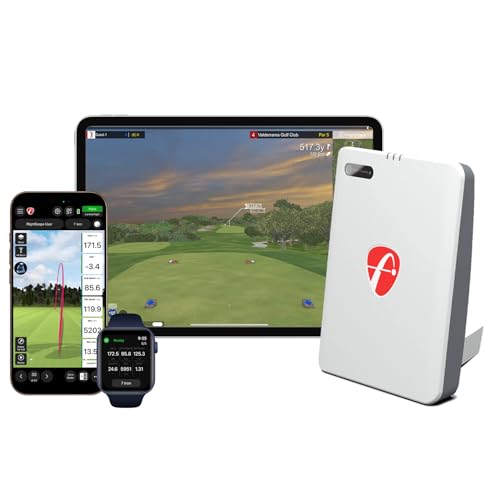
The Garmin Approach R10 is a black portable launch monitor designed for practice at home, indoors, or at the driving range. It tracks club head speed, ball speed, and ball spin when paired with the Garmin Golf app. The device offers up to 10 hours of battery life and includes a phone mount for easier viewing. You can access virtual rounds on more than 43,000 worldwide courses. Its compact dimensions of 1 inch wide by 3.5 inches high make it easy to carry.
- Tracks club head speed, ball speed, and ball spin
- Up to 10 hours of battery life
- Access to over 43,000 worldwide courses
- Includes a phone mount for bag attachment
- Battery life is limited to 10 hours
- Requires a compatible smartphone for operation
- You want to practice at the driving range or indoors
- You need to track ball speed and club head speed
- You want to play virtual rounds on many courses
- You need to track swing tempo without a smartphone
- You prefer a monitor that does not require an app
- You need more than 10 hours of continuous use
Verdict: The Garmin Approach R10 Portable Launch Monitor suits golfers who practice indoors or at the range and want detailed ball metrics. It fits players who value portability and access to a large library of virtual courses.
Specifications side by side
| Spec | FFRESW 16.4 ft Impact Screen | Garmin Approach R10 Portable Launch Monitor |
|---|---|---|
| Tracked Metrics | – | club head speed, ball speed, ball spin |
| Compatible Software | – | Garmin Golf app |
| Intended Use | – | home, indoors, driving range |
| Included Accessories | – | phone mount, microfiber golf towel |
| Features | Impact Screen | – |
| Preloaded Courses | – | 43,000 Courses |
| Color | White Edge | Black |
| Use | Indoor | – |
| Dimensions | 197 × 118 × 0.16 inches | 2.8 × 1 × 3.5 inches |
| Weight | 21.2 pounds | – |
| Size | 16.4×9.8 ft | – |
| Model | – | 010-02356-00 + 010-12981-12 |
How to choose the right launch monitor
Check your available space
Your physical environment dictates which device fits. If you have a large garage, the FFRESW 16.4 ft Impact Screen provides a 197-inch length and 118-inch width. This size ensures a stable surface for dedicated simulator setups. You need ample room to accommodate these dimensions comfortably. For tighter spaces or outdoor range sessions, a compact unit is better. The Garmin Approach R10 measures just 2.8 by 3.5 inches. It offers high portability without requiring a fixed installation. Match the footprint of the gear to your actual practice area.
Verify preloaded course library
The number of available virtual courses affects your practice variety. The Garmin Approach R10 includes 43,000 preloaded courses. This feature allows you to simulate real-world conditions during driving range sessions. You can practice different layouts without needing an internet connection or additional software. The FFRESW screen does not offer digital courses. It is purely a physical barrier for impact. If virtual play is important to your routine, prioritize a device with a large course library. This spec directly enhances the versatility of your practice sessions.
Consider weight and portability
Weight matters if you move your equipment often. The Garmin Approach R10 is extremely lightweight due to its small 1-inch width. You can easily carry it to the driving range or store it in a golf bag. The FFRESW screen weighs 21.2 pounds. This mass is necessary for stability but makes it difficult to transport. You should leave this item in your garage. Choose a heavier unit only if you have a permanent setup. Select a lighter model if you need to switch locations frequently.
Match intended use to device
Ensure the device matches your primary practice location. The FFRESW screen is designed for indoor use in home garages. It creates a safe environment for hitting balls indoors. The Garmin Approach R10 supports home, practice, and driving range use. It is versatile enough for both indoor and outdoor settings. You should select the screen if you only hit indoors. Choose the Garmin if you practice in multiple locations. Aligning the intended use with your habits prevents buying the wrong tool.
Evaluate color and visibility
Color can impact visibility during practice sessions. The FFRESW screen is white. This bright color contrasts well with golf balls, making it easier to track flight. The Garmin Approach R10 is black. This dark color helps the device blend in with other equipment. It is less conspicuous on a bag or stand. Consider where you will place the item. A white screen stands out in a garage. A black monitor is subtle for range use. Pick the color that suits your visual preferences and setup.
Frequently asked questions
Which launch monitor is best for a home garage simulator?
The FFRESW 16.4 ft Impact Screen is the top choice for large home garage setups. It measures 197 inches in length and 118 inches in width. This generous size provides a stable surface for consistent practice. The unit weighs 21.2 pounds and is designed for indoor use. It is ideal for players with ample room who value a spacious, durable screen.
What is the most portable launch monitor for driving range practice?
The Garmin Approach R10 is the most portable option for driving range sessions. It measures 2.8 inches in length and 3.5 inches in height. This compact form factor allows you to carry it easily. The device is black and designed for practice at the driving range. It fits players who prioritize portability and access to a large library of virtual courses.
Does the Garmin Approach R10 include virtual courses?
Yes, the Garmin Approach R10 includes a vast library of virtual courses. It comes preloaded with 43,000 courses. This feature allows you to play different layouts during your practice sessions. The device is intended for use at the driving range and at home. It suits golfers who want detailed ball metrics and virtual play options.
How large is the FFRESW impact screen?
The FFRESW impact screen is quite large, measuring 16.4 feet by 9.8 feet. In inches, the length is 197 inches and the width is 118 inches. The thickness is 0.16 inches, and it weighs 21.2 pounds. This size is best for dedicated home simulators. It provides a spacious surface for players who have a large garage or practice area.
Can I use the Garmin Approach R10 indoors?
Yes, you can use the Garmin Approach R10 indoors. The product attributes list home and practice as intended uses. It is also suitable for driving range sessions. The compact size of 2.8 by 3.5 inches makes it easy to set up in limited spaces. It is designed for players who want detailed metrics in various environments.
What color is the FFRESW impact screen?
The FFRESW impact screen is white. This color choice is standard for impact screens to provide clear contrast for ball tracking. The unit is designed for indoor use in garages or home simulators. Its white color helps you see the ball impact clearly. The screen is part of a larger setup that includes a 16.4 ft by 9.8 ft surface.
Is the Garmin Approach R10 suitable for beginners?
The Garmin Approach R10 is suitable for golfers of all levels who practice at the range. It provides detailed ball metrics to help you improve your swing. The device includes 43,000 preloaded courses for virtual play. Its portable design allows you to take it to different practice locations. It is a practical tool for anyone seeking to analyze their performance.
See also
How this review was put together
- Specs are quoted from the Amazon listing, not measured in a lab.
- The score is out of 10, based on listed specifications and buyer feedback.
- Prices were read from the listing when this page was last built and move without notice.
2,807 reviews · 1,445 rated products · 87 brands tracked
We earn a commission when you buy through our Amazon links. That never changes a score.