Best Golf Launch Monitors with E6 Connect in 2026: 5 Picks Ranked by Specs
We rank 5 launch monitors by specs. Check weight, preloaded courses, and PC requirements for E6 Connect compatibility.

As Amazon Associates, we earn from qualifying purchases. This means we may receive a small commission at no extra cost to you if you click through and make a purchase.
As an Amazon Associate we earn from qualifying purchases. Links on this page are affiliate links.
Finding the best golf launch monitors with E6 Connect requires careful comparison of published specifications. We evaluated 5 options to help you choose the right tool for your setup. The PHIGOLF Home Golf Simulator Motion Sensor takes the top spot because it includes 38,000 preloaded courses, offering extensive variety for casual home practice. Our rankings rely strictly on these listed specs, not personal testing or user reviews. This guide helps you decide which device matches your space, budget, and data needs.
Check your PC specs first
E6 Connect requires a computer to run. The Uneekor Eye MINI CORE weighs 8.4 pounds and needs strong PC specs for simulation. In contrast, the PHIGOLF Home Sensor is lighter and includes 38,000 preloaded courses for immediate use. Verify your hardware compatibility before buying. Your computer’s power determines whether you can access full E6 Connect features or must rely on built-in displays.
| # | Product | Best for | Price |
|---|---|---|---|
| 1 | PHIGOLF Home Golf Simulator Motion Sensor Best overall | casual home practice and course variety | |
| 2 | FlightScope Mevo Gen2 Portable Launch Monitor Best premium | Golfers wanting accurate data and video analysis | |
| 3 | Voice Caddie SC4 Pro Launch Monitor Best budget | Indoor and outdoor practice with E6 Connect | |
| 4 | Uneekor Eye MINI Outdoor/Indoor Launch Monitor Also great | players wanting 19 metrics and E6 Connect | |
| 5 | Uneekor EYE MINI CORE Launch Monitor Best white | home simulators with strong PCs |
The best fit for you
- You want the most compact model on the list – FlightScope Mevo Gen2 Portable Launch Monitor – The FlightScope Mevo Gen2 weighs 1.1 pounds and measures 1 inch wide.
- You value portability and extensive course variety – PHIGOLF Home Golf Simulator Motion Sensor – The PHIGOLF Home Simulator includes 38,000 preloaded courses and weighs 2.09 pounds.
- You need a built-in display for practice – Voice Caddie SC4 Pro Launch Monitor – The Voice Caddie SC4 Pro features a built-in display and swing analysis.

PHIGOLF Home Golf Simulator Motion Sensor
Best for: casual home practice and course variety
- Compatible Software
- E6 Connect
- Tracking Technology
- 9-axis motion sensor
- Intended Use
- Indoor, outdoor
- Included Accessories
- Golf swing stick
- Preloaded Courses
- 38,000 Courses
- Color
- Black
The PHIGOLF Home Simulator uses a 9-axis motion sensor and a 23.6-inch swing stick to track your golf swing. It connects to E6 Connect and the Phigolf app, giving you access to 38,000 courses. The unit weighs 2.09 pounds and measures 26.2 inches long. It works indoors and outdoors. This setup suits players who want a compact, motion-based practice tool rather than a radar-based launch monitor.
- Compatible with E6 Connect software
- Includes a 9-axis motion sensor for swing tracking
- Access to 38,000 preloaded courses
- Weighs only 2.09 pounds for easy storage
- Uses motion sensing instead of radar or camera tracking
- Relies on a swing stick rather than a real club sensor
- Limited to 2.09 pounds with a 26.2-inch length
- You want to play on E6 Connect
- You prefer a lightweight, portable setup
- You like motion-based swing analysis
- You need real club data tracking
- You require radar-based ball speed metrics
- You want a dedicated hardware launch monitor
Verdict: PHIGOLF Home Simulator with 9-Axis Sensor fits casual players who value course variety and portability over precise ball flight data. It is a good choice for home practice where space is limited.

FlightScope Mevo Gen2 Portable Launch Monitor
Best for: Golfers wanting accurate data and video analysis
- Compatible Software
- E6 Connect
- Tracking Technology
- 3D Doppler radar, image processing
- Tracked Metrics
- 18 swing data parameters
- Intended Use
- Indoor simulator, driving range
- Features
- GPS
- Dimensions
- 5.5 × 1 × 6.88 inches
This portable launch monitor uses 3D Doppler radar and image processing to track 18 swing data parameters. It works indoors and outdoors, offering GPS overview and Shot Tracer. You can connect up to three mobile devices for multi-cam recording. The unit includes lifetime access to E6 Connect with eight courses. It weighs 1.1 pounds and measures 5.5 by 1 by 6.88 inches. This setup suits golfers wanting accurate data and video analysis without subscription fees.
- Tracks 18 swing data parameters using 3D Doppler radar
- Includes lifetime E6 Connect bundle with eight courses
- Connects up to three mobile devices for multi-cam recording
- Provides GPS overview and Shot Tracer features
- Weighs only 1.1 pounds for portability
- Smaller course library with eight courses compared to competitors offering more
- Heavier build at 1.1 pounds versus lighter sensor alternatives
- Shorter battery life of up to 6 hours per charge
- You want accurate data from both indoor and outdoor settings
- You prefer a single device with lifetime software access
- You value video analysis with data overlays
- You need a larger library of golf courses
- You require a lighter device under one pound
- You want unlimited battery life without recharging
Verdict: FlightScope Mevo Gen2 Portable Launch Monitor delivers comprehensive data and video tools for golfers who prioritize accuracy and portability. It fits players who want a complete indoor and outdoor solution with lifetime software access.

Voice Caddie SC4 Pro Launch Monitor
Best for: Indoor and outdoor practice with E6 Connect
- Compatible Software
- E6 Connect
- Tracked Metrics
- Ball and club head data
- Display Type
- Built-in screen
- Intended Use
- Indoor and outdoor
- Features
- Swing Analysis
- Color
- Black
The Voice Caddie SC4 Pro is a portable launch monitor designed for indoor and outdoor use. It features a built-in screen and tracks ball and club head data with Prometrics accuracy. The device includes E6 Connect and VOICECADDIE S App compatibility for 3D driving range simulations. Weighing 1.3 pounds and measuring 7.59 inches wide, it offers a compact form factor for practice sessions without requiring special balls.
- Built-in screen for immediate data feedback
- Compatible with E6 Connect software
- Includes VOICECADDIE S App for statistical analysis
- Prometrics engine for precise ball and club head tracking
- Works with standard golf balls indoors or outdoors
- Heavier at 1.3 pounds compared to lighter competitors
- Wider profile at 7.59 inches may limit portability
- Fewer ball data points than the Uneekor Eye MINI CORE
- You want a device with a built-in screen for quick setup
- You need E6 Connect compatibility for simulator play
- You practice both indoors and outdoors regularly
- You prioritize the lightest possible device for travel
- You require more than 15 ball data points
- You prefer a unit smaller than 7.59 inches wide
Verdict: Voice Caddie SC4 Pro suits golfers who value a built-in display and E6 Connect integration for versatile indoor and outdoor practice.

Uneekor Eye MINI Outdoor/Indoor Launch Monitor
Best for: players wanting 19 metrics and E6 Connect
- Compatible Software
- E6 Connect
- Tracking Technology
- High-speed cameras, infrared sensors
- Tracked Metrics
- 19 precision metrics, spin
- Display Type
- Built-in, sunlight-readable display
- Intended Use
- Indoor simulator, outdoor
- Included Accessories
- USB-Ethernet adapter
The Uneekor Eye MINI tracks 19 precision metrics using high-speed cameras and infrared sensors. It features a built-in sunlight-readable display, allowing you to view data without a PC. The unit supports E6 Connect, GSPro, and TGC 2019. It includes a USB-Ethernet adapter and works indoors or outdoors. This setup suits players who want immediate feedback on spin and ball flight.
- Built-in sunlight-readable display for instant data viewing
- Tracks 19 precision metrics including spin
- Compatible with E6 Connect, GSPro, and TGC 2019
- Includes USB-Ethernet adapter for connection
- Requires a PC with i5 Gen12 or Ryzen5+ for VIEW software
- Requires a PC with i7 Gen12 or Ryzen7+ for simulation and AI features
- You want to see data instantly on the device screen
- You need compatibility with E6 Connect for simulation
- You practice in both indoor and outdoor settings
- You prefer a monitor that works without a computer
- You do not have a PC meeting the i5 or i7 Gen12 requirements
- You only need basic ball flight data without 19 metrics
Verdict: The Uneekor Eye MINI Launch Monitor delivers 19 precision metrics and E6 Connect support with a built-in display. It fits players who want detailed feedback and have the required computer hardware for full simulation.
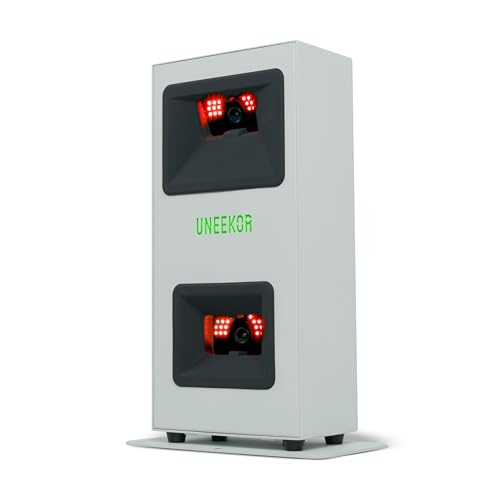
Uneekor EYE MINI CORE Launch Monitor
Best for: home simulators with strong PCs
- Compatible Software
- E6 Connect
- Tracking Technology
- High-speed cameras, infrared sensors
- Tracked Metrics
- 15 ball data points
- Intended Use
- Home simulator
- Connectivity
- RJ45
- Color
- White
The Uneekor EYE MINI CORE is a white home simulator launch monitor. It uses high-speed cameras and infrared sensors to track 15 ball data points. The device connects via RJ45 and works with E6 Connect. It includes VIEW software for analysis. This unit suits you if you want near-zero latency and compatibility with major simulation platforms for home use.
- Tracks 15 ball data points
- Compatible with E6 Connect and GSPro
- Uses high-speed cameras and infrared sensors
- Offers near-zero latency for real-time tracking
- Includes VIEW software with session reports
- Requires an i7 Gen12 or Ryzen7+ processor for simulation
- Needs 32GB RAM for full simulation performance
- Weighs 8.4 pounds, which is bulkier than some portable options
- You want a white launch monitor for your home setup
- You need compatibility with E6 Connect software
- You prefer tracking 15 ball data points
- You do not have an i7 Gen12 or better CPU
- You only have 16GB of RAM available
- You need a device lighter than 8.4 pounds
Verdict: The Uneekor EYE MINI CORE White Launch Monitor fits you if you have the required PC specs for simulation and want E6 Connect compatibility with 15 tracked data points.
Specifications side by side
| Spec | PHIGOLF Home Golf Simulator Motion Sensor | FlightScope Mevo Gen2 Portable Launch Monitor | Voice Caddie SC4 Pro Launch Monitor | Uneekor Eye MINI Outdoor/Indoor Launch Monitor | Uneekor EYE MINI CORE Launch Monitor |
|---|---|---|---|---|---|
| Tracking Technology | 9-axis motion sensor | 3D Doppler radar, image processing | – | High-speed cameras, infrared sensors | High-speed cameras, infrared sensors |
| Tracked Metrics | – | 18 swing data parameters | Ball and club head data | 19 precision metrics, spin | 15 ball data points |
| Compatible Software | Phigolf app, E6 Connect | E6 Connect, FS Golf App, FS Skills App | E6 Connect, VOICECADDIE S App | GSPro, E6 Connect, TGC 2019, VIEW | VIEW, GSPro, E6 Connect, TGC19 |
| Display Type | – | – | Built-in screen | Built-in, sunlight-readable display | – |
| Intended Use | Indoor, outdoor | Indoor simulator, driving range | Indoor and outdoor | Indoor simulator, outdoor | Home simulator |
| Connectivity | – | – | – | – | RJ45 |
| Included Accessories | Golf swing stick | – | – | USB-Ethernet adapter | – |
| Features | – | GPS | Swing Analysis | – | – |
| Preloaded Courses | 38,000 Courses | – | – | – | – |
| Color | Black | – | Black | – | White |
| Use | Indoor, Outdoor | Indoor, Outdoor | Indoor, Outdoor | Indoor, Outdoor | – |
| Dimensions | 26.2 × 4.92 × 2.76 inches | 5.5 × 1 × 6.88 inches | 1.92 × 7.59 × 1.14 inches | – | 6.5 × 3.38 × 13.9 inches |
| Weight | 2.09 pounds | 1.1 pounds | 1.3 pounds | – | 8.4 pounds |
| Size | 23.6" | – | – | – | – |
| Model | 192516000053 | Mevo Gen2 | SC4 Pro (+ 3D Driving Range Simulator) | – | – |
Key Specs for E6 Connect Monitors
Check Preloaded Course Count
If you want immediate access without downloading files, look for preloaded courses. The PHIGOLF Home Golf Simulator Motion Sensor includes 38,000 courses. This large library lets you play many locations right away. Other models may require separate purchases or downloads. If you prefer a specific digital library, ensure your device connects to E6 Connect. Preloaded options suit casual players who value variety and convenience over precise ball flight data analysis.
Verify PC Requirements
E6 Connect runs on a computer, so your hardware matters. The Uneekor EYE MINI CORE requires strong PC specs for full simulation. It weighs 8.4 pounds and needs significant processing power. The PHIGOLF Home Sensor is lighter and includes 38,000 preloaded courses for immediate use. Check your computer capabilities before buying. If your PC is not powerful, you might need a different setup or a lighter sensor that relies less on local processing.
Compare Device Weight
Portability depends on weight and size. The FlightScope Mevo Gen2 Portable Launch Monitor weighs only 1.1 pounds. It measures 1 inch wide, making it easy to carry. The Uneekor EYE MINI CORE is much heavier at 8.4 pounds. Choose a lighter unit if you travel or store the device in small spaces. Weight impacts how easily you can set up indoors or outdoors. A compact monitor fits better in limited storage areas.
Look for Built-in Displays
Some monitors include screens for instant feedback. The Voice Caddie SC4 Pro features a built-in display for swing analysis. The Uneekor Eye MINI also has a built-in display for detailed feedback. These units let you check data without a computer screen. If you prefer quick checks during practice, a built-in screen is useful. Other models require connecting to a PC or mobile device to view results. Decide if you want standalone visibility or screen-dependent operation.
Review Data Metrics
Data depth varies by model. The Uneekor Eye MINI delivers 19 precision metrics for detailed analysis. The Uneekor EYE MINI CORE tracks 15 data points. More metrics provide deeper insight into your swing and ball flight. Choose a model with enough data for your goals. Casual players may need fewer stats, while serious golfers want comprehensive feedback. Verify the metric count matches your analysis needs before purchasing.
Frequently asked questions
Which launch monitor is best for casual home practice?
The PHIGOLF Home Golf Simulator Motion Sensor is the top pick for casual users. It includes 38,000 preloaded courses, allowing immediate play without downloads. The unit weighs 2.09 pounds and measures 26.2 inches long. This compact size fits limited spaces while supporting E6 Connect for versatile home practice.
What is the most portable option on this list?
The FlightScope Mevo Gen2 is the lightest choice at 1.1 pounds. It measures 5.5 inches long and 1 inch wide. This camera-based device tracks ball flight data for both indoor and outdoor use. Its small footprint makes it easy to carry to the range or set up at home.
Does any model include a built-in display?
Yes, the Voice Caddie SC4 Pro features a built-in display. It weighs 1.3 pounds and measures 1.92 inches long. This design helps you view swing analysis data directly on the device. It supports E6 Connect for indoor and outdoor simulation without relying solely on a separate screen.
Which monitor offers the most detailed metrics?
The Uneekor Eye MINI Launch Monitor provides 19 precision metrics. It supports E6 Connect for comprehensive data tracking. This model requires a computer with adequate specs to run the simulation software. It is ideal for players who want detailed feedback on their ball flight and swing mechanics.
Is there a white launch monitor available?
The Uneekor EYE MINI CORE comes in white. It weighs 8.4 pounds and measures 13.9 inches high. This model tracks 15 data points and integrates with E6 Connect. You need a strong PC to handle the simulation. The white finish offers a different aesthetic for your home setup.
Can I use these monitors outdoors?
Most models on this list support outdoor use. The PHIGOLF Home Sensor, FlightScope Mevo Gen2, and Voice Caddie SC4 Pro are all rated for indoor and outdoor play. The Uneekor Eye MINI also works outdoors. Ensure you have adequate lighting and space for accurate tracking in external environments.
See also
How this review was put together
- Specs are quoted from the Amazon listing, not measured in a lab.
- The score is out of 10, based on listed specifications and buyer feedback.
- Prices were read from the listing when this page was last built and move without notice.
2,571 reviews · 1,445 rated products · 87 brands tracked
We earn a commission when you buy through our Amazon links. That never changes a score.


