Choosing Golf Launch Monitors in 2026: The Specs That Matter and 8 Picks
This guide compares 8 golf launch monitors using only published specifications. You will learn which tracking technology suits your practice space and budget.

As Amazon Associates, we earn from qualifying purchases. This means we may receive a small commission at no extra cost to you if you click through and make a purchase.
As an Amazon Associate we earn from qualifying purchases. Links on this page are affiliate links.
This golf launch monitor buying guide helps you choose the right tool for your practice needs. You will learn how to compare key specifications like tracking technology, portability, and intended use. We selected each product based strictly on its published data, ensuring you get facts over marketing claims. The list includes 8 options, ranging from basic speed trackers to detailed dual-camera systems.
You will decide which device fits your setup, whether that is a home simulator or a driving range. The guide explains what each spec means in practice, so you can match features to your goals. You can identify the best option for indoor use or outdoor tracking. By focusing on dimensions, weight, and sensor types, you avoid guesswork. Read on to find a launch monitor that supports your training routine without unnecessary complexity.
Key Specs for Choosing Launch Monitors
Tracking Technology Type
Your choice of tracking technology defines the data depth and setup complexity. Radar systems, like the Voice Caddie SC200Plus, use Doppler radar to measure ball speed and distance reliably outdoors. Camera-based units, such as the Rapsodo MLM2PRO, rely on video analysis to capture swing path and face angle. You must decide if you need simple ball flight metrics or detailed swing mechanics. Radar offers portability and ease of use for range sessions. Camera systems provide richer data but often require more precise alignment and lighting. Consider where you will practice most often. Indoor environments may favor specific sensor types over others. Match the technology to your primary goal, whether it is basic distance checking or comprehensive swing improvement.
Look for
- Radar or camera-based sensing
- Data depth required for practice
Device Portability and Weight
Portability determines how easily you can transport your launch monitor. The Garmin Approach R10 weighs only 12 ounces, making it simple to carry in a golf bag. The Shot Scope LM1 is compact but slightly larger at 8 inches wide. Heavier units, like the PHIGOLF sensor at over 2 pounds, are less convenient for frequent travel. If you practice at multiple ranges or courses, lightweight designs save space and effort. Bulky devices may stay at home, limiting their utility. Check the dimensions and weight in the specifications. Smaller devices often sacrifice some advanced features for convenience. Decide if you prioritize easy transport or stationary precision. Your carrying habits should guide this choice.
Look for
- Weight under 1 pound
- Compact dimensions for bags
Intended Use Environment
The environment where you practice dictates the suitable equipment. Some monitors, like the Garmin Approach R10, are designed primarily for indoor or range use. Others, such as the Rapsodo MLM2XPRO, support both indoor and outdoor settings. The PHIGOLF sensor includes preloaded courses for virtual play at home. If you practice on the range, ensure the device handles outdoor lighting and wind. For home simulators, check compatibility with impact screens and software. The Voice Caddie SC200Plus is built for portable outdoor use. Match the device to your primary practice location. Versatile units offer flexibility but may cost more. Specific devices often excel in one environment over another.
Look for
- Indoor or outdoor capability
- Simulator compatibility if needed
Preloaded Courses and Software
Software integration enhances the practice experience for some players. The PHIGOLF sensor connects to apps with over 38,000 preloaded courses, allowing virtual play. This feature suits casual players who enjoy variety and AI feedback. Other devices focus purely on data metrics without extensive course libraries. The Garmin R10 relies on smartphone apps for analysis. If you value immersive practice sessions, check for compatible software and course counts. Pure data trackers may lack these entertainment features. Decide if you want simulation or just metrics. App availability and course variety are key differentiators. Ensure your device supports the software you prefer.
Look for
- Number of preloaded courses
- App compatibility and features
Physical Dimensions and Build
The physical size and build quality affect storage and durability. The 13 Under Golf TA25R is a long, slender trainer at 40 inches, designed for specific swing mechanics. The Aerixtron impact screen is massive, measuring 9.8 by 9.8 feet, intended for fixed home setups. Smaller monitors fit easily into bags. Larger screens require dedicated space. Consider where you will store the device when not in use. A bulky screen is not portable. A small sensor is easy to hide. Check the length, width, and height specifications. Build quality ensures longevity, especially for outdoor use. Match the size to your storage constraints.
Look for
- Length and width specs
- Storage space requirements
Specialized Features and Feedback
Unique features can streamline your practice routine. The Voice Caddie SC200Plus offers voice feedback, providing real-time data without looking at a screen. This is useful for quick range sessions. The PHIGOLF sensor uses AI for swing analysis. Some devices focus on basic speed and distance, like the Shot Scope LM1. Others provide detailed path and spin metrics. Identify which feedback method works best for you. Voice prompts save time. Visual data requires more attention. Consider if you need advanced swing insights or simple ball flight numbers. Specialized features often cater to specific player types. Choose based on your learning style.
Look for
- Voice feedback capability
- Advanced swing metrics
Types of Golf Launch Monitors
Portable Launch Monitors
These compact devices focus on essential metrics like ball speed and carry distance. The Shot Scope LM1 measures 8 by 12 inches and requires no subscription. It suits range sessions where wireless features are unnecessary. The Garmin Approach R10 is even smaller at 2.8 by 1 inches. It relies on smartphone apps for data analysis. You get a 10-hour battery life for extended practice. The trade-off is limited data depth compared to larger systems. You sacrifice detailed spin metrics for extreme portability and ease of setup.
Dual-Tracking Systems
Advanced units combine camera and radar technology for comprehensive swing analysis. The Rapsodo MLM2PRO uses dual tracking to capture detailed spin and path metrics. It weighs 1 pound and measures 5.5 by 9.4 inches. The MLM2XPRO offers similar robust data with PC app integration. These systems fit serious golfers who prioritize data accuracy over minimal size. You gain precise shot tracking for simulator use. The main trade-off is the need for a stable setup. They are less ideal for quick, casual range sessions due to their complexity.
Swing Training Aids
Some tools focus on mechanics rather than ball flight data. The 13 Under Golf TA25R is a left-handed trainer designed for indoor use. It measures 40 inches long and weighs 1.7 pounds. The PHIGOLF Motion Sensor is a stick that connects to apps for virtual course play. It includes 38,000 preloaded courses and AI feedback. These aids suit casual players refining their swing at home. You get variety and mechanical feedback. The trade-off is a lack of precise launch data. They are not replacements for dedicated launch monitors.
Portable Radar Units
Doppler radar devices provide reliable speed and distance tracking in a small form. The Voice Caddie SC200Plus is a small unit with voice feedback. It weighs only 8 ounces and stores real-time data for analysis. This model fits golfers who value portable, real-time metrics. It is effective for outdoor practice where radar works best. You get consistent speed readings without complex setup. The trade-off is limited metric variety. You do not receive detailed spin or path data. It is a focused tool for speed enthusiasts.
Simulator Screens
Impact screens are essential components for home simulator setups. The Aerixtron screen measures 9.8 by 9.8 feet. It uses 3D air mesh for sound reduction and projection clarity. Weighing 13.8 pounds, it provides a wide surface for serious practice. This product suits buyers prioritizing immersion and durability. You get a professional feel for your indoor range. The trade-off is a lack of portability. It is a fixed installation rather than a portable device. It requires compatible launch monitors to function effectively.
Common Mistakes When Buying Launch Monitors
Ignoring indoor versus outdoor tracking limits
Radar units often fail indoors due to space constraints. Camera systems require specific lighting and line of sight. Check the manufacturer’s recommended distance and environment. Match the technology to your primary practice location to ensure accurate data collection every time.
Overlooking required app connectivity
Many monitors rely on smartphone apps for data visualization. Ensure your device is compatible with the required operating system. Some units need constant internet access for cloud features. Verify connectivity requirements before purchasing to avoid frustration during your practice sessions.
Assuming all metrics apply to every club
Not every monitor tracks spin rate or launch angle accurately for all clubs. Some devices struggle with short irons or wedges. Review the specification sheet for club coverage. Confirm the unit measures the specific metrics you need for your game improvement goals.
Neglecting weight and portability needs
Heavy units are difficult to transport to the range or course. Compact designs offer better convenience for mobile players. Check the dimensions and weight specifications carefully. Choose a model that fits easily into your golf bag without adding unnecessary bulk to your gear.
| # | Product | Best for | Price |
|---|---|---|---|
| 1 | Shot Scope LM1 Portable Launch Monitor | Basic speed and distance tracking | |
| 2 | 13 Under Golf TA25R Swing Trainer | left-handed golfers practicing indoors | |
| 3 | Rapsodo MLM2PRO Mobile Launch Monitor | Detailed swing analysis with dual tracking | |
| 4 | Garmin Approach R10 Portable Launch Monitor | range practice with a smartphone | |
| 5 | Rapsodo MLM2XPRO Dual-Camera Launch Monitor | Detailed swing metrics and PC app use | |
| 6 | PHIGOLF Home Golf Simulator Motion Sensor | casual home practice and virtual course play | |
| 7 | Voice Caddie SC200Plus Portable Radar | portable radar tracking with voice feedback | |
| 8 | Aerixtron Gray 9.8×9.8 ft Impact Screen | Wide home simulator setups |

Shot Scope LM1 Portable Launch Monitor
Best for: Basic speed and distance tracking
- Tracked Metrics
- Ball speed, club speed, smash factor
- Compatible Software
- Golf GPS App
- Intended Use
- Indoor, outdoor range, on-course
- Connectivity
- USB-C
- Included Accessories
- USB-C charger
- Color
- Black
The Shot Scope LM1 is a compact launch monitor measuring club speed, ball speed, and smash factor. It tracks carry and total distance with instant feedback. The device supports on-course, range, and speed training sessions. It includes a free Golf GPS app and offers over five hours of battery life. This unit suits players wanting portable data for indoor or outdoor practice.
- Measures ball speed, club speed, and smash factor
- Tracks carry and total distance
- Includes free Golf GPS app with no subscription
- Provides 5+ hours of battery life
- IPX3 rated for rain-resistant use
- Battery life is under 6 hours
- Lacks Bluetooth or wireless connectivity
- Dimensions are 8 x 12 x 8 inches
- You want instant smash factor data
- You need a device for on-course use
- You prefer a free app solution
- You require wireless connectivity
- You need long battery life over 6 hours
- You want advanced 3D analysis
Verdict: Shot Scope LM1 Mini Launch Monitor fits players seeking basic speed and distance metrics without subscription fees. It is ideal for range sessions or casual on-course tracking where wireless features are not required.
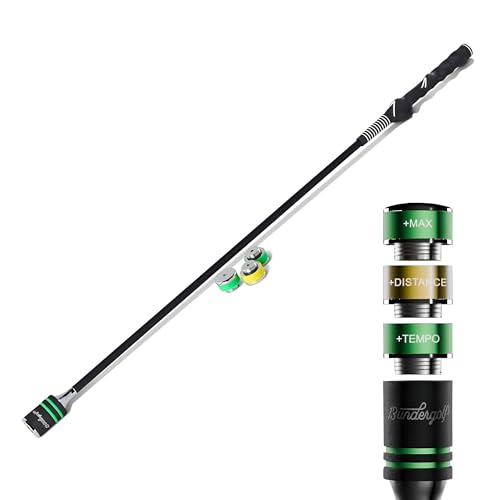
13 Under Golf TA25R Swing Trainer
Best for: left-handed golfers practicing indoors
- Hand Orientation
- Left Hand
- Use
- Indoor
- Dimensions
- 40 × 2 × 1 inches
- Weight
- 1.7 pounds
The 13 Under Golf TA25 is a left-handed swing trainer designed for indoor practice. It measures 40 inches long and weighs 1.7 pounds. The stick features a 2-inch width and includes three screw-in weights for progressive training. You can stack up to 600 grams to build speed and rhythm. The molded grip helps reinforce a neutral hand position. It fits into a standard golf bag for easy transport.
- Includes three screw-in weights for progressive training
- 40-inch length fits in a standard golf bag
- Molded grip aids in hand positioning
- Flexible fiberglass shaft provides instant feedback
- Left-handed orientation limits right-handed users
- 1.7-pound weight is higher than lightweight clubs
- Indoor-only use restricts outdoor range practice
- You want to improve your swing tempo
- You need a trainer for indoor practice
- You are a left-handed golfer
- You are a right-handed golfer
- You need a device for outdoor range use
- You prefer a lightweight training aid
Verdict: 13 Under Golf TA25 Left-Handed Trainer is a solid choice for left-handed golfers seeking to refine their swing mechanics indoors. It offers a practical solution for those who can accommodate its specific orientation and indoor focus.

Rapsodo MLM2PRO Mobile Launch Monitor
Best for: Detailed swing analysis with dual tracking
- Tracking Technology
- Doppler radar, dual camera
- Tracked Metrics
- Spin rate, spin axis, club speed
- Intended Use
- Indoor, outdoor, driving range
- Included Accessories
- 3 Chrome Tour balls
- Features
- Shot Tracking
- Color
- Gray
The Rapsodo MLM2PRO uses Doppler radar and a dual camera setup to track shot accuracy. It captures 15 key metrics, including spin rate, spin axis, and club speed. The unit measures 5.51 by 3.94 by 9.45 inches and weighs 1 pound. It includes three Chrome Tour balls. This monitor suits players seeking detailed swing data for indoor or outdoor practice sessions.
- Dual tracking technology combines Doppler radar with a dual camera setup for reliable data.
- Captures 15 key metrics including spin rate, spin axis, and club speed.
- Compact dimensions of 5.51 by 3.94 by 9.45 inches and a light 1-pound weight.
- Includes three Chrome Tour balls for immediate use.
- Weighs 1 pound, which is heavier than the Shot Scope LM1.
- Dimensions of 9.45 by 5.51 by 3.94 inches are bulkier than the Garmin Approach R10.
- You want dual camera and radar tracking for high accuracy.
- You need detailed metrics like spin axis and club speed.
- You practice indoors and outdoors with a portable device.
- You need the absolute smallest portable monitor available.
- You prefer a lighter device under 1 pound.
- You only want basic ball flight data without spin metrics.
Verdict: Rapsodo MLM2PRO Gray Launch Monitor provides robust dual-tracking data for serious practice. It fits golfers who prioritize detailed spin and path metrics over minimal portability.
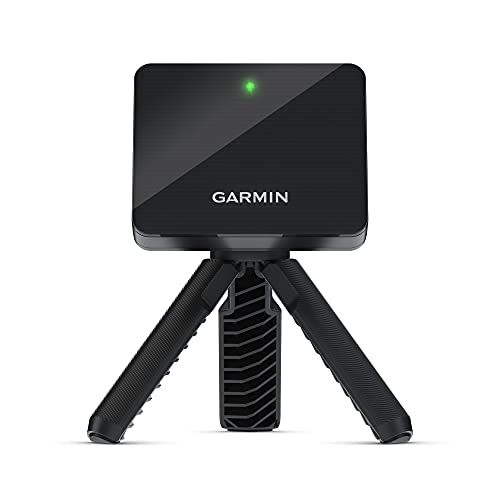
Garmin Approach R10 Portable Launch Monitor
Best for: range practice with a smartphone
- Tracked Metrics
- club head speed, ball speed, ball spin
- Compatible Software
- Garmin Golf app
- Intended Use
- home, indoors, driving range
- Included Accessories
- phone mount
- Color
- Black
- Dimensions
- 3.5 × 2.8 × 1 inches
The Garmin Approach R10 is a compact launch monitor designed for home and range use. It measures club head speed within plus or minus 3 mph, ball speed within plus or minus 1 mph, and launch angle within plus or minus 1 degree. Weighing only 12 ounces, it fits easily in your bag. You get 10 hours of battery life and a dedicated phone mount for setup. It pairs with the Garmin Golf app to track spin and tempo.
- Tracks club head speed with plus or minus 3 mph accuracy
- Measures ball speed with plus or minus 1 mph accuracy
- Includes a phone mount for easy bag attachment
- Provides up to 10 hours of battery life
- Club head speed accuracy is plus or minus 3 mph
- Requires a smartphone and the Garmin Golf app for data
- You want a lightweight device that weighs 12 ounces
- You practice at home or on the driving range
- You prefer using a phone mount for stability
- You need standalone hardware without a phone
- You require higher accuracy than plus or minus 3 mph for speed
- You want to avoid using a companion app
Verdict: The Garmin Approach R10 Portable Launch Monitor fits golfers who value portability and app-based analysis. It is a practical tool for range sessions where a phone mount and 10-hour battery life matter more than standalone hardware.

Rapsodo MLM2XPRO Dual-Camera Launch Monitor
Best for: Detailed swing metrics and PC app use
- Tracking Technology
- Dual-camera, Doppler radar
- Tracked Metrics
- spin rate, spin axis, club path
- Compatible Software
- Rapsodo Golf, PC app, Rapsodo Studios
- Intended Use
- Home & driving range, indoor & outdoor
- Included Accessories
- 12 RPT golf balls, balancing tripod
- Color
- Gray
The Rapsodo MLM2XPRO tracks spin rate, spin axis, and club path using dual-camera and Doppler radar technology. Weighing one pound, it pairs quickly with the Rapsodo Golf mobile app, the new PC app, and Rapsodo Studios. This kit includes a balancing tripod and 12 RPT golf balls. It suits golfers seeking accurate swing metrics and simulated putting for home or range use.
- Dual-camera and Doppler radar tracking for spin rate and club path
- Compatible with Rapsodo Golf app, PC app, and Rapsodo Studios
- Includes balancing tripod and 12 RPT golf balls
- Weighs one pound for portable use
- One pound weight is heavier than the Shot Scope LM1
- Relies on camera and radar which may need precise alignment
- You want detailed spin and path metrics for practice
- You prefer using a PC app for larger screen analysis
- You need a portable unit for home or range use
- You require a lighter device under one pound
- You only need basic ball speed data
- You prefer a system without smartphone dependency
Verdict: Rapsodo MLM2XPRO Launch Monitor offers robust dual-camera and Doppler radar metrics for serious home simulators. It fits golfers who value detailed swing data and PC app integration over ultra-lightweight portability.

PHIGOLF Home Golf Simulator Motion Sensor
Best for: casual home practice and virtual course play
- Tracking Technology
- 9-axis motion sensor
- Compatible Software
- Phigolf app, E6 Connect
- Intended Use
- Indoor, outdoor
- Included Accessories
- Golf swing stick
- Preloaded Courses
- 38,000 Courses
- Color
- Black
This indoor and outdoor simulator uses a 9-axis motion sensor to track swings. It pairs with the Phigolf app and E6 Connect software. The system includes a 26.2-inch golf swing stick and offers access to over 38,000 courses. It weighs 2.09 pounds and supports AI swing coaching. This setup suits players wanting interactive practice without complex launch monitor hardware.
- 9-axis motion sensor tracks swing movement
- Access to 38,000+ virtual courses
- Compatible with E6 Connect software
- Includes AI-powered swing coaching
- Works indoors or outdoors
- Weighs 2.09 pounds, which is heavier than mini portable units
- Requires a smartphone or tablet for operation
- Uses a dedicated swing stick rather than standard club tracking
- You want to practice swings at home without a large simulator setup
- You enjoy playing virtual rounds on thousands of real-world courses
- You prefer motion-sensor technology over radar or camera systems
- You need professional-grade ball speed and spin data
- You want to use your own golf clubs for tracking
- You require a standalone device without a phone
Verdict: PHIGOLF Motion Sensor Golf Stick offers a fun, app-based way to practice swings at home. It fits casual players who value course variety and AI feedback over precise launch data.

Voice Caddie SC200Plus Portable Radar
Best for: portable radar tracking with voice feedback
- Tracking Technology
- Doppler radar
- Display Type
- LCD display
- Intended Use
- Home, outdoor, indoor
- Features
- Swing Analysis
- Color
- Gray
- Dimensions
- 36 × 5 × 5 inches
The Voice Caddie SC200Plus uses Doppler radar technology to track shot data in real time. It features an LCD display and voice output for instant feedback. This gray unit weighs 8 ounces and measures 36 inches in length. It stores club statistics and supports swing speed mode without a ball. It suits golfers seeking reliable portable launch monitoring for indoor or outdoor practice.
- Doppler radar technology for accurate data collection
- Voice output and LCD display for instant feedback
- Stores shot data and club statistics
- Supports swing speed mode without a ball
- Compact 8-ounce weight for portability
- 36-inch length is bulkier than mini alternatives
- Small LCD display limits data visibility
- 8-ounce weight is heavier than ultralight sensors
- You want real-time voice feedback on your shots
- You need reliable Doppler radar for outdoor use
- You prefer storing club statistics for analysis
- You require a compact mini design under 10 inches
- You prefer a lightweight sensor under 5 ounces
- You need a large color display for detailed data
Verdict: Voice Caddie SC200Plus Gray Radar delivers reliable Doppler radar tracking with voice feedback. It fits golfers who value portable, real-time data storage for swing analysis.

Aerixtron Gray 9.8×9.8 ft Impact Screen
Best for: Wide home simulator setups
- Features
- Impact Screen
- Color
- Gray
- Intended Use
- Simulator, Indoor and Outdoor, Home
- Dimensions
- 98.4 × 98.4 × 0.28 inches
- Weight
- 13.8 pounds
This Aerixtron impact screen measures 9.8 by 9.8 feet with a 0.28-inch thickness. The gray fabric reduces light reflectivity to improve projection contrast. It uses 3D air mesh to absorb sound and resist tears. You get a flame-retardant surface and stainless steel grommets for quick setup. It fits indoor and outdoor simulator spaces.
- 9.8 x 9.8 ft coverage area
- 3.45mm thick 3D air mesh fabric
- Gray color reduces ambient light washout
- Reduces impact noise by 60 percent
- Flame-retardant material for safety
- 13.8 pounds weight adds bulk to transport
- 0.28 inch thickness may limit compact storage
- Fixed 9.8 x 9.8 ft size restricts tight spaces
- You need a large 9.8 x 9.8 ft impact surface
- You want gray fabric to boost projector contrast
- You require flame-retardant material for home safety
- You need a compact screen under 9 feet wide
- You prefer a lighter screen under 10 pounds
- You want a screen with adjustable height options
Verdict: Aerixtron Gray 3D Air Mesh Screen provides a wide 9.8 x 9.8 ft surface for serious home simulators. It suits buyers who prioritize sound reduction and projection clarity over portability.
Specifications side by side
| Spec | Shot Scope LM1 Portable Launch Monitor | 13 Under Golf TA25R Swing Trainer | Rapsodo MLM2PRO Mobile Launch Monitor | Garmin Approach R10 Portable Launch Monitor | Rapsodo MLM2XPRO Dual-Camera Launch Monitor | PHIGOLF Home Golf Simulator Motion Sensor | Voice Caddie SC200Plus Portable Radar | Aerixtron Gray 9.8×9.8 ft Impact Screen |
|---|---|---|---|---|---|---|---|---|
| Tracking Technology | – | – | Doppler radar, dual camera | – | Dual-camera, Doppler radar | 9-axis motion sensor | Doppler radar | – |
| Tracked Metrics | Ball speed, club speed, smash factor | – | Spin rate, spin axis, club speed | club head speed, ball speed, ball spin | spin rate, spin axis, club path | – | – | – |
| Compatible Software | Golf GPS App | – | – | Garmin Golf app | Rapsodo Golf, PC app, Rapsodo Studios | Phigolf app, E6 Connect | – | – |
| Display Type | – | – | – | – | – | – | LCD display | – |
| Intended Use | Indoor, outdoor range, on-course | – | Indoor, outdoor, driving range | home, indoors, driving range | Home & driving range, indoor & outdoor | Indoor, outdoor | Home, outdoor, indoor | – |
| Connectivity | USB-C | – | – | – | – | – | – | – |
| Included Accessories | USB-C charger | – | 3 Chrome Tour balls | phone mount | 12 RPT golf balls, balancing tripod | Golf swing stick | – | – |
| Features | – | – | Shot Tracking | – | – | – | Swing Analysis | Impact Screen |
| Preloaded Courses | – | – | – | – | – | 38,000 Courses | – | – |
| Color | Black | Green/Yellow | Gray | Black | Gray | Black | Gray | Gray |
| Hand Orientation | – | Left Hand | – | – | – | – | – | – |
| Use | – | Indoor | Indoor, Outdoor | Indoor | Indoor, Outdoor | Indoor, Outdoor | – | Indoor, Outdoor |
| Dimensions | 8 × 8 × 12 inches | 40 × 2 × 1 inches | 5.51 × 9.45 × 3.94 inches | 3.5 × 2.8 × 1 inches | – | 26.2 × 4.92 × 2.76 inches | 36 × 5 × 5 inches | 98.4 × 98.4 × 0.28 inches |
| Weight | – | 1.7 pounds | 1 pounds | 12 ounces | 1 pounds | 2.09 pounds | 8 ounces | 13.8 pounds |
| Model | SS-LM-1AA-LM1 | – | MLM2PRO | 010-02356-00 | MLM2PRO | 192516000053 | SC200Plus | – |
| Size | – | – | – | (14' x 20' x 10') | – | 23.6" | Small | 9.8 x 9.8 ft |
If you need a display for your golf simulator, our gaming monitor buying guide covers refresh rates and resolution.
Frequently asked questions
What is the difference between radar and camera launch monitors?
Radar systems use Doppler technology to track ball flight, while camera units rely on visual tracking. The Voice Caddie SC200Plus uses radar for portable, real-time data storage. In contrast, the Rapsodo MLM2PRO and MLM2XPRO employ dual-camera systems for detailed swing analysis. Radar is often preferred for outdoor range sessions, whereas cameras provide robust metrics for simulator setups.
Which launch monitor is best for left-handed golfers?
The 13 Under Golf TA25R Swing Trainer is designed specifically for left-handed players. It measures 40 inches in length and weighs 1.7 pounds, making it suitable for indoor practice. This trainer helps refine swing mechanics by accommodating the specific orientation required for left-handed strokes. It is a practical tool for those who need a dedicated indoor solution.
Do I need a smartphone to use a launch monitor?
Many modern launch monitors require a smartphone for data analysis. The Garmin Approach R10 relies on app-based analysis and needs a phone mount for range sessions. Similarly, the PHIGOLF Motion Sensor uses an app for virtual course play and AI feedback. Some units, like the Shot Scope LM1, function without wireless features, offering basic metrics without subscription fees.
How portable are typical golf launch monitors?
Portability varies by model and intended use. The Garmin Approach R10 is highly compact, measuring 3.5 by 2.8 inches and weighing 12 ounces. The Shot Scope LM1 is larger at 8 by 12 inches but remains portable for range use. The Rapsodo MLM2PRO weighs 1 pound, balancing detailed data with manageable size for serious practice sessions.
Can I use these monitors for indoor simulator setups?
Yes, several models support indoor use. The Rapsodo MLM2XPRO offers dual-camera and Doppler radar metrics for serious home simulators. The PHIGOLF Motion Sensor allows for casual home practice with access to thousands of virtual courses. The 13 Under Golf TA25R is also designed for indoor swing training. Ensure your space meets the recommended distance for accurate tracking.
What size impact screen do I need for a home simulator?
The Aerixtron Gray Impact Screen provides a wide 9.8 by 9.8 ft surface. It measures 98.4 inches in width and length, with a height of 0.28 inches. This screen suits buyers who prioritize sound reduction and projection clarity. It is designed for wide home simulator setups, accommodating serious indoor play without compromising on space or visual quality.
See also
How this review was put together
- Specs are quoted from the Amazon listing, not measured in a lab.
- The score is out of 10, based on listed specifications and buyer feedback.
- Prices were read from the listing when this page was last built and move without notice.
972 reviews · 1,445 rated products · 87 brands tracked
We earn a commission when you buy through our Amazon links. That never changes a score.


