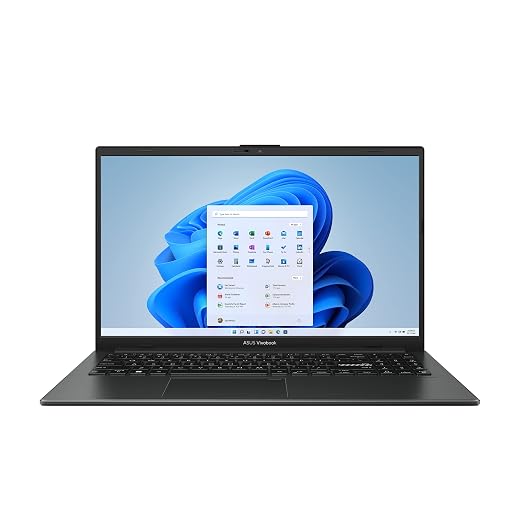
Lenovo IdeaPad Slim 3i Review: Reliability, Upgradability, and Hidden Flaws
The Lenovo IdeaPad Slim 3i arrives configured with an Intel Core i5-1335U processor, 16GB of soldered LPDDR5 system memory, a 512GB solid-state drive, and Windows 11 Pro pre-installed. On paper, this 15.6-inch notebook represents a capable entry for standard business, administrative, and academic workflows where immediate responsiveness and contemporary operating system features take precedence. However,…

As Amazon Associates, we earn from qualifying purchases. This means we may receive a small commission at no extra cost to you if you click through and make a purchase.
The Lenovo IdeaPad Slim 3i arrives configured with an Intel Core i5-1335U processor, 16GB of soldered LPDDR5 system memory, a 512GB solid-state drive, and Windows 11 Pro pre-installed. On paper, this 15.6-inch notebook represents a capable entry for standard business, administrative, and academic workflows where immediate responsiveness and contemporary operating system features take precedence. However, beneath those pragmatic core components lie notable architectural compromises—most prominently a restricted twisted nematic display panel, an unalterable memory configuration, and a third-party seller warranty arrangement—that make careful scrutiny necessary before committing to long-term deployment.
This notebook best serves office workers, clerical operators, and general users seeking a ready-to-deploy productivity station for document generation, web portals, and local data calculation. It is decidedly less appropriate for creative specialists, visual media enthusiasts, or anyone needing upgradeable hardware that can adapt as computing demands expand over several years. Buyers prioritizing long-term serviceability or factory-direct depot repairs will want to evaluate the practical implications of its soldered internals and merchant-backed coverage before making an investment.
Lenovo IdeaPad Slim 3i spec sheet
| Processor | Intel Core i5-1335U (10 Cores, 12 Threads, 1.3 GHz Base, up to 4.6 GHz Turbo) |
|---|---|
| Graphics | Integrated Intel UHD Graphics |
| System Memory | 16GB LPDDR5 4800 MHz (Soldered, 0 Expansion Slots) |
| Internal Storage | 512GB PCIe NVMe Solid State Drive |
| Display Panel | 15.6-inch Full HD (1920 x 1080) TN LCD, 250 nits, 60Hz, Non-Touch |
| Operating System | Windows 11 Pro (64-bit) |
| Wireless Connectivity | Wi-Fi 6 (802.11ax) and Bluetooth |
| Physical Ports | 2 x USB-A 3.0, 1 x USB-C 3.0, 1 x HDMI 1.4, Media Card Reader, Audio Combo |
| Physical Dimensions | 14.15 x 9.25 x 0.70 inches; Arctic Grey Chassis |
| Warranty Provision | One-Year Seller Warranty |
Every field from the listing (40)
| 0 | Color, Gray |
|---|---|
| 1 | Hard-Drive Size, 512 GB |
| 2 | Operating System, Windows 11 Pro |
| 3 | Other Special Features of the Product, Memory Card Slot, Numeric Keypad, Privacy Camera |
| 4 | Graphics Description, Integrated |
| 5 | Graphics Coprocessor, Intel UHD Graphics |
| 6 | Hard Disk Description, SSD |
| 7 | Video Processor, Intel |
| 8 | Specific Uses For Product, Business, Entertainment, Student |
| 9 | Form Factor, Notebook |
| 10 | Camera Description, Front |
| 11 | Graphics Ram Type, DDR4 SDRAM |
| 12 | Warranty Type, One-year seller warranty |
| 13 | Item Dimensions L x W x Thickness, 14.15"L x 9.25"W x 0.7"Th |
| 14 | Video Output, HDMI 1.4 |
| 15 | Operating System Family, Windows |
| 16 | Screen Size, 15.6 inches |
| 17 | Resolution, 1080p |
| 18 | Native Resolution, 1920 x 1080 pixels |
| 19 | Display Type, LCD |
| 20 | Display Resolution Maximum, 1920×1080 pixels |
| 21 | Display Technology, LCD |
| 22 | Display Refresh Rate in Hertz, 60 |
| 23 | Maximum Display Brightness, 250 nit |
| 24 | Supported Monitor Maximum Quantity, 1 |
| 25 | Display Maximum Resolution, 1920 x 1080 |
| 26 | Connectivity Technology, Bluetooth, HDMI, USB, Wi-Fi |
| 27 | Wireless Technology, Bluetooth, Wi-Fi |
| 28 | Wireless Compability, 802.11ax |
| 29 | Wi-Fi Generation, Wi-Fi 6 |
| 30 | Battery Cell Type, Lithium Polymer |
| 31 | Lithium-Battery Energy Content, 65 watt-hours |
| 32 | Human-Interface Input, Touch Pad |
| 33 | Keyboard Description, No Backlight |
| 34 | Audio Output Type, Headphones, Speakers |
| 35 | Speaker Description, 2 x 1.5W |
| 36 | Processor Series, Core i5 |
| 37 | Processor Speed, 1.3 GHz |
| 38 | Processor Count, 10 |
| 39 | Processor Brand, Intel |
Quoted from the product listing. We did not measure these figures.
01Display Quality and Visual Limitations
The screen configuration represents the most significant compromise on the Lenovo IdeaPad Slim 3i. While the 15.6-inch diagonal measurement and Full HD resolution of 1920 by 1080 pixels supply sufficient desktop area for side-by-side browser windows and basic data sheets, the underlying panel technology is Twisted Nematic rather than In-Plane Switching. In practical daily office use, this panel type exhibits narrow vertical and horizontal viewing angles. Tilting the screen forward or backward causes rapid luminance shifting and contrast inversion, requiring you to adjust the hinge angle repeatedly to maintain legible text.
Luminance reaches a maximum specified rating of 250 nits. This output level is adequate for artificially lit corporate spaces, domestic studies, or dim work cubicles, but it quickly washes out when positioned near sunny windows or beneath aggressive commercial fluorescent fixtures. Those accustomed to the wider viewing margins and consistent color reproduction found in modern IPS laptops—such as those discussed in our review of the asus vivobook 15.6” fhd ips pc laptop intel core 5 120u 16gb ram, 512gb ssd, silver—will notice the flatter color profiles and restricted viewing sweet spot on this entry-level display. The non-touch surface helps keep unwanted glare slightly subdued compared to glossy glass digitizers, but it cannot offset the baseline optical limits of budget TN technology.
For dedicated office data entry, accounting platforms, email management, and standard text composition, the display panel meets bare minimum functional requirements. However, users considering this machine for photo proofing, digital design, or collaborative presentations where multiple viewers look at the same screen will find the visual performance frustrating. Color consistency shifts noticeably whenever the viewer steps off-center, making true color judgment impossible.
02Computing Performance and Memory Upgradability
At the center of the hardware array sits the Intel Core i5-1335U, a 13th-generation processor constructed with a hybrid core layout. It features two performance cores dedicated to heavier single-threaded calculations alongside eight efficiency cores that manage background processes, peripheral software, and operating system overhead. With twelve total processing threads, a base clock of 1.3 gigahertz, and maximum turbo speeds reaching 4.6 gigahertz, this 15.6 fhd windows 11 laptop 16gb ram configuration delivers fluid responsiveness across general business suites, extensive web sessions, and multitasking environments. The integrated Intel UHD Graphics handles standard operating system visual scaling, multimedia streaming, and basic external display output without thermal distress.
The system memory implementation demands careful prospective assessment. The laptop includes 16GB of high-speed LPDDR5 memory running at 4800 megahertz, which is more than adequate for heavy document manipulation, large spreadsheets, and multi-tab research today. However, the listing documentation confirms that the unit contains zero memory expansion slots. This means the memory is soldered directly to the motherboard. Anyone planning a future Lenovo IdeaPad Slim 3i RAM upgrade will find it mechanically impossible to add capacity later. The 16GB integrated at the factory represents the permanent functional ceiling for the operating lifespan of the device.
Internal storage is provided by a 512GB PCIe NVMe solid-state drive, which ensures prompt operating system boot sequences and fast file transfer speeds. The laptop comes configured with Windows 11 Pro, which offers native administrative advantages over Windows Home, including BitLocker drive encryption, remote desktop hosting, and domain joining capabilities. While the core performance envelope handles daily administrative operations with ease, purchasers must recognize that the non-upgradable motherboard layout requires purchasing all the memory capacity you will ever need on day one.
03Port Selection, Physical Chassis, and Daily Usability
The exterior chassis is finished in Arctic Grey, presenting a clean, understated profile with an overall thickness of 0.70 inches and a footprint measuring 14.15 by 9.25 inches. Within this form factor, Lenovo incorporates a full-sized keyboard deck complete with an integrated numeric keypad, which provides substantial utility for bookkeeping, accounting tasks, and numeric entry. The keyboard layout also features a dedicated Microsoft Copilot hardware key to invoke operating system productivity assistance directly. Shoppers working late shifts should note that the technical specifications list no keyboard backlighting, which makes external ambient light essential when typing in dimly lit environments.
Port connectivity covers standard peripheral needs but reflects cost-conscious interface selections. The chassis provides two USB-A 3.0 ports, one USB-C 3.0 port, an integrated media card reader, a 3.5mm headphone and microphone combo jack, and a dedicated power port. Video output is routed through an HDMI 1.4 port. Because HDMI 1.4 is technically constrained to lower refresh rates when driving high-resolution external monitors, users planning to run external 4K displays will find their output limited to 30Hz rather than modern 60Hz standards. Users seeking different physical configurations or alternative input configurations may find value in comparing machines like the dell – inspiron 15 15.6 touch screen laptop – intel core i5 with 8gb memory – 512gb ssd – carbon bla, which handles basic workspace ergonomics with a different hardware balance.
Wireless communication is handled by modern Wi-Fi 6 (802.11ax) and integrated Bluetooth, facilitating stable connectivity across modern enterprise and home wireless routers. For video conferencing, the front-facing webcam features an integrated physical privacy shutter, allowing users to physically block the camera lens when not in use. Multi-touch navigation is managed by a standard precision touchpad that executes gesture commands reliably, though the chassis materials show predictable micro-flexing across the center of the keyboard deck when subjected to firm typing pressure.
04Warranty Coverage, Support Channels, and Reliability Realities
One of the most vital aspects for any careful hardware purchaser to investigate is the warranty structure backing this machine. The product listing explicitly specifies that this unit carries a one-year seller warranty rather than a direct factory depot warranty from Lenovo. This distinction is crucial for business operators and students who rely on rapid turnaround times when technical failures occur. When hardware issues arise with a seller-warranted machine, service claims, replacement parts sourcing, and repair logistics are handled through the selling merchant rather than Lenovo’s established regional support infrastructure.
Third-party warranty fulfillment presents distinct practical trade-offs. In the event of a catastrophic motherboard defect, power rail failure, or integrated component malfunction, having to negotiate repair authorizations through an independent retailer often introduces communication friction and extended transit delays. Furthermore, because components like the 16GB LPDDR5 memory are permanently soldered to the main system board, individual memory chips cannot be swapped out; any memory failure necessitates a full motherboard replacement. Buyers seeking robust corporate repair lifecycles often explore alternatives like the hp pavilion 15.6 hd touchscreen anti-glare laptop, 16gb ram, 1tb ssd storage, intel core processor u to weigh how different manufacturers and configurations manage post-purchase support.
Long-term hardware reliability in budget-oriented notebooks also hinges heavily on cooling efficiency and hinge structural integrity. The IdeaPad Slim 3i utilizes a standard single-fan thermal management layout tuned for the low-power Intel Core i5-1335U, which keeps fan noise modest under moderate operational loads. However, because the structural casing relies heavily on composite plastic assemblies around the display hinges, users should exercise consistent care when opening and closing the lid from the center point rather than the corners to prevent structural hinge fatigue over years of daily handling.
The verdict
Lenovo IdeaPad Slim 3i
8.8/10
Buyer score
Very positive
Average star rating left by Amazon buyers, doubled to a 10-point scale. It is not a score we gave the product.
The Lenovo IdeaPad Slim 3i presents a functional, utilitarian computing profile that covers the fundamental needs of administrative and student computing. Its pairing of the Intel Core i5-1335U processor with 16GB of fast LPDDR5 memory and a 512GB solid-state drive delivers smooth responsiveness for document creation, high-tab browsing, and multitasking under Windows 11 Pro. The inclusion of a full numeric keypad, a hardware privacy shutter, and reliable wireless standards establishes a solid practical baseline for daily task completion.
Nevertheless, prospective purchasers must weigh those functional strengths against significant structural trade-offs. The 250-nit TN display panel limits visual comfort with narrow viewing angles and modest contrast, the soldered memory eliminates any future memory upgrade pathway, and the one-year seller warranty bypasses standard manufacturer support channels. If your expectations align with an unalterable office notebook intended for fixed desk work and standard productivity software, it fulfills its operational brief, but buyers seeking display excellence, expandable hardware, or official factory depot backing should consider other options.
Pros
- Responsive 10-core Intel Core i5-1335U processor
- Generous 16GB high-speed LPDDR5 memory
- Windows 11 Pro included out of the box
- Dedicated numeric keypad and physical privacy shutter
- Modern Wi-Fi 6 wireless connectivity
Cons
- Narrow viewing angles from 250-nit TN display
- Zero RAM expansion slots due to soldered memory
- One-year warranty fulfilled by seller rather than manufacturer
- Lacks keyboard backlighting for dim environments
Buy it if
- You need a ready-to-use business machine equipped with Windows 11 Pro, an efficient 10-core processor, and 16GB of memory for office suites and web databases.
- Your primary workflow takes place in a standard indoor office setting where the display angle remains fixed directly in front of you.
- You regularly work with spreadsheets, point-of-sale entries, or numerical datasets that benefit from a dedicated physical numeric keypad.
- You value straightforward privacy hardware, such as a built-in mechanical webcam shutter and integrated Wi-Fi 6 wireless connectivity.
Skip it if
- You demand an IPS display with vibrant color reproduction and wide, shift-free viewing angles for media viewing or creative digital tasks.
- You expect to upgrade physical components like system memory down the line to prolong the functional lifespan of the machine.
- You require direct, factory-backed depot warranty protection from the original equipment manufacturer rather than independent seller fulfillment.
- You frequently type in low-light conditions and require a built-in backlit keyboard.
See it on AmazonAffiliate link. Price and stock change at Amazon, not here.
Questions buyers ask
Can you upgrade the RAM in the Lenovo IdeaPad Slim 3i?
No. The 16GB of LPDDR5 system memory is soldered directly to the motherboard, and the unit features zero memory expansion slots. The 16GB capacity configured at the factory is the maximum amount of memory the machine will ever support.
Does the Lenovo IdeaPad Slim 3i have a backlit keyboard?
The listing specifications confirm that this notebook does not feature a backlit keyboard. While it includes a full numeric keypad and a dedicated Microsoft Copilot shortcut key, you will need external ambient light when typing in dark or dim environments.
What type of display panel is used on this notebook?
The notebook is equipped with a 15.6-inch Full HD (1920 x 1080) TN LCD panel rated at 250 nits of brightness. Because it uses twisted nematic technology rather than IPS, viewing angles are limited, and colors will shift if the display is viewed from off-center angles.
What does the one-year seller warranty cover?
The one-year seller warranty indicates that hardware service, repairs, and technical defect resolution are managed directly by the third-party merchant selling the notebook, rather than through Lenovo’s direct manufacturer warranty depots. Service procedures and return timelines will depend entirely on the seller’s specific support policies.
Can the HDMI port output 4K resolution at 60Hz to an external monitor?
The laptop features an HDMI 1.4 port. Under the HDMI 1.4 specification standard, video bandwidth is restricted, meaning external 4K displays will generally be limited to a refresh rate of 30Hz. It is best suited for standard 1080p external monitors and enterprise projectors.
How this review was put together
- Specs are quoted from the Amazon listing, not measured in a lab.
- The score is the average star rating left by Amazon buyers, doubled to a 10-point scale.
- Prices were read from the listing when this page was last built and move without notice.
- Buyer quotes are reproduced word for word, with the name and date shown.
199 reviews · 1,445 rated products · 87 brands tracked
We earn a commission when you buy through our Amazon links. That never changes a score, because we do not set the scores.