Lenovo Legion Pro 7 Review: Real-World Thermals, Warranty, and Reliability
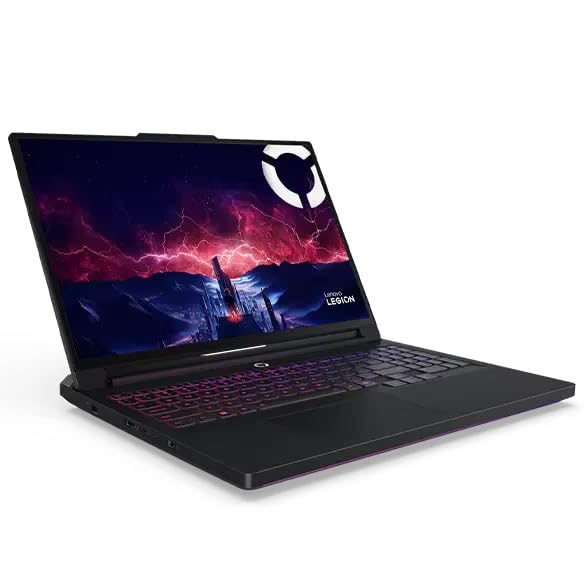
The Lenovo Legion Pro 7 Gen 10 represents the brand’s flagship high-performance tier, pairing an AMD Ryzen 9 9955HX processor with an NVIDIA GeForce RTX 5070 Ti graphics card and an ultra-fast 240Hz OLED display. It is an unapologetic desktop-replacement portable rig designed to sustain demanding compute loads, making it an exceptional contender for high-framerate…
As Amazon Associates, we earn from qualifying purchases. This means we may receive a small commission at no extra cost to you if you click through and make a purchase.
The Lenovo Legion Pro 7 Gen 10 represents the brand’s flagship high-performance tier, pairing an AMD Ryzen 9 9955HX processor with an NVIDIA GeForce RTX 5070 Ti graphics card and an ultra-fast 240Hz OLED display. It is an unapologetic desktop-replacement portable rig designed to sustain demanding compute loads, making it an exceptional contender for high-framerate competitive gaming and heavy rendering workflows where peak throughput is mandatory.
This machine directly suits serious competitive players, enthusiast creators, and power users who require desktop-tier processing power alongside class-leading visual fidelity. However, shoppers who prioritize lightweight daily portability, budget-friendly hardware pricing, or prolonged untethered battery operation should consider more efficient alternatives such as the Lenovo Legion Pro 5 gaming laptop.
Lenovo Legion Pro 7 Gen 10 spec sheet
| Processor | AMD Ryzen 9 9955HX (2.50 GHz up to 5.40 GHz) |
|---|---|
| Graphics Coprocessor | NVIDIA GeForce RTX 5070 Ti Laptop GPU (12GB VRAM) |
| Memory | 32 GB DDR5-5600MT/s (2 x 16 GB SODIMM) |
| Storage | 2 TB M.2 2280 PCIe Gen5 Performance TLC SSD |
| Display Panel | 16-inch WQXGA (2560 x 1600) OLED, 240Hz, 500 nits, HDR 1000 True Black |
| Thermal Architecture | Coldfront 275W Vapor Chamber with Turbo Fans and Acoustic AI |
| Battery Capacity | 99.9Wh with Slim Tip Power Connection |
| Networking | Wi-Fi 7 (2×2 BE 320MHz), Bluetooth 5.4, 2.5GbE RJ-45 Ethernet |
| Webcam and Audio | 5MP RGB Camera with Privacy Shutter, Realtek ALC3306 Quad Speakers |
| Warranty Coverage | One Year Legion Ultimate Support (Courier or Carry-in) |
Quoted from the product listing. We did not measure these figures.
01Thermal Cooling Architecture and Sustained Performance
Managing heat in a high-wattage desktop replacement is the defining challenge for hardware longevity, and the lenovo legion pro 7 thermal cooling configuration tackles this via the proprietary Legion Coldfront system. At the heart of this thermal assembly is a massive 275W vapor chamber coupled with high-output turbo fans. Unlike traditional copper heat pipes that transfer heat along narrow paths, a vapor chamber distributes thermal energy across a wide, sealed vacuum plate. This prevents hot spots directly above the AMD Ryzen 9 9955HX die and the graphics processor, keeping thermal throttling at bay during extended gaming or rendering sessions.
Software and acoustics are governed by the onboard Lenovo AI Engine+, which applies real-time Scenario Detection to balance thermal fan curves against component temperatures. Using the Acoustic AI synchronization system and the hardware Fn+Q mode toggle, users can quickly alternate between full-throttle performance modes and balanced daily profiles. However, pushing a 275W total platform dissipation inside a 1.05-inch chassis produces significant exhaust heat. Over multi-hour sessions, sustained thermal cycling introduces physical stress to micro-solder joints and internal components. Buyers relying on continuous heavy computing must maintain clear intake vents and clean fan blades regularly to avoid thermal saturation.
The engineering of the lenovo legion pro 7 coldfront vapor chamber successfully maintains stable clock speeds without immediate drops in frequency, providing steady frame pacing in modern gaming titles. For long-term hardware health, the critical risk factor remains environmental dust accumulation inside the fin stacks. Because the vapor chamber operates within a sealed tolerance, airflow obstruction will cause operating temperatures to rise quickly, which can accelerate the drying of internal thermal interface materials over several years of hard usage.
02Processing Power and Gaming Hardware Reliability
The processing foundation of this configuration pairs the 16-core, 32-thread AMD Ryzen 9 9955HX with dedicated graphics to deliver uncompromising computing output. When looking at the lenovo legion pro 7 for gaming, this processor handles physics simulations, high-tick-rate online lobbies, and simultaneous streaming broadcasts with ease. The listing notes the inclusion of the NVIDIA GeForce RTX 5070 Ti graphics processor equipped with 12GB of high-bandwidth video memory, offering plenty of overhead for modern high-resolution texture packs and ray-tracing pipelines. Enthusiasts evaluating platform performance against higher-tier configurations like the Lenovo Legion Pro 7i RTX 5080 will find that this setup provides a balanced blend of power efficiency and high-framerate capability.
Memory and storage specifications are configured for demanding workloads right out of the box. The system ships with 32 GB of high-speed DDR5-5600MT/s memory installed as two removable 16 GB SODIMMs. Utilizing dual modular SODIMM slots rather than soldered RAM is a major reliability advantage for hardware longevity, enabling simple field replacement should a memory module fail down the road. Storage is equally cutting-edge, featuring a 2 TB M.2 2280 PCIe Gen5 Performance TLC solid-state drive. PCIe Gen5 drives yield near-instantaneous load times, though they generate considerably more heat than older Gen4 drives, requiring the chassis internal heatsinks to manage drive temperatures under heavy disk write operations.
When assessing overall lenovo legion pro 7 specs, component selection is geared toward elite throughput. Lenovo AI Engine+ fine-tunes resource allocation between the CPU and GPU via Smart FPS routines, avoiding power mismatches during sudden in-game scene changes. The chief long-term consideration here is the high electrical demand placed on the motherboard voltage regulator modules (VRMs). Consistently drawing heavy power through compact circuitry requires clean electrical supply lines, making the use of a stable surge protector or battery backup a sensible precaution for home battle stations.
03OLED Display Quality and Long-Term Panel Care
Visual presentation is anchored by a 16-inch WQXGA (2560 x 1600) non-touch screen that takes full advantage of organic light-emitting diode technology. The lenovo legion pro 7 oled display delivers an exceptional 240Hz refresh rate alongside an HDR 1000 True Black rating and 100% DCI-P3 color gamut coverage. With a peak brightness specification of 500 nits and low blue light hardware certification, the panel yields deep contrast, vibrant color accuracy, and virtually instantaneous pixel response times that eliminate ghosting in competitive first-person shooters.
While the visual immersion matches or exceeds standard IPS panels found on alternatives like the Lenovo Legion Pro 7i Gen 10, OLED technology introduces distinct ownership responsibilities. Static display elements, such as persistent operating system taskbars, game user interface HUDs, or fixed productivity toolbars, represent a potential risk for uneven pixel wear or burn-in over thousands of hours of high-brightness operation. Lenovo includes a glare surface finish to enhance image pop, but users working in brightly lit rooms with direct backlighting may experience noticeable reflections.
To ensure panel longevity, users should utilize Windows 11 dark mode settings, configure automatic screen timeouts, and hide static desktop icons when not actively gaming. The display does not support touch input, which preserves the delicate panel surface from hand pressure and oils. When properly cared for, the contrast ratio and rapid frame refresh provide an outstanding visual experience that makes traditional backlit screens feel dated by comparison.
04Chassis Engineering, Port Selection, and Hardware Longevity
The physical construction of the machine utilizes an Eclipse Black clamshell chassis measuring 14.35 inches wide by 10.9 inches deep and 1.05 inches thick. This substantial footprint accommodates an extensive thermal array and an integrated 99.9Wh battery, which is the exact legal maximum capacity allowed on commercial airline flights. While the substantial battery offers decent headroom for basic productivity tasks, running the Ryzen 9 processor and dedicated graphics coprocessor at full load will drain the battery rapidly, reinforcing that this machine is engineered primarily to operate connected to its high-capacity Slim Tip power brick.
Physical connectivity across the chassis is comprehensive, minimizing the need for external breakout dongles. The peripheral array includes:
- Two USB-A ports operating at 5Gbps for standard peripherals
- One USB-A port running at 10Gbps with Always On charging capability
- One USB-C port (10Gbps) supporting USB Power Delivery (95-100W) and DisplayPort 2.1
- One additional USB-C port (10Gbps) supporting DisplayPort 2.1
- One dedicated HDMI 2.1 video output supporting resolutions up to 8K at 60Hz
- One 2.5GbE RJ-45 Ethernet jack for low-latency wired networking
- One 3.5mm headphone/microphone audio combo jack
- One proprietary Slim Tip power input port
Multimedia hardware is similarly well-rounded. The laptop features a built-in 5MP RGB webcam paired with a dual-microphone array and an integrated physical privacy shutter, providing clear video capture for calls alongside physical privacy protection. Audio is managed by a Realtek ALC3306 codec routing through a four-speaker sound system, consisting of two 2W woofers and two 2W tweeters optimized by Nahimic Audio and a Smart Amplifier. Wireless connectivity remains state-of-the-art with Wi-Fi 7 (2×2 BE 320MHz) and Bluetooth 5.4, ensuring reliable wireless peripheral links and maximum theoretical network throughput.
05Warranty Support and Common Reliability Failure Points
Understanding post-purchase service coverage is vital when investing in high-power mobile hardware. The retail packaging includes one year of standard Courier or Carry-in Lenovo Warranty, categorized as Legion Ultimate Support. Under standard terms, hardware failures requiring repair involve shipping the unit to a central depot or carrying it to an authorized facility. However, the manufacturer allows buyers to purchase optional upgrades for up to 4 years of Lenovo Premium Care Onsite Plus upon registering the computer. For professional users who cannot afford weeks of downtime, securing onsite support represents a significant risk-reduction measure.
When examining potential lenovo legion pro 7 common issues for high-performance clamshells, thermal fatigue and mechanical wear are the primary failure vectors over extended lifespans. Components operating at high power thresholds experience frequent expansion and contraction cycles as temperatures swing from idle to peak loads. Key reliability areas to monitor over multi-year ownership include:
- Dust buildup within the vapor chamber exhaust fins, leading to elevated baseline temperatures and reduced fan bearing lifespan
- Sustained heat transfer impacting the ultra-fast PCIe Gen5 SSD controller under sustained write operations
- Uneven OLED pixel wear or burn-in if high-contrast desktop elements remain static at maximum brightness levels
- Mechanical wear on the external I/O ports and the high-wattage Slim Tip power connector from frequent repositioning
Reliable warranty support serves as an essential safety net for complex, highly integrated gaming laptops. Because the CPU, GPU, and vapor chamber cooling assembly are tightly engineered into a unified motherboard architecture, component failures outside of modular RAM or storage usually require complete system board replacements. Buyers intending to keep this machine across multiple years should factor comprehensive lenovo legion pro 7 warranty support into their long-term ownership strategy.
The verdict
Lenovo Legion Pro 7 Gen 10
9.6/10
Our score
Overwhelmingly positive
Scores are out of 10, based on listed specifications and buyer feedback.
When weighing whether the machine justifies its place in the market, the overall engineering provides a convincing affirmative. The combination of a top-tier Ryzen 9000 HX processor, cutting-edge RTX 5070 Ti graphics, and an ultra-responsive 240Hz OLED display creates an exceptional desktop replacement. By deploying an expansive 275W Coldfront vapor chamber cooling design, the machine avoids the aggressive thermal throttling that frequently hampers compact systems, sustaining maximum clock speeds across heavy gaming sessions and workstation workloads.
Ultimately, prospective buyers must enter ownership with realistic expectations regarding maintenance and long-term care. High-performance computing inherently generates intense thermal cycles, and maintaining optimal airflow is mandatory for the hardware’s extended survival. When paired with Lenovo’s available multi-year onsite warranty options and sensible OLED usage habits, this laptop stands as a formidable, future-ready powerhouse capable of dominating demanding modern workloads for years to come.
Pros
- 275W Coldfront vapor chamber cooling prevents thermal throttling
- Vibrant 16-inch 240Hz WQXGA OLED display with HDR 1000
- Blazing-fast 2 TB PCIe Gen5 solid-state storage
- Dual modular SODIMM slots allow straightforward memory upgrades
- Comprehensive port layout featuring Wi-Fi 7 and 2.5GbE LAN
- Optional upgrade to 4 years of Onsite Premium Care
Cons
- Substantial 1.05-inch chassis requires heavy proprietary charger
- OLED display requires conscious care to prevent static image burn-in
- One-year standard warranty requires paid extension for onsite service
Buy it if
- You demand uncompromised framerates driven by an AMD Ryzen 9 9955HX processor and an NVIDIA RTX 5070 Ti graphics coprocessor.
- You want an industry-leading 16-inch 240Hz WQXGA OLED panel with HDR 1000 True Black contrast and 100% DCI-P3 color coverage.
- You prioritize expansive modern connectivity, including Wi-Fi 7, 2.5GbE LAN, dual DisplayPort 2.1 over USB-C, and PCIe Gen5 storage.
- You plan to take advantage of optional extended onsite warranty coverage for long-term business or creative peace of mind.
Skip it if
- You require an ultra-thin, highly portable laptop for travel without relying on a bulky AC charging adapter.
- You work primarily in static desktop environments with high risk of OLED screen burn-in and prefer a conventional IPS panel.
- You are searching for an entry-level gaming machine and do not need a 275W vapor chamber cooling architecture.
See it on AmazonAffiliate link. Price and stock change at Amazon, not here.
Questions buyers ask
What warranty coverage comes standard with the Lenovo Legion Pro 7 Gen 10?
The laptop includes one year of Courier or Carry-in Legion Ultimate Support from Lenovo. Users have the option to upgrade coverage up to four years of Lenovo Premium Care Onsite Plus upon registering the device with Lenovo.
Can the system memory and storage be upgraded by the user?
Yes. The laptop features two standard DDR5 SODIMM slots, configured from the factory with two 16 GB sticks for 32 GB total, as well as an M.2 2280 slot populated by a 2 TB PCIe Gen5 SSD. Because the memory is not soldered, it can be serviced or upgraded over time.
How does the Coldfront vapor chamber cooling system function?
The cooling system relies on a 275W vapor chamber that spreads heat evenly across a broad sealed chamber rather than relying solely on traditional copper pipes. High-output turbo fans, an acoustic AI profile, and multi-mode fan switching via Fn+Q help dissipate heat through chassis exhaust vents.
Are there risks of burn-in on the 240Hz OLED display?
Like all OLED panels, prolonged display of static images at maximum brightness can result in uneven pixel wear over time. Utilizing dark mode, enabling screen savers, setting dynamic desktop wallpapers, and auto-hiding the Windows taskbar will mitigate long-term burn-in risks.
Does the laptop support USB-C charging for travel?
Yes. One of the USB-C ports supports USB Power Delivery between 95W and 100W. While this allows for low-power charging on the go, full performance gaming requires the proprietary high-output Slim Tip AC power connector.
Maintaining peak thermal performance on a high-airflow system like the Legion Pro 7 requires keeping your gaming setup free of ambient dust that clogs intake vents over time. Automating your floor cleaning routine is an effortless way to preserve hardware longevity. Consulting recommendations from a trusted RoboVac Reviewer helps you select the right automated cleaner to keep pet hair and airborne debris away from your intake fans.
How this review was put together
- Specs are quoted from the Amazon listing, not measured in a lab.
- The score is out of 10, based on listed specifications and buyer feedback.
- Prices were read from the listing when this page was last built and move without notice.
593 reviews · 1,445 rated products · 87 brands tracked
We earn a commission when you buy through our Amazon links. That never changes a score.


