Samsung Odyssey G9 Analysis: Reliability, Curve Strain, and Support Risks
The Samsung Odyssey G9 represents an ambitious leap in ultrawide display engineering, designed to consolidate dual-screen workstations into a single panoramic canvas without distracting middle bezels. Spanning an expansive 48.7-inch diagonal view with a sharp 5120×1440 Dual QHD resolution, this peripheral pairs Quantum Dot QLED color reproduction with an intense 240Hz refresh rate and variable…
As Amazon Associates, we earn from qualifying purchases. This means we may receive a small commission at no extra cost to you if you click through and make a purchase.
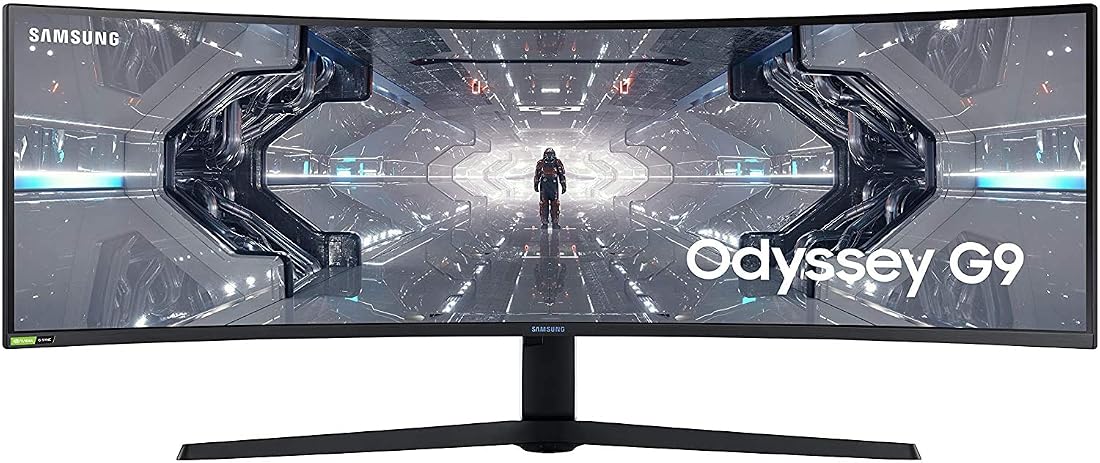
The Samsung Odyssey G9 represents an ambitious leap in ultrawide display engineering, designed to consolidate dual-screen workstations into a single panoramic canvas without distracting middle bezels. Spanning an expansive 48.7-inch diagonal view with a sharp 5120×1440 Dual QHD resolution, this peripheral pairs Quantum Dot QLED color reproduction with an intense 240Hz refresh rate and variable refresh rate synchronization. On paper, it is a masterclass in visual immersion for simulator pilots and enthusiast gamers, but its radical physical architecture, heavy thermal footprint, and demanding form factor make it an investment that requires close technical scrutiny before purchasing.
This monitor is uniquely tailored for dedicated simulation enthusiasts, high-end PC gamers with flagship graphics hardware, and financial or productivity multitaskers who thrive on a 32:9 desktop workspace. Conversely, mainstream desktop users with standard-depth furniture, budget-conscious buyers unable to invest in premium display mounting hardware, and cautious consumers who prioritize dependable, set-it-and-forget-it hardware longevity with straightforward customer service should look elsewhere.
Samsung Odyssey G9 spec sheet
| Screen Size | 48.7 inches diagonal (32:9 aspect ratio) |
|---|---|
| Curvature | 1000R deep curve |
| Native Resolution | Dual QHD (5120×1440 maximum) |
| Panel Technology | QLED with Quantum Dot enhancement |
| Refresh Rate | 240Hz |
| Static Contrast Ratio | 2500:1 typical |
| Peak Brightness | 1000 cd/m² (420 cd/m² typical) |
| Variable Refresh Rate | NVIDIA G-SYNC Compatible, AMD FreeSync Premium Pro |
| Pixel Pitch & Density | 0.3 mm pixel pitch, 108.97 PPI |
| Physical Dimensions & Weight | 16.39"D x 45.18"W x 21.15"H, 31.1 lbs |
Every field from the listing (40)
| 0 | Aspect Ratio, 32:09 |
|---|---|
| 1 | Screen Finish, Curved |
| 2 | Contrast Ratio, 2500:1 |
| 3 | Refresh Rate, 240 hertz |
| 4 | Display Type, QLED |
| 5 | Display Technology, QLED |
| 6 | Viewing Angle, 178 degrees |
| 7 | Brightness, 1000 cd |
| 8 | Pixel Pitch, 0.3 |
| 9 | Picture Quality Enhancement Technology, QLED |
| 10 | Screen Size, 48.7 inches |
| 11 | Item Dimensions D x W x H, 16.39"D x 45.18"W x 21.15"H |
| 12 | Item Weight, 31.1 pounds |
| 13 | Resolution, DQHD |
| 14 | Display Resolution Maximum, 5120×1440 pixels |
| 15 | Native Resolution, 2560×1440 |
| 16 | Power Consumption, 0.3 watts |
| 17 | Voltage, 110 volts |
| 18 | Connectivity Technology, HDMI |
| 19 | Hardware Connectivity, DisplayPort, HDMI, USB 3.0 |
| 20 | Adaptive Sync, G-Sync |
| 22 | Specific Uses For Product, Gaming |
| 23 | Color, Black and White |
| 24 | Mounting Type, Wall Mount |
| 25 | Compatible Devices, Laptop, Desktop, Gaming Console |
| 26 | Warranty Type, One-Year Warranty |
| 27 | Shape, Rectangular |
| 28 | Brand, Samsung |
| 29 | Model Number, LC49G95TSSNXZA |
| 30 | Model Name, Odyssey G9 |
| 31 | Warranty Description, 1 year manufacturer |
| 32 | UPC, 887276413174 |
| 33 | Manufacturer, Samsung |
| 34 | Item Type Name, Monitor |
| 35 | Best Sellers Rank, #91,847 in Electronics (See Top 100 in Electronics) #2,207 in Computer Monitors |
| 36 | ASIN, B088HH6LW5 |
| 37 | Customer Reviews, 4.2 4.2 out of 5 stars (4,262) 4.2 out of 5 stars |
| 38 | Response Time, 1 milliseconds |
| 39 | Total Number of HDMI Ports, 2 |
| 40 | Total Usb Ports, 4 |
Quoted from the product listing. We did not measure these figures.
01Display Performance and Dual QHD Visual Quality
When assessing the core Samsung Odyssey G9 specs, the panel foundation rests on a massive 32:9 aspect ratio that directly replaces two standard 27-inch 16:9 screens sitting side by side. Operating at a resolution of 5120×1440 pixels, the screen packs 108.97 pixels per inch with a 0.3 mm pixel pitch. This pixel density strikes a functional equilibrium: it renders crisp text for documents, detailed spreadsheets, and sharp gaming environments without requiring excessive Windows display scaling. The underlying QLED layer, backed by Quantum Dot technology, produces vibrant color saturation covering 125% of the sRGB color space. High-contrast scenes benefit from the 2500:1 static contrast ratio, ensuring dark areas appear noticeably deeper than on conventional IPS panels, while a peak luminance capability of 1000 cd/m² provides intense highlights when high dynamic range content is engaged.
Operating a display of this scale introduces real rendering challenges that prospective buyers must calculate in advance. Driving the Samsung Odyssey G9 dual QHD panel means pushing approximately 7.37 million pixels per frame—nearly 90% of the pixel count found in a full 4K display—at frame rates reaching up to 240Hz. Achieving stable output at these figures requires modern graphics cards equipped with Display Stream Compression (DSC) over DisplayPort. Users exploring ultra-wide setups often find themselves cross-shopping between this 49-inch platform and even larger formats like the massive Samsung Neo G9 57 inch tier. While that larger 57-inch counterpart demands an even more punishing dual-4K pipeline, the 49-inch Odyssey G9 remains a formidable load that will push high-tier enthusiast GPUs to their operational limits in demanding titles.
For day-to-day productivity and professional design tasks, the panel presents distinctive trade-offs. The broad desktop width allows users to stack multiple application windows alongside each other without bezel interference, greatly streamlining timeline editing, streaming configurations, and complex multi-source workflows. However, the extreme horizontal span means color uniformity and brightness can shift slightly toward the far outer edges when viewed off-center. Although the listed 178-degree viewing angles are solid for a vertical alignment panel, users sitting close to the screen will detect subtle contrast shifts at the far perimeters if the panel is improperly aligned with their primary line of sight.
02Curvature Ergonomics and Physical Desk Footprint
The defining visual and functional characteristic of this monitor is its aggressive 1000R curvature radius. Samsung engineered this dramatic arc to match the natural peripheral arc of human vision. In practical terms, an arc of 1000R means that if the curve formed a complete circle, its radius would measure exactly one meter. In the context of the Samsung G9 curve eye strain discussions, this geometry ensures that the outer edges of the screen remain roughly equidistant from the viewer’s pupils as the center of the display. This uniform focal distance reduces the need for the ocular muscles to constantly refocus as you shift gaze across the vast horizontal workspace, providing a more natural field of focus than a completely flat 49-inch panel would allow.
Despite these ergonomic claims, adapting to an extreme 1000R curve involves a definite learning curve. For specialized desktop applications involving precision CAD modeling, architecture, or graphic design, straight lines will appear visually bowed across the center plane until your brain adjusts to the perspective warping. Desktop space consumption is another massive practical consideration. With a total unit depth of 16.39 inches from the front of the screen arc to the back of the wide tripod base, this monitor dominates shallow desks. It requires a dedicated work surface of at least 30 to 36 inches in depth to position the display far enough away to avoid physical neck strain and visual fatigue. Those seeking a curved configuration without relinquishing an entire room often compare such dimensions against smaller standalone curved displays like the Samsung Odyssey G55C 32-inch, which requires considerably less structural space.
Mounting this massive 31.1-pound assembly introduces significant structural logistical challenges:
- Desk Thickness and Material: The substantial front-heavy leverage exerted by the curved chassis can crack or bow thin particle-board or hollow-core honeycomb desks over time.
- Third-Party Arm Compatibility: Due to the forward center of gravity generated by the 1000R bend, standard monitor arms frequently tilt downward under the load; specialized heavy-duty tilt-pivot brackets are required.
- Vibration Transmission: Heavy mechanical keyboard typing on an unstable desk can cause noticeable side-to-side oscillation across the wide 45.18-inch wingspan.
03Hardware Durability, Thermal Stresses, and Panel Integrity
Assessing long-term Samsung Odyssey G9 reliability requires understanding the physical stresses inherent in bending a high-performance 49-inch panel. A primary concern among long-term owners centers on thermal expansion and contraction. The monitor houses substantial internal power processing hardware and a high-luminance backlight system capable of drawing significant operational wattage. As the internal components warm up during high-brightness HDR sessions, the differing expansion rates of the plastic outer housing, metal structural subframe, and glass panel array can produce audible popping or clicking noises during warm-up and cool-down cycles.
These thermal dynamics play a direct role in reported Samsung Odyssey G9 common issues, particularly concerning structural bonding. Under continuous heat cycling, stress concentrates around the upper bezel perimeter where the structural frame holds the curved glass under tension. In severe cases, early revisions of this monitor family exhibited instances of Samsung Odyssey G9 panel separation, where the internal display adhesive loosened, creating a slight physical gap between the glass edge and the outer plastic casing. This opening can allow localized backlight bleed to escape along the top seam. While subsequent manufacturing runs incorporated revised adhesives and reinforced clips, buyers must inspect the perimeter sealing thoroughly upon unboxing and monitor bezel seams throughout the first several months of ownership.
Panel uniformity and pixel integrity also warrant close monitoring. Driving an edge-lit array across nearly four feet of curved glass makes zero-defect manufacturing difficult. Prospective buyers should immediately run single-color full-screen test patterns to check for stuck or dead sub-pixels, as well as uneven edge-lit luminance clouds in the corners. Evaluating these quality-control risks is essential when determining whether to invest in an ultra-wide form factor or consider standard high-density screens like the Samsung Odyssey Neo G8, which isolates performance into a more compact, structurally stable frame.
04Motion Handling, Sync Performance, and Firmware Stability
For high-tempo simulation and competitive play, deploying the Samsung Odyssey G9 for gaming yields an exceptionally fluid experience when the hardware is dialed in correctly. The 240Hz refresh rate delivers up to four times the frame updates of a conventional 60Hz business monitor, translating to buttery smooth panning and instantaneous tracking across peripheral vision. Integrated support for NVIDIA G-SYNC compatibility and AMD FreeSync Premium Pro eliminates tearing and jarring micro-stutters by dynamically synchronizing panel timing to the graphics card’s render pipeline. In fast-paced racing simulations and first-person shooters, the expansive field of view lets you spot competitors in your peripheral vision long before they would register on a standard 16:9 monitor.
Achieving this visual fluidity, however, depends heavily on firmware stability and cable integrity. Operating at the full 5120×1440 resolution at 240Hz with 10-bit color requires substantial bandwidth that maxes out the capabilities of DisplayPort 1.4 hardware. In early firmware versions, users frequently encountered display handshake failures, intermittent black-screen dropouts, and difficulties waking the monitor from Windows sleep states. Samsung has addressed many of these connection handshake anomalies through ongoing firmware revisions, but applying updates requires downloading image files onto a USB drive and using the designated service port on the rear I/O cavity.
Another operational consideration is graphics driver stability. Ensuring that modern graphics drivers communicate reliably with the monitor’s scaler requires keeping both GPU drivers and monitor firmware updated in lockstep. Enthusiasts who transition from large format living-room displays, such as the Samsung QN90F 55, will appreciate the G9’s significantly lower input latency and rapid pixel transitions, but they must be prepared to troubleshoot occasional multi-monitor handshake quirks that do not occur on simpler consumer displays.
05Warranty Realities and Post-Purchase Support Risks
Given the sheer physical scale and intricate mechanical build of the Odyssey G9, navigating the Samsung Odyssey G9 warranty policy is a crucial factor in the purchasing decision. A standard limited warranty covers manufacturing defects in materials and workmanship, but the practical logistics of servicing a 31-pound, four-foot-wide curved monitor present unique hurdles. Retaining the massive original shipping carton and foam inserts is mandatory; attempting to ship this curved display for repair in generic third-party packaging almost guarantees cracked substrate glass or fractured internal diffusers during transit.
Warranty claims involving display defects can also be subject to strict manufacturer thresholds. Samsung, like most major panel vendors, operates with specific pixel-defect tolerance guidelines. A solitary dark pixel located in the far outer peripheral edge may not meet the official claim threshold for an outright panel replacement, meaning buyers must familiarize themselves with standard defect-count criteria before initiating claims. Furthermore, service experiences vary considerably depending on local authorized repair depot availability. In some regions, on-site technician repair is provided, while in others, owners must handle freight drop-offs or wait extended periods for replacement scaler boards or panels to arrive from regional distribution hubs.
To protect against unexpected hardware downtime, careful buyers should consider supplementary protections:
- Retailer Return Windows: Conduct all primary stress testing, dead-pixel sweeps, and thermal inspections within the seller’s initial zero-questions return period.
- Packaging Preservation: Store the original factory box and structural polystyrene inserts in an attic or closet to facilitate safe warranty transit if needed.
- Surge Protection: Connect the display to a high-joule surge suppressor or uninterruptible power supply (UPS) to protect the internal power supply against voltage spikes.
The verdict
Samsung Odyssey G9
8.4/10
Buyer score
Mostly positive
Average star rating left by Amazon buyers, doubled to a 10-point scale. It is not a score we gave the product.
Evaluating whether the Samsung Odyssey G9 is worth it requires weighing its extraordinary visual performance against its real-world physical and mechanical demands. When properly configured and paired with capable PC hardware, this monitor provides an unmatched panoramic gaming experience. Its 240Hz refresh rate, Dual QHD sharpness, rich QLED color saturation, and deeply wrapped 1000R field of view completely transform racing, flight simulators, and sweeping open-world titles into deeply captivating visual experiences that flat monitors simply cannot replicate.
Nevertheless, cautious buyers must respect the inherent physical compromises of this complex peripheral. Between the deep desktop footprint, the heavy load placed on monitor arms, the potential for thermal expansion noises, and historical quality control challenges like panel separation, this is not a casual purchase. If you have the dedicated desk depth, a high-end graphics pipeline, and the patience to thoroughly test the panel during your initial return window, the Odyssey G9 offers singular immersion. If you prefer low-maintenance reliability and standard form factors, sticking with conventional widescreen options remains the safer path.
Pros
- Expansive 49-inch Dual QHD 32:9 workspace
- Fluid 240Hz refresh rate with sync support
- Vibrant QLED color with 125% sRGB coverage
- Deeply immersive 1000R field-of-view curvature
- High 2500:1 static contrast ratio
Cons
- Substantial desk footprint requires deep furniture
- Heavy 31.1-pound chassis demands specialized mounting
- Thermal cycling can produce housing clicking sounds
- Aggressive curve distorts precision CAD straight lines
Buy it if
- You specialize in flight simulators, sim-racing setups, or panoramic adventure titles that natively support 32:9 rendering and benefit immensely from wide peripheral immersion.
- You currently run a dual-monitor workstation and want to eliminate the center bezel seam while preserving equivalent horizontal desktop screen space.
- You possess a top-tier enthusiast graphics card capable of driving a Dual QHD pixel matrix at high frame rates over DisplayPort.
- You have a dedicated, sturdy desk with at least 30 to 36 inches of usable surface depth to accommodate the substantial stand footprint.
Skip it if
- You primarily work in precision architecture, vector drafting, or CAD software where the 1000R curve can create distracting visual distortions on straight horizontal lines.
- You lack the space or structural desk strength to safely support a 31.1-pound, front-heavy display setup.
- You expect guaranteed, hassle-free panel longevity and prefer simple, compact monitor designs that avoid thermal expansion creaks and potential adhesive stresses.
See it on AmazonAffiliate link. Price and stock change at Amazon, not here.
Questions buyers ask
Does the 1000R curve cause geometric distortion during daily desktop work?
Yes, horizontal lines across spreadsheets, architectural blueprints, and precision design software will appear noticeably curved due to the aggressive 1000R radius. While your eyes and brain gradually adapt to this perspective after several days of general computing, professionals who require absolute geometric accuracy for print or CAD work generally prefer flat panels.
What graphics card is needed to run this monitor at its full 240Hz refresh rate?
To run the full 5120×1440 resolution at 240Hz with 10-bit color depth, you need a modern enthusiast graphics card that supports DisplayPort 1.4 with Display Stream Compression (DSC). Running demanding modern games at native resolution will push even high-end graphics cards hard, making powerful hardware essential to take full advantage of the high refresh rate.
How does the Samsung Odyssey G9 manage heat dissipation during long gaming sessions?
The monitor dissipates heat passively through ventilation slots positioned around the rear casing and upper perimeter. Because the display produces significant brightness across a massive surface area, internal components warm up quickly, which can occasionally lead to faint clicking sounds as the plastic housing expands and contracts during thermal cycles.
What should buyers check immediately upon unboxing this monitor?
Immediately inspect the top and side bezel seams to confirm the curved panel is securely seated in the frame without any signs of separation or glue gap. Next, connect the display to run full-screen solid color slides (red, green, blue, black, white) to detect any stuck pixels, dead pixels, or excessive corner backlight bleed before your retailer return window closes.
Can a standard desktop monitor arm hold the Odyssey G9?
Standard monitor arms will rarely support this display. Even if an arm is rated for 30 pounds, the dramatic 1000R forward curve shifts the monitor’s center of gravity forward, placing excessive leverage on the tilt hinge. Mounting this monitor safely requires a heavy-duty monitor arm specifically engineered with a reinforced, lockable tilt-pivot mechanism designed for extreme ultrawide displays.
How the ratings split
Share of Amazon ratings at each star level, as shown on the listing.
What buyers wrote
Copied word for word from the Amazon listing. We did not edit or select for tone.
And even then sometimes it doesn't display I called Samsung they gave me instructions which did not fix the issue Last purchased Jun 14, 2023 I procrastinated in returning this item now its too late too, the only thing i can say if your stuck with…
I went in with this purchase a little skeptical because I've been reading about the rocky launch with this monitor, but from the first five days of owning it so far, I think those issues with flickering and QC are for the most part addressed. For…
How this review was put together
- Specs are quoted from the Amazon listing, not measured in a lab.
- The score is the average star rating left by Amazon buyers, doubled to a 10-point scale.
- Prices were read from the listing when this page was last built and move without notice.
- Buyer quotes are reproduced word for word, with the name and date shown.
199 reviews · 1,445 rated products · 87 brands tracked
We earn a commission when you buy through our Amazon links. That never changes a score, because we do not set the scores.


