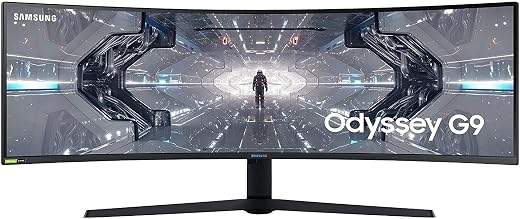
Samsung Odyssey G93SC Review: Is This 49-Inch QD-OLED Built to Last?
The Samsung Odyssey G93SC represents Samsung’s push to bring Quantum Dot OLED visual fidelity to a panoramic 49-inch 32:9 desktop format. Pairing an ultra-wide 5120×1440 resolution with an ultra-fast 240Hz refresh rate and a 0.03ms gray-to-gray response time, this monitor aims to replace dual-monitor desk arrangements with a seamless, curved single-panel design. On paper, it…

As Amazon Associates, we earn from qualifying purchases. This means we may receive a small commission at no extra cost to you if you click through and make a purchase.
The Samsung Odyssey G93SC represents Samsung’s push to bring Quantum Dot OLED visual fidelity to a panoramic 49-inch 32:9 desktop format. Pairing an ultra-wide 5120×1440 resolution with an ultra-fast 240Hz refresh rate and a 0.03ms gray-to-gray response time, this monitor aims to replace dual-monitor desk arrangements with a seamless, curved single-panel design. On paper, it delivers benchmark-level contrast and fluid gaming motion, but potential buyers must scrutinize whether this organic display technology holds up against long-term hardware wear and tear under demanding daily workloads.
This premium curved gaming display specifically targets sim racers, flight simulation enthusiasts, and competitive gamers who prioritize maximum field of view and instantaneous response times above all else. Conversely, office professionals relying primarily on static spreadsheets, coders facing prolonged text rendering, and buyers seeking zero-maintenance panel durability should approach with hesitation. If you need a workstation screen that runs static software eight hours a day without maintenance, looking at conventional backlights like a samsung odyssey monitor 49 inch or an IPS display remains the safer path forward.
Samsung Odyssey G93SC spec sheet
| Screen Size and Aspect Ratio | 49 inches, 32:9 super-ultrawide |
|---|---|
| Display Panel Technology | Quantum Dot OLED (QD-OLED) |
| Native Screen Resolution | Dual QHD 5120 x 1440 pixels |
| Refresh Rate | 240Hz |
| Response Time | 0.03ms (GtG) |
| Contrast Ratio | 1,000,000:1 (DisplayHDR True Black 400) |
| Screen Curvature and Finish | 1800R curve, matte surface finish |
| Adaptive Sync Compatibility | NVIDIA G-Sync compatible, AMD FreeSync Premium Pro |
| Input Ports and Connectivity | DisplayPort, HDMI 2.1, USB Hub (data transmission only) |
| Dimensions and Weight | 47.1" W x 11.2" D x 20.9" H, 27.8 lbs |
Every field from the listing (40)
| 0 | Aspect Ratio, 32:9 |
|---|---|
| 1 | Screen Finish, Matte |
| 2 | Contrast Ratio, 1,000,000:1 |
| 3 | Refresh Rate, 240 hertz |
| 4 | Display Type, OLED |
| 5 | Display Technology, OLED |
| 6 | Viewing Angle, 178 degrees |
| 7 | Brightness, 250 cd |
| 8 | Pixel Pitch, 0.23 |
| 9 | Color Gamut, 0.99 |
| 10 | Picture Quality Enhancement Technology, HDR10+ |
| 11 | Screen Size, 49 inches |
| 12 | Item Dimensions D x W x H, 11.2"D x 47.1"W x 20.9"H |
| 13 | Item Weight, 27.8 pounds |
| 14 | Resolution, QHD Ultra Wide 1440p |
| 15 | Display Resolution Maximum, 5120×1440 pixels |
| 16 | Native Resolution, 5120×1440 |
| 17 | Power Consumption, 3.13 watts |
| 18 | Voltage, 120 volts |
| 19 | Total Number of HDMI Ports, 2 |
| 20 | Total Usb Ports, 3 |
| 21 | Number of Component Outputs, 3 |
| 22 | Total USB 2.0 Ports, 3 |
| 23 | Total USB 3.0 Ports, 3 |
| 24 | Additional Features, Curved, Height Adjustment, High Dynamic Range, Tilt Adjustment, Ultrawide Screen |
| 25 | Specific Uses For Product, Desktop, Gaming, Photo Video Editing |
| 26 | Color, Aluminum Silver |
| 27 | Mounting Type, VESA Mount |
| 28 | Compatible Devices, Desktop, Gaming Console, Laptop |
| 29 | Warranty Type, 3 Year Manufacturer Warranty |
| 30 | Shape, Curved |
| 31 | Brand, Samsung |
| 32 | Model Number, LS49CG932SNXZA |
| 33 | Model Name, G93SC |
| 34 | Warranty Description, 3 Year Manufacturer |
| 35 | UPC, 887276768946 |
| 36 | Manufacturer, Samsung |
| 37 | Included Components, DisplayPort Cable, HDMI Cable, Power Cable |
| 38 | Best Sellers Rank, #10,937 in Electronics (See Top 100 in Electronics) #376 in Computer Monitors |
| 39 | ASIN, B0CDQMQQS2 |
Quoted from the product listing. We did not measure these figures.
01QD-OLED Durability and Burn-In Risk Assessment
Any serious analysis of this display must address the inherent trade-offs of organic light-emitting diodes. The Samsung Odyssey G93SC utilizes self-lit QD-OLED pixels, which means every individual diode produces its own light and color without a traditional separate LED backlight. This design allows for infinite contrast and pristine dark levels, but organic compounds naturally degrade over thousands of hours of operation. Evaluating the samsung odyssey g93sc burn in risk is therefore critical for anyone planning to use this monitor outside of pure video entertainment.
In a super-ultrawide 32:9 layout, static interface elements pose a defined threat over extended periods. Gamers regularly encounter fixed heads-up displays, mini-maps, speedometers, and inventory bars that remain pinned to identical pixel clusters across hundreds of play hours. When transitioning to desktop tasks, the Windows taskbar, browser tabs, and split-screen application borders present uninterrupted static lines. While modern OLED controllers include automated cycling to refresh pixel states, uneven wear remains an inescapable physical vulnerability of the technology when static graphics are driven at sustained luminance.
Warranty transparency is another crucial factor when investigating long-term ownership security. When evaluating samsung odyssey g93sc warranty coverage, prospective buyers should note that the listing does not specify whether image retention, panel burn-in, or subpixel degradation are explicitly covered under standard warranty repair terms. For high-investment hardware, the absence of an explicit burn-in protection pledge in the product data means buyers must practice disciplined preventative care: hiding taskbars, rotating window placements, and avoiding sustained maximum brightness on static windows.
02Motion Handling and Visual Gaming Performance
Where this display unequivocally triumphs is visual fluidity and dynamic responsiveness. The odyssey g93sc 240hz performance operates in tandem with a microscopic 0.03ms response time, essentially eradicating the motion blur, ghosting, and smearing found on traditional liquid crystal displays. In fast-paced competitive shooters and high-speed simulation titles, objects maintain tack-sharp edge definition across rapid camera pans, giving players immediate visual confirmation without temporal smear.
Immersion reaches exceptional heights thanks to the display’s expansive 1800R curvature and super-ultrawide proportions. Setting up the odyssey g93sc for sim racing transforms cockpit-view driving simulators by wrapping the track and digital side mirrors around your natural peripheral vision. Unlike multi-screen setups that introduce distracting plastic bezels right in your visual center, the continuous 49-inch curve provides an unobstructed visual horizon. Synchronized via AMD FreeSync Premium Pro and certified G-Sync compatibility, the monitor suppresses tearing and micro-stutter even when rendering demanding graphical scenes.
Contrast reproduction enhances realism across varied lighting conditions. The 1,000,000:1 contrast ratio and DisplayHDR True Black 400 certification ensure deep interstellar blacks in space simulations and realistic shadow detail in dimly lit game corridors. Rather than raising black levels across an entire screen zone, individual pixels turn off entirely. Gamers who cross-shop smaller form factors like the asus rog strix 27” 1440p oled gaming monitor (xg27aqdmg) – qhd, glossy oled, 240hz, 0.03ms, custom h gain an appreciation for how transformative the massive 49-inch horizontal canvas is for environmental immersion.
03Desktop Productivity, Text Rendering, and Usability Flaws
While gaming showcases the panel’s strengths, everyday computing brings measurable trade-offs that prospective owners must evaluate. A recurring topic among prospective owners concerns samsung g93sc text clarity. QD-OLED panels rely on a distinct triangular subpixel arrangement rather than the standard linear RGB subpixel structure assumed by standard desktop font anti-aliasing engines. Consequently, high-contrast text edges, such as black fonts on white backgrounds or fine coding syntax, can show faint color fringing along their borders, leading to soft letter rendering during long reading sessions.
Multitasking capabilities partially offset these visual quirks through practical hardware integration. The Picture-by-Picture feature splits the 5120×1440 canvas cleanly down the middle, behaving like two discrete 27-inch 1440p displays running side by side from separate native video inputs. This setup allows users to connect a gaming rig and a work laptop concurrently. The Auto Source Switch Plus functionality also eliminates manual input hunting by automatically shifting display priority when a newly connected console or computer powers on.
Nevertheless, potential buyers should recognize several samsung odyssey g93sc problems inherent to general daily operation. The matte screen finish does an effective job diffusing harsh office lighting reflections, yet direct sunlight in bright rooms can wash over the deep black presentation common to untreated OLED glass. Furthermore, while the monitor incorporates an integrated USB hub, the listing clarifies that this hub supports data transmission only, meaning it does not supply power delivery to charge connected mobile devices or modern single-cable productivity laptops.
04Hardware Architecture, Stand Footprint, and Desk Ergonomics
Physical setup requires deliberate preparation due to the unit’s substantial physical dimensions. Spanning 47.1 inches horizontally and requiring 11.2 inches of desk depth with its factory stand, this 27.8-pound monitor demands a structurally rigid, deep desktop. The included ergonomic stand offers height adjustment to align the display with natural eye levels, which is vital for preventing neck fatigue when scanning across an ultra-wide panoramic panel.
Samsung’s industrial chassis design is impressively slim, measuring a mere 4.5mm at its thinnest edge with a sleek metal housing that lends an executive aesthetic to any gaming station. The rear of the chassis houses integrated CoreSync and Core Lighting+ bias illumination, which projects environmental lighting behind the monitor to soften visual transitions in dark rooms. The display also houses integrated stereo speakers, providing functional daily audio for system alerts and casual media streaming without cluttering the desk with external sound equipment.
Hardware inputs include HDMI 2.1 and DisplayPort connections, which are necessary to push native 5120×1440 resolution at a full 240Hz refresh rate. Driving over 7.3 million pixels at high frame rates requires a potent modern graphics processor. Users who do not own upper-tier graphics hardware or who prefer a simpler, zero-burn-in workspace may find traditional flat panels, such as the samsung odyssey g50a series 27-inch wqhd (2560×1440) gaming monitor, 165hz, 1ms, ips panel, g-sync, a much more manageable option for routine everyday gaming.
The verdict
Samsung Odyssey G93SC
8.2/10
Buyer score
Mostly positive
Average star rating left by Amazon buyers, doubled to a 10-point scale. It is not a score we gave the product.
Determining whether the Samsung Odyssey G93SC delivers on its promises depends entirely on your primary computing intent. As a dedicated entertainment display, this samsung 49 inch qd oled gaming monitor is an engineering marvel. It merges the enveloping scope of a dual-wide 1800R display with the unmatched pixel response, infinite contrast, and saturated color rendition that only self-emissive QD-OLED hardware can produce. In virtual racing cockpits and immersive open-world gaming, few screens on the market can compete with this visual experience.
However, cautious buyers must balance that performance against practical reliability considerations. The technical reality of organic pixel wear means this display cannot be treated with the careless indifference of a standard office monitor. Between subpixel text smoothing quirks, the physical bulk on your desk, and the lack of explicit burn-in coverage outlined in the product listing, the G93SC requires conscious usage habits. If you accept these trade-offs and intend to use it primarily for gaming, it remains an extraordinary piece of display technology.
Pros
- Blistering 240Hz refresh rate and 0.03ms response time
- Infinite contrast ratio with DisplayHDR True Black 400
- Massive 49-inch 32:9 panoramic curved view
- Hardware Picture-by-Picture dual-source multitasking
- Ultra-slim 4.5mm metal chassis with CoreSync lighting
Cons
- Inherent QD-OLED burn-in risk from static software
- Subpixel arrangement causes subtle text fringing
- USB hub supports data transmission only without power
- Listing does not specify explicit burn-in warranty terms
Buy it if
- You primarily play racing simulators, flight sims, or wide-canvas action titles that directly benefit from a panoramic 32:9 view.
- You demand absolute pixel response times and zero ghosting alongside deep black levels and HDR color fidelity.
- You want to eliminate dual-monitor desk bezels by using built-in Picture-by-Picture splitting across two machines.
- You already own a high-end graphics card capable of driving 5120×1440 pixels up to 240Hz.
Skip it if
- Your typical screen time involves static desktop office work, word processing, and spreadsheets where text fringing and burn-in wear become genuine risks.
- You have a shallow workstation desk unable to comfortably house an 11.2-inch deep stand and a 47-inch wide curved frame.
- You expect single-cable USB-C power delivery to charge your laptop during daily use.
See it on AmazonAffiliate link. Price and stock change at Amazon, not here.
Questions buyers ask
Does the Samsung Odyssey G93SC include built-in speakers?
Yes, the listing confirms that the Samsung Odyssey G93SC includes built-in speakers, allowing you to output system alerts, casual audio, and gaming sound directly from the chassis without external desktop speakers.
Can the USB hub on the monitor charge a connected laptop?
No, the product details state that the integrated USB hub supports data transmission only, meaning it cannot provide power delivery or charging capabilities to connected laptops.
How does the 1800R curve feel for general computing?
The 1800R curvature is engineered to match the natural peripheral arc of human vision across its 47.1-inch width. While it creates deep immersion in video games and simulations, users working with strict straight lines or graphic design grids may notice subtle visual bending until they acclimate to the curve.
Does this monitor support running two computers at the same time?
Yes, the display features Picture-by-Picture functionality, which splits the ultra-wide 5120×1440 canvas into two native-resolution half-screens, letting you monitor two separate computer systems side by side simultaneously.
What should buyers know about burn-in prevention on this screen?
Because the listing does not specify explicit warranty coverage for panel burn-in, users should practice routine care, including hiding static taskbars, using screen savers, rotating static windows, and avoiding persistent static logos at high brightness levels.
How this review was put together
- Specs are quoted from the Amazon listing, not measured in a lab.
- The score is the average star rating left by Amazon buyers, doubled to a 10-point scale.
- Prices were read from the listing when this page was last built and move without notice.
- Buyer quotes are reproduced word for word, with the name and date shown.
199 reviews · 1,445 rated products · 87 brands tracked
We earn a commission when you buy through our Amazon links. That never changes a score, because we do not set the scores.