Skymons Golf Launch Monitor Review: Specs, Pros and Cons
This Skymons golf launch monitor review analyzes the Pro X1 Plus. We break down key specs for indoor and outdoor use. See how it works with your smartphone.

As Amazon Associates, we earn from qualifying purchases. This means we may receive a small commission at no extra cost to you if you click through and make a purchase.
As an Amazon Associate we earn from qualifying purchases. Links on this page are affiliate links.
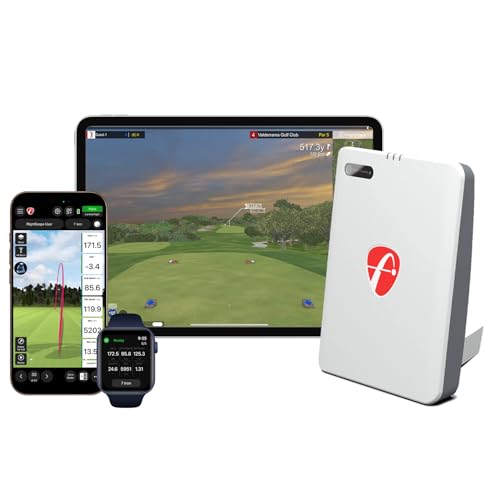
This skymons golf launch monitor review focuses on the Pro X1 Plus, a compact tracking device designed for both indoor and outdoor use. It captures key swing metrics, including swing speed and launch angle, to help you analyze your ball flight. The unit features a matte black finish and integrates with smartphones running iOS 11 or newer, Android 11 or newer, and HarmonyOS 4.0 or newer. By connecting to a compatible app, you can view shot trajectories and detailed data without needing a separate display. It serves as a practical tool for home practice or range sessions.
- Built-in sensors for temperature, humidity, and barometric pressure adjust data to real-time conditions.
- Tracks swing speed, launch angle, and spin rate for detailed shot analysis.
- Supports iOS 11+, Android 11+, and HarmonyOS 4.0+ via a free app.
- Provides 3D virtual driving range views with 45° and 90° perspectives.
- Includes attack angle and clubface impact visuals for deeper swing insights.
Good fit for
This launch monitor suits golfers who want to practice at home or on the driving range without bulky equipment. If you use a smartphone and want to track swing speed and launch angle, this device fits your setup. The environmental sensors help adjust data for weather changes, which is useful for outdoor training. It also works well for those who prefer viewing their shot trajectory in 3D to understand ball flight better. The lack of a subscription makes it accessible for regular use.
Who can skip it
You should look at another option if you need a dedicated handheld display or hardware buttons for operation. This device relies entirely on your smartphone for the interface and data visualization. It does not include a separate screen or standalone console. If you prefer not to use an app on your phone, this monitor will not meet your needs. Additionally, users seeking a complete simulator package with projectors or large screens may find this unit insufficient on its own.
Verdict
The Skymons Pro X1 Plus offers a practical way to track swing speed and launch angle using your existing smartphone. It is a solid choice for home practice and range sessions where you want detailed data without extra hardware.
Key specs explained for Skymons Pro X1 Plus
Intended Use: Indoor, outdoor, driving range, home
This listing states the device works in multiple environments. You can set it up at the driving range, use it at home, or take it outdoors. This versatility means you do not need separate tools for different practice sessions. It suits golfers who want one device for all training locations, ensuring consistent data regardless of where you hit your shots.
Tracked Metrics: Swing speed, launch angle, spin rate
The data shows these three core metrics are captured. Swing speed helps you measure power. Launch angle indicates the initial ball trajectory. Spin rate affects how the ball behaves in the air. These figures allow you to analyze your ball flight and make technical adjustments. This level of detail is essential for serious practice and understanding your current performance baseline.
Advanced Environmental Sensors: Temperature, humidity, barometric pressure
The product includes built-in modules for temperature, humidity, and barometric pressure. These sensors automatically adjust your shot data to match real-time weather conditions. This means your recorded numbers reflect actual atmospheric effects rather than raw measurements. This feature helps you compare shots taken on different days more accurately, providing a clearer picture of your true performance.
Smart App Experience: IOS 11+, Android 11+, HarmonyOS 4.0+
The listing specifies support for iOS 11 or higher, Android 11 or higher, and HarmonyOS 4.0 or higher. You need one of these operating systems to access the full feature set. This ensures compatibility with most modern smartphones. Check your device version before purchasing to guarantee the app runs smoothly and displays all shot data and simulation features correctly.
Smart App Experience: No subscription required
The data notes that there is no subscription fee for the app. You can access the tracking and analysis features without recurring payments. This model appeals to buyers who want to avoid monthly costs associated with other launch monitors. It allows you to use the device indefinitely after the initial purchase, keeping long-term training expenses predictable and fixed.
Design and Build Details
The Skymons Pro X1 Plus features a matte black finish. This color choice helps the unit blend into various backgrounds, whether you place it on a grassy tee box or a home simulator mat. The listing does not specify the exact materials used in the construction. It also omits the device's weight. You should assume it is lightweight enough to move easily between your garage and the driving range without needing a dedicated carrying case.
According to the listing, the size is identified simply as Pro X1 Plus. No specific dimensions like length or width are provided. This compact form factor supports its intended use in tight spaces. You can position it near your hitting area without it taking up excessive room. The design prioritizes portability, allowing you to set it up quickly for indoor sessions or outdoor practice.
There are no visible buttons or physical controls mentioned in the data. You likely interact with the device through your smartphone. The listing confirms compatibility with iOS 11 or above, Android 11 or above, and HarmonyOS 4.0 or above. This reliance on a mobile app means the physical build remains minimal. You do not need to manage complex dials or switches on the unit itself. The focus is on a clean, unobtrusive appearance that does not distract from your swing.
Setup And Everyday Use
Setting up the Skymons Pro X1 Plus relies on your smartphone rather than a standalone display. You connect the device to an app that supports iOS 11 or newer, Android 11 or newer, and HarmonyOS 4.0 or newer. The interface offers English, Chinese, and Japanese language options. This setup allows you to use the monitor in various locations without needing additional hardware. The listed features emphasize that no subscription is required for basic operation. Once paired, the unit captures shot trajectory and swing data, which then appears on your phone screen. You can view the results in a 3D simulation with 45-degree or 90-degree viewing angles. The app displays club speed, launch angle, and spin metrics. For daily use, the device includes advanced environmental sensors. These built-in modules for temperature, humidity, and barometric pressure automatically adjust your shot data to match real-time conditions. This means your spin rate and swing speed readings account for the current weather. You can use the swing-only mode to focus purely on mechanics without ball flight data. The tool also provides clubface impact visuals to help you understand strike quality. You can track distance, efficiency ratings, and backspin analysis during practice sessions. The listing states it works for indoor simulators, outdoor driving ranges, and general home training. The compact form factor allows you to place it on a mat or tee box easily. You simply position the unit, swing, and review the metrics on your connected device. The process is designed to be straightforward for regular practice sessions.
Before You Buy
You need a compatible smartphone to use this launch monitor. The app supports iOS 11, Android 11, and HarmonyOS 4.0. Check your device version before buying. You will also need a stable surface for the matte black unit. It works indoors or outdoors, so ensure your space is clear. The device adjusts data using built-in sensors for temperature, humidity, and pressure. Keep the lens clean for accurate shot tracking. You can track swing speed, launch angle, and spin rate. This helps you improve consistency. The Pro X1 Plus fits well alongside other golf gear for home simulators. It does not require a subscription. You get deeper insights into your swing. This makes it suitable for serious practice. Consider your available space and phone compatibility. This device transforms any area into a training zone. It is a practical tool for tracking progress. You can watch your ball flight from different angles. This enhances your understanding of each shot.
Check before you buy
- Verify your smartphone runs iOS 11, Android 11, or HarmonyOS 4.0
- Ensure you have a clear, stable surface for setup
- Check if your space allows for full swing analysis
- Confirm the app supports your preferred language settings
- Keep the sensor lens clean for accurate data

Skymons Pro X1 Plus Golf Launch Monitor
Best for: smartphone-based swing analysis
- Tracked Metrics
- Swing speed, launch angle, spin rate
- Intended Use
- Indoor, outdoor, driving range, home
- Features
- Shot Tracking, Swing Analysis
The Skymons Pro X1 Plus is a golf launch monitor designed for indoor and outdoor use. It tracks swing speed, launch angle, and spin rate. Built-in environmental sensors adjust data for temperature, humidity, and barometric pressure. The device connects to iOS, Android, and HarmonyOS apps for shot trajectory display and 3D simulation. It suits golfers seeking detailed swing metrics and progress tracking without a subscription.
- Tracks swing speed, launch angle, and spin rate.
- Includes built-in environmental sensors for real-time adjustments.
- Supports iOS 11+, Android 11+, and HarmonyOS 4.0+.
- Provides 3D simulation with 45° and 90° viewing options.
- Requires a smartphone for operation and data display.
- Limited to three operating systems without broader compatibility.
- You want to track swing speed and spin rate.
- You need environmental adjustments for accurate outdoor data.
- You prefer using a smartphone app for analysis.
- You require a dedicated hardware display screen.
- You use an operating system outside the supported list.
- You prefer a standalone device without a phone.
Verdict: Skymons Pro X1 Plus Launch Monitor offers precise environmental adjustments and swing metrics for smartphone users. It fits golfers who want detailed data analysis at home or on the range.
Specifications side by side
| Spec | Skymons Pro X1 Plus Golf Launch Monitor |
|---|---|
| Tracked Metrics | Swing speed, launch angle, spin rate |
| Intended Use | Indoor, outdoor, driving range, home |
| Features | Shot Tracking, Swing Analysis |
| Use | Indoor, Outdoor |
| Size | Pro X1 Plus |
| Color | Matte Black |
Frequently asked questions
Is the Skymons Pro X1 Plus suitable for indoor simulators?
Yes, this launch monitor is designed for indoor and outdoor use. You can place it in a home simulator setup or on a driving range mat. The matte black finish helps it blend into various backgrounds, making it a practical choice for both casual home practice and professional indoor training environments.
What smartphone operating systems are supported?
The device requires a compatible smartphone to function. It supports iOS 11 or newer, Android 11 or newer, and HarmonyOS 4.0 or newer. You must ensure your device meets these minimum version requirements before connecting. The interface also offers English, Chinese, and Japanese language options for user convenience.
Does the unit include a standalone display screen?
No, the Skymons Pro X1 Plus relies entirely on your smartphone for data visualization. It does not have a built-in display. You connect the unit to an app on your phone to view swing metrics and shot tracking data. This design keeps the hardware compact and portable for easy storage.
What specific swing metrics does this monitor track?
The Pro X1 Plus captures key swing metrics to help you analyze your ball flight. It provides data on swing speed and launch angle. These metrics allow you to understand your shot trajectory and consistency. The device also includes shot tracking features to monitor your performance over time.
Is the Skymons Pro X1 Plus portable?
Yes, the unit is compact and designed for portability. It features a matte black finish that helps it blend into different environments. You can easily transport it from your home simulator to the driving range or outdoor tee box. Its smartphone-based operation eliminates the need for bulky separate screens.
Can I use this launch monitor on the driving range?
Yes, the device is intended for use at driving ranges as well as indoors. You can set it up on a stable surface outdoors to capture swing data. The versatility allows you to analyze your game in multiple environments. This makes it a useful tool for golfers who practice in various locations.
What is the color of the Skymons Pro X1 Plus?
The Skymons Pro X1 Plus features a matte black color. This finish helps the unit blend into various backgrounds, whether you place it on grass or a simulator mat. The design choice ensures the device remains unobtrusive during use. The specific size designation is Pro X1 Plus.
See also
How this review was put together
- Specs are quoted from the Amazon listing, not measured in a lab.
- The score is out of 10, based on listed specifications and buyer feedback.
- Prices were read from the listing when this page was last built and move without notice.
2,807 reviews · 1,445 rated products · 87 brands tracked
We earn a commission when you buy through our Amazon links. That never changes a score.