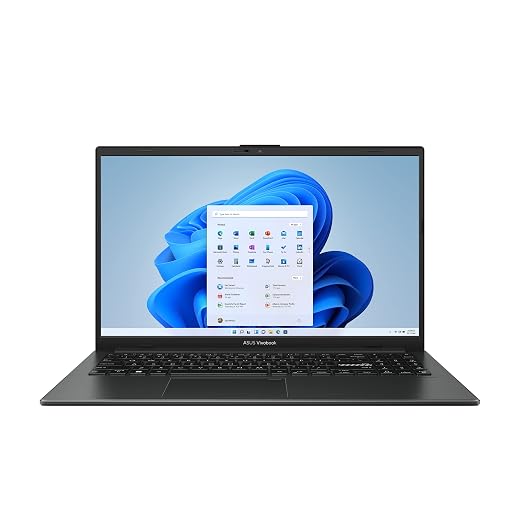
Dell 16 Plus Copilot+ 2-in-1 Review: Hardware Analysis & Warranty Risks
The Dell 16 Plus 2-in-1 (associated with the Inspiron 7640 family) combines an expansive 16-inch touchscreen, an eight-core Intel Core Ultra 7 256V processor, 16GB of DDR5 memory, and modern Copilot+ capabilities within a 360-degree convertible aluminum-accented frame. Delivering strong on-device artificial intelligence processing, ample desktop-replacement workspace, and responsive day-to-day speed, this convertible presents an…

As Amazon Associates, we earn from qualifying purchases. This means we may receive a small commission at no extra cost to you if you click through and make a purchase.
The Dell 16 Plus 2-in-1 (associated with the Inspiron 7640 family) combines an expansive 16-inch touchscreen, an eight-core Intel Core Ultra 7 256V processor, 16GB of DDR5 memory, and modern Copilot+ capabilities within a 360-degree convertible aluminum-accented frame. Delivering strong on-device artificial intelligence processing, ample desktop-replacement workspace, and responsive day-to-day speed, this convertible presents an intriguing blend of productivity and flexibility, though the reality of third-party modifications and the physical leverage on its hinges demands a careful assessment from long-term reliability shoppers.
This convertible machine primarily serves business analysts, educators, remote professionals, and multitasking students who need an expansive canvas for multi-window productivity, stylus interactions, and video collaboration across extended workdays. However, mobile workers looking for a featherlight notebook or shoppers wanting uncomplicated, direct-from-factory warranty terms may find conventional clamshell designs like the dell – inspiron 15 15.6 touch screen laptop – intel core i5 with 8gb memory – 512gb ssd – carbon bla a simpler, lower-risk ownership proposition.
Dell 16 Plus 2-in-1 spec sheet
| Processor | Intel Core Ultra 7 256V (8-core architecture) |
|---|---|
| Graphics | Intel Arc Graphics (integrated, 6GB shared memory) |
| System Memory | 16GB DDR5 RAM |
| Internal Storage | 1TB PCIe NVMe M.2 SSD |
| Display | 16.0-inch WUXGA (1920 x 1200) ComfortView Plus touchscreen, 300 nits |
| Chassis Form Factor | Convertible 2-in-1 with 360-degree hinge |
| Weight | 4.5 pounds |
| Wireless Connectivity | Wi-Fi 7 |
| Physical Ports | Thunderbolt 4, USB 3.2 Gen 2 Type-C, USB 3.2 Gen 1 Type-A, HDMI 2.1, Audio Jack |
| Condition & Warranty | Resealed for system upgrades; one-year Dell warranty on remaining components |
Every field from the listing (40)
| 0 | Color, 16"|Ultra 7 |
|---|---|
| 1 | Hard-Drive Size, 1 TB |
| 2 | Operating System, Windows 11 Home |
| 3 | Other Special Features of the Product, Backlit Keyboard, Fingerprint Reader, HD Audio, Numeric Keypad, Support Stylus |
| 4 | Graphics Description, Integrated |
| 5 | Graphics Coprocessor, Intel ARC Graphics |
| 6 | Hard Disk Description, SSD |
| 7 | Item Weight, 4.5 pounds |
| 8 | Video Processor, Intel |
| 9 | Specific Uses For Product, Business, Entertainment, Student |
| 10 | Graphics Card Ram, 6 GB |
| 11 | Form Factor, Convertible |
| 12 | Hard Disk Interface, Solid State |
| 13 | Camera Description, Front |
| 14 | Biometric Security Feature, Fingerprint Recognition |
| 15 | Graphics Ram Type, Shared |
| 16 | Compatible Devices, External displays, mice, keyboards, storage devices, printers, and other accessories |
| 17 | Warranty Type, Extended |
| 18 | Item Dimensions L x W x Thickness, 14.05"L x 9.87"W x 0.67"Th |
| 19 | Video Output, HDMI, Thunderbolt 4 |
| 20 | Screen Bezel Thickness, Bezel-Less |
| 21 | Operating System Family, Windows |
| 22 | Rear Facing Camera Photo Sensor Resolution, 2 mp |
| 23 | Front Photo Sensor Resolution, 2 mp |
| 24 | Screen Size, 16 inches |
| 25 | Resolution, WUXGA |
| 26 | Native Resolution, 1920 x 1200 pixels |
| 27 | Display Type, LED |
| 28 | Display Resolution Maximum, 1920×1200 pixels |
| 29 | Display Technology, LED |
| 30 | Display Refresh Rate in Hertz, 60 |
| 31 | Maximum Display Brightness, 300 nit |
| 32 | Touch Screen Type, capacitive |
| 33 | Display Maximum Resolution, 1920 x 1200 pixels |
| 34 | Connectivity Technology, Bluetooth, HDMI, USB, Wi-Fi |
| 35 | Wireless Technology, Bluetooth, Wi-Fi |
| 36 | Wireless Compability, 802.11.be, Bluetooth |
| 37 | Bluetooth Version, 5.3 |
| 38 | Wi-Fi Generation, Wi-Fi 7 |
| 39 | Human-Interface Input, Touch Pad, Touchscreen, Touchscreen with Stylus Support |
Quoted from the product listing. We did not measure these figures.
01Third-Party Upgrades and Warranty Reliability
A central consideration for any buyer looking at this specific listing is the vendor disclosure: the computer is brand new but has been opened and resealed to upgrade system specifications. In practical terms, third-party upgrade firms such as ISTComputers purchase base factory configurations and replace components like the solid-state drive to deliver a 1TB capacity. While this practice provides convenient out-of-the-box storage without requiring the user to wield a screwdriver, it introduces clear operational and administrative splits in your warranty protection.
The product listing explicitly notes that a one-year warranty from Dell applies to remaining original components, while the overall unit carries an extended warranty designation. If the motherboard, display assembly, or power delivery circuitry suffers a hardware defect, original manufacturer diagnostic pathways apply. However, if the upgraded 1TB PCIe NVMe SSD develops bad sectors, thermal throttling, or read-write failures, Dell technical support may decline repair for the non-factory drive, routing the claim back to the seller. For corporate environments or self-employed professionals who rely on single-channel depot repair, this hybrid support model introduces potential friction during downtime.
Prospective purchasers evaluating dell 16 plus laptop db16250 alternatives should confirm their comfort with these terms before deployment. While aftermarket SSD upgrades are mechanically straightforward, ensuring clear documentation of who handles the solid-state storage warranty throughout the first year is vital. Evaluating dell 16 plus upgrade reliability requires acknowledging that while the underlying hardware is robust, post-factory disassembly always hinges on the quality control of the technician who performed the internal swap.
02Hinge Durability and 360-Degree Chassis Ergonomics
Large-format convertible laptops occupy a distinct niche, but they present unique mechanical realities that differ sharply from compact 13-inch counterparts. At 4.5 pounds, the Dell 16 Plus 2-in-1 is a substantial piece of hardware. The dual 360-degree hinges must provide sufficient friction to hold a wide 16-inch display steady while a user taps, swipes, or writes with an active pen, yet remain smooth enough to permit single-handed adjustments when opening the chassis on a desk.
Over long periods, dell 16 plus hinge durability depends heavily on usage patterns. Because a 16-inch panel generates considerable mechanical leverage against the hinge anchors, lifting or adjusting the screen from a single outer corner can impart asymmetric torsional stress on the internal mounts. Users who open the lid from the center point preserve the hinge alignment far better over multi-year ownership cycles. The four operational stances—traditional laptop, tent mode, presentation stand, and flat tablet—offer distinct utility, but the physical weight fundamentally dictates how these modes are enjoyed.
In practice, tent and stand modes are exceptional for narrow desks, kitchen counters, or secondary reference displays during video calls, effectively isolating the keyboard away from spills and clutter. Conversely, holding a 4.5-pound slab in the crook of an arm for prolonged e-book reading or handheld sketching is physically exhausting. Tablet mode on this machine functions best when placed flat on a drafting desk or conference table, where the supported stylus functionality allows comfortable note-taking without bearing the chassis weight.
03Processor Performance and Professional Workflows
At the heart of this machine sits the Intel Core Ultra 7 256V processor, boasting an 8-core layout paired with 16GB of fast DDR5 memory. As part of Intel’s modern mobile generation, this silicon incorporates dedicated Neural Processing Units (NPUs) designed to accelerate on-device artificial intelligence tasks under the Windows 11 Copilot+ framework. Routine administrative computing, local background blur in video conferencing, predictive text generation, and local AI summaries run seamlessly without placing excessive loads on the primary computing cores.
For general business operations, software programming, spreadsheet compilation, and multitasking across dozens of browser tabs, the dell 16 plus specs deliver swift, dependable performance. The integrated Intel Arc Graphics setup utilizes 6GB of shared memory, providing ample rendering power for driving high-resolution external monitors, handling multi-stream 4K media playback, and managing photo editing suites. The listing identifies business, student, and entertainment environments as optimal use cases, reinforcing that the laptop excels at sustained productivity rather than high-end production rendering.
Buyers looking for dedicated graphics muscle for workstation-grade 3D animation, heavy video production, or intensive gaming should look toward machines purpose-built for those tasks, such as the lenovo – legion pro 5i 16 2.5k oled gaming laptop – intel core ultra 9 275hx 2025 – 32gb ram – nvidi. While the Dell 16 Plus 2-in-1 effortlessly tackles casual gaming and day-to-day office tasks, its integrated Arc architecture is fundamentally tailored toward power efficiency and visual fidelity in mobile business applications rather than sustained high-draw graphical computing.
04Display Quality, Biometrics, and Connectivity
Visual workspace is a defining attribute of this dell 16 2-in-1 touchscreen laptop. The 16.0-inch panel features a WUXGA resolution of 1920 x 1200, employing a 16:10 aspect ratio that yields significantly more vertical viewing area than legacy 16:9 widescreen panels. For document editing, timeline scrubbing, and web research, the extra vertical lines reduce scrolling fatigue. The display is rated at 300 nits of brightness and incorporates ComfortView Plus hardware low-blue-light technology, making it well-suited for indoor office environments, lecture halls, and living spaces.
The integrated peripheral suite provides balanced security and communication tools:
- Front FHD Webcam: Delivers sharp 1080p video clarity for professional remote conferences, accompanied by an integrated physical privacy shutter for guaranteed visual cutoff.
- Biometric Security: A fingerprint reader integrated into the keyboard deck provides rapid, secure biometric authentication through Windows Hello.
- Full-Featured Keyboard: Includes an integrated backlit keyboard layout with a dedicated numeric keypad, catering directly to accounting, data entry, and finance specialists.
- High-Fidelity Audio: Onboard HD audio speakers deliver balanced reproduction for conference calls, lectures, and casual media streaming.
Connectivity remains a strong highlight of the chassis. The machine incorporates a Thunderbolt 4 (USB4 Type-C) port, a USB 3.2 Gen 2 Type-C port, a USB 3.2 Gen 1 Type-A port, an HDMI 2.1 display port, and an analog audio combo jack. This comprehensive assortment allows users to interface with legacy peripherals while driving up to three external displays simultaneously without requiring cumbersome conversion hubs. Furthermore, the inclusion of cutting-edge Wi-Fi 7 provides future-proof wireless throughput on compatible modern networking routers.
05Battery Claims and Thermal Management
Dell claims up to a 21-hour battery life for this system, an ambitious metric achieved under strictly controlled efficiency testing scenarios. In real-world business and educational environments—where screen brightness sits near its 300-nit peak, Wi-Fi 7 maintains persistent network transfers, and multiple background applications communicate with cloud servers—endurance will naturally vary from laboratory figures. Nevertheless, the efficiency optimizations of the Intel Core Ultra 7 256V architecture allow the machine to reliably navigate standard business days away from a wall outlet.
Regarding dell copilot+ pc thermal performance, the convertible chassis must vent heat effectively whether resting on a desktop or folded back in tent mode. Dell routes cooling airflow through bottom intake perforations and exhaust zones near the hinge assembly. When working on flat hard surfaces, internal temperatures remain disciplined, and fan acoustic profiles are modest during administrative tasks. However, users should take care not to place the 4.5-pound chassis on soft bedding or plush surfaces in tablet orientation, as blocking the chassis vents can trigger elevated skin temperatures and internal fan throttling.
The verdict
Dell 16 Plus 2-in-1
10.0/10
Buyer score
Overwhelmingly positive
Average star rating left by Amazon buyers, doubled to a 10-point scale. It is not a score we gave the product.
When asking is dell 16 plus worth it, the answer depends entirely on how you balance physical versatility against warranty simplicity. The Dell 16 Plus 2-in-1 excels as an expansive, highly capable desktop replacement that transitions effortlessly between presentations, document review, and multi-monitor office workstations. Its combination of an Intel Core Ultra 7 processor, 16GB of DDR5 RAM, a crisp 1920 x 1200 ComfortView Plus display, and versatile connectivity provides dependable everyday execution for demanding productivity tasks.
However, cautious buyers must keep the reseller upgrade conditions top of mind. The resealed status means your 1TB storage component lives outside the standard factory assembly line, dividing potential warranty claims between Dell and the supplying merchant. If you approach the purchase with clear eyes regarding its 4.5-pound weight and split warranty responsibilities, this convertible delivers an exceptionally capable, feature-packed workspace built for modern productivity.
Pros
- Expansive 16-inch 16:10 touchscreen display
- Versatile ports including Thunderbolt 4 and HDMI 2.1
- Modern Wi-Fi 7 wireless connectivity
- Crisp FHD webcam with physical privacy shutter
- Full backlit keyboard with dedicated numeric keypad
Cons
- Resealed configuration introduces split warranty coverage
- Heavy 4.5-pound weight causes tablet fatigue
- Modest 300-nit brightness limits outdoor usability
Buy it if
- You need a sprawling 16-inch 16:10 touchscreen workspace with full stylus support for desktop-based digital signing, annotating, and presenting.
- Your workflow benefits from robust physical connectivity, including direct HDMI 2.1, Thunderbolt 4, and the ability to drive three external monitors.
- You require a dedicated numeric keypad and backlit layout for extensive data entry, financial modeling, or administrative spreadsheets.
- You want modern on-device AI acceleration and future-ready Wi-Fi 7 connectivity housed in an adaptable convertible frame.
Skip it if
- You want a strictly factory-sealed device where every internal component is backed by standard single-source Dell depot service.
- You intend to use tablet mode primarily while standing or walking, where a 4.5-pound chassis quickly induces arm fatigue.
- You regularly work in outdoor sunlit environments where a 300-nit panel can struggle against direct glare.
See it on AmazonAffiliate link. Price and stock change at Amazon, not here.
Questions buyers ask
What does it mean that the Dell 16 Plus 2-in-1 has been resealed?
The listing states that the laptop was opened and resealed by a third-party distributor to upgrade internal hardware, such as installing a 1TB PCIe NVMe SSD. While the machine is brand new, the physical chassis has been accessed after leaving the Dell manufacturing facility.
How does the third-party upgrade impact the manufacturer warranty?
Dell covers the original components that shipped from the factory for one year under its manufacturer warranty. Any aftermarket upgraded components, such as the replaced storage drive, are typically supported directly by the reseller rather than through Dell standard warranty depots.
Does the laptop come with an active stylus pen in the box?
The technical specifications state that the screen supports stylus input, but the listing does not specify that an active pen is included in the packaging. Buyers planning to take handwritten notes or sketch should anticipate purchasing a compatible stylus separately.
Can I connect multiple external monitors to this laptop?
Yes. The hardware configuration includes a Thunderbolt 4 port, a USB 3.2 Gen 2 Type-C port, and an HDMI 2.1 output, allowing the system to support up to three external displays simultaneously alongside the primary panel.
Is the 16-inch 2-in-1 comfortable to hold as a handheld tablet?
Weighing approximately 4.5 pounds, the laptop is considerably heavier than traditional handheld mobile tablets. While tablet mode functions smoothly when resting flat on a conference table or desk, holding it unsupported for extended periods can cause noticeable arm fatigue.
How this review was put together
- Specs are quoted from the Amazon listing, not measured in a lab.
- The score is the average star rating left by Amazon buyers, doubled to a 10-point scale.
- Prices were read from the listing when this page was last built and move without notice.
- Buyer quotes are reproduced word for word, with the name and date shown.
199 reviews · 1,445 rated products · 87 brands tracked
We earn a commission when you buy through our Amazon links. That never changes a score, because we do not set the scores.