Razer Blade 14 Long-Term Review: Thermal Limits, Build, and Support
The Razer Blade 14 is an ultra-portable gaming laptop engineered to fit high-tier processing components into a slim 0.62-inch anodized aluminum unibody chassis. Equipped with the AMD Ryzen AI 9 365 processor, 32 GB of 8000 MHz LPDDR5X memory, and an NVIDIA GeForce RTX 5070 Laptop GPU running at up to 115W TGP, this machine…
As Amazon Associates, we earn from qualifying purchases. This means we may receive a small commission at no extra cost to you if you click through and make a purchase.
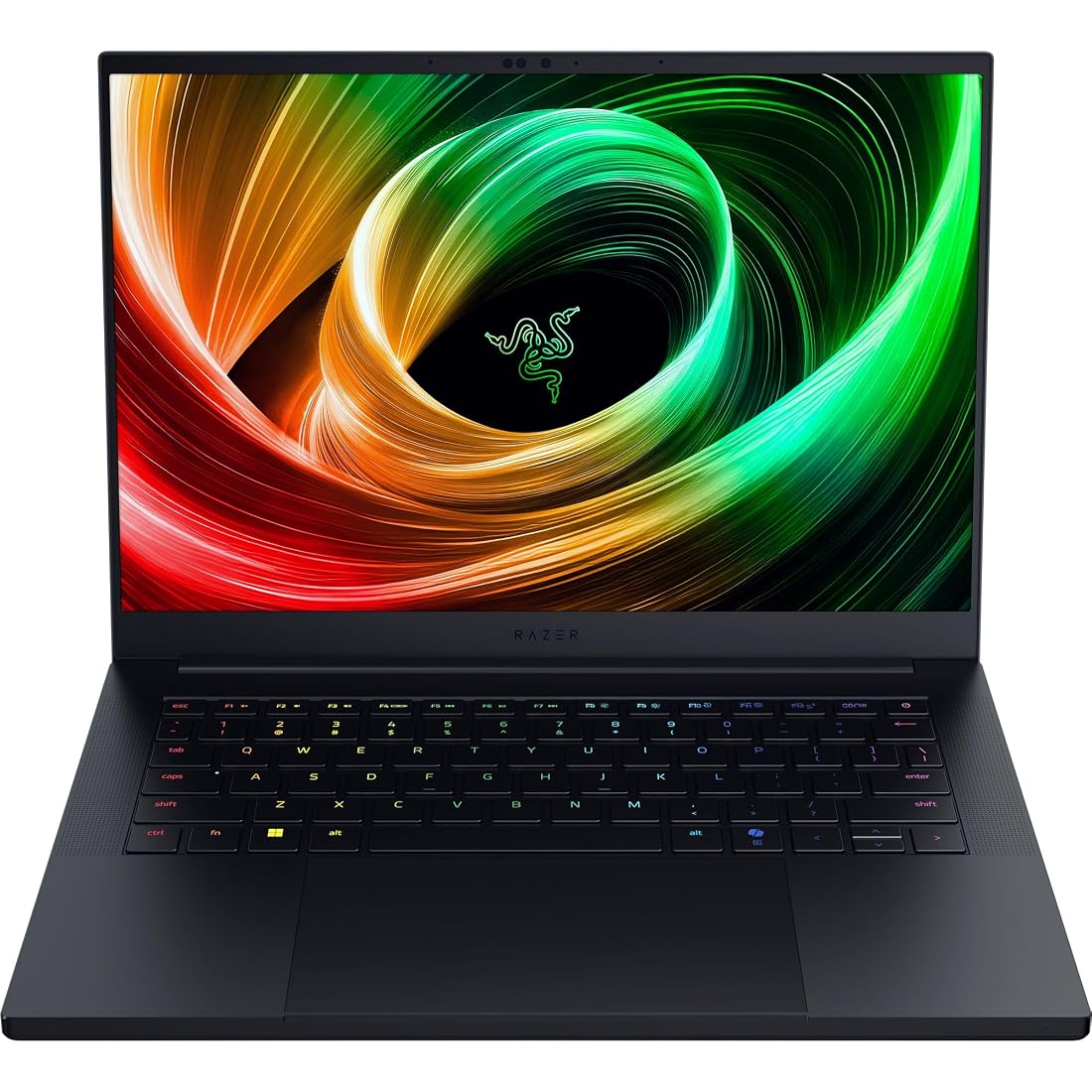
The Razer Blade 14 is an ultra-portable gaming laptop engineered to fit high-tier processing components into a slim 0.62-inch anodized aluminum unibody chassis. Equipped with the AMD Ryzen AI 9 365 processor, 32 GB of 8000 MHz LPDDR5X memory, and an NVIDIA GeForce RTX 5070 Laptop GPU running at up to 115W TGP, this machine targets enthusiasts who demand serious graphical power without carrying a bulky workstation. It delivers remarkable frame pacing, fast generative computing, and studio-grade visual fidelity in a 3.59-pound form factor, though buyers must accept the physical compromises inherent to housing high-wattage components inside a dense, ultra-thin metal shell.
This laptop suits traveling creators, software developers, and mobile gamers who value rigid craftsmanship, strict color accuracy, and compact mobility above all else. However, users seeking a stationary desktop replacement, complete internal component upgrade paths, or silent acoustic performance under full computational load will find a larger chassis far more practical for their daily workload.
Razer Blade 14 spec sheet
| Processor | AMD Ryzen AI 9 365 (Up to 50 TOPS NPU) |
|---|---|
| Graphics | NVIDIA GeForce RTX 5070 Laptop GPU (Up to 115W TGP) |
| Display | 14-inch 3K (2880×1800) 120 Hz OLED, Calman Verified, 0.2 ms |
| Memory | 32 GB LPDDR5X (8000 MHz) |
| Storage | 1 TB Solid State Drive |
| Chassis Dimensions | 12.24 x 8.83 x 0.64 inches, 3.59 lbs |
| Battery & Charging | 72 Whr Battery, 200W Adapter (Fast Charge 50% in 30 mins) |
| Operating System | Windows 11 Home |
Every field from the listing (40)
| 0 | Color, Black |
|---|---|
| 1 | Hard-Drive Size, 1 TB |
| 2 | Operating System, Windows 11 Home |
| 3 | Other Special Features of the Product, AI-driven productivity tools, Advanced cooling system, Calman Verified Display |
| 4 | Graphics Description, RTX 5070 |
| 5 | Hard Disk Description, SSD |
| 6 | Video Processor, NVIDIA |
| 7 | Specific Uses For Product, Gaming |
| 8 | Form Factor, Ultra-Portable |
| 9 | Camera Description, Front |
| 10 | Graphics Ram Type, GDDR5X |
| 11 | Compatible Devices, Headphone, Mouse, Speaker |
| 12 | Warranty Type, Limited |
| 13 | Item Dimensions L x W x Thickness, 12.24"L x 0.64"W x 8.83"Th |
| 14 | Video Output, HDMI |
| 15 | Operating System Family, Windows |
| 16 | Screen Size, 14 inches |
| 17 | Resolution, 2880×1800 |
| 18 | Native Resolution, 2880 x 1800 pixels |
| 19 | Display Type, OLED |
| 20 | Display Resolution Maximum, 2880×1800 pixels |
| 21 | Display Technology, OLED |
| 22 | Display Refresh Rate in Hertz, 120 |
| 23 | Maximum Display Brightness, 400 nit |
| 24 | Touch Screen Type, No Touchscreen |
| 25 | Display Maximum Resolution, 2880×1800 |
| 26 | Connectivity Technology, Bluetooth, HDMI, USB, Wi-Fi |
| 27 | Wireless Technology, Wi-Fi |
| 28 | Wireless Compability, 802.11a/b/g/n/ac, Bluetooth |
| 29 | Bluetooth Version, 5.4 |
| 30 | Wi-Fi Generation, Wi-Fi 7 |
| 31 | Battery Cell Type, Lithium Polymer |
| 32 | Battery Life, 11 hours |
| 33 | Battery Average Life Standby, 12 hours |
| 34 | Lithium-Battery Energy Content, 72 watt-hours |
| 35 | Human-Interface Input, Touch Pad |
| 36 | Keyboard Description, Gaming |
| 37 | Keyboard Layout, QWERTY |
| 38 | Touchpad Feature, Precision Touch |
| 39 | Processor Series, Ryzen AI |
Quoted from the product listing. We did not measure these figures.
01Vapor Chamber Architecture and Thermal Reliability
Managing heat dissipation inside a chassis measuring just 0.62 inches thin represents a severe engineering challenge. The Razer Blade 14 implements a bespoke vapor chamber cooling system that replaces conventional copper heat pipes with a sealed, liquid-filled vacuum chamber. This chamber spans critical heat zones across the CPU and GPU dies, vaporizing internal liquid to spread thermal energy uniformly toward dual high-efficiency exhaust fans. When evaluating razer 14 laptop cooling reliability, this broad thermal spread prevents concentrated hotspots, ensuring consistent power delivery during extended computational sessions.
Nevertheless, sustained razer blade 14 thermal performance operates under absolute physical constraints. Because the unibody aluminum chassis acts as a secondary passive heatsink, surface warmth builds noticeably around the top keyboard deck and rear vents during sustained rendering or gaming. Shoppers who compare form factors will find that larger configurations like the razer blade 16 (2026) provide substantially more internal air volume, which naturally lowers surface temperatures. For the 14-inch form factor, owners must keep lower intake grills clear of soft fabrics and perform regular cleanings to prevent dust from insulating the cooling assembly over years of ownership.
Acoustic profiles also factor heavily into long-term thermal management. To disperse up to 115 watts from the graphics processor alongside the Ryzen CPU, the dual fans must spin aggressively under load. The vapor chamber prevents sudden thermal throttling spikes, but fan noise reaches distinct levels during heavy processing tasks. Ensuring proper airflow and operating on flat, hard surfaces remains essential to protect internal micro-soldered components and preserve long-term battery cell health.
02Processing Power and Graphics Execution
Choosing this razer 14 laptop for gaming provides access to the AMD Ryzen AI 9 365 processor, which features an integrated neural processing unit capable of up to 50 TOPS. This dedicated NPU yields 200 percent more AI processing power than the previous generation, powering local Copilot+ tools, background audio isolation, and accelerated creative generative workflows. Razer pairs this CPU with 32 GB of LPDDR5X memory running at an ultra-fast 8000 MHz. This memory configuration offers 33 percent faster frequency than its predecessor, delivering the rapid bandwidth required by memory-intensive computational suites while drawing less idle power.
In examining the razer blade 14 rtx 5070 configuration, the GPU operates at up to 115W TGP and leverages NVIDIA DLSS 4 to render demanding titles smoothly at the native 2880×1800 resolution. Ray tracing and high-resolution geometry execute reliably without destabilizing frame pacing. While stationary desktop substitutes like the razer blade 18 gaming laptop deliver higher wattage ceilings, this 115W threshold hits an ideal equilibrium between aggressive performance and compact enclosure safety.
When assessing the full razer 14 laptop specs, prospective buyers must note that the 32 GB of LPDDR5X RAM is soldered directly onto the system board to achieve the 0.62-inch slim profile. While 32 GB provides plenty of runway for current multitasking, rendering pipelines, and modern games, it cannot be expanded in the future. The 1 TB solid-state drive remains standard M.2 storage, providing clear flexibility for post-purchase drive upgrades as storage requirements grow.
03Visual Precision and the 3K OLED Display
The razer blade 14 oled display is one of the most compelling aspects of this machine. Featuring a 14-inch 3K (2880×1800) panel operating at a 120 Hz refresh rate, it presents sharp text and fluid visuals. Because OLED technology illuminates each pixel individually, the panel achieves infinite contrast, absolute black levels, and vivid color reproduction without backlight bleed. A rapid 0.2 ms response time eliminates motion ghosting during fast-paced competitive gaming, delivering clean frame transitions across all visual content.
Creative professionals will appreciate the factory Calman Verification, which guarantees that color profiles align with strict production standards right out of the box. The 16:10 aspect ratio adds vertical screen area, providing practical workspace for timeline editing and code navigation. Shoppers researching general-purpose ultra-portables such as the acer aspire 14 ai laptop will notice that Razer targets a much higher standard of visual response and calibration fidelity, making this display ideal for dual-purpose gaming and creative workloads.
Long-term maintenance of an OLED panel requires mindful daily operation. While Windows 11 includes built-in safeguards like pixel-refreshing and automatic display dimming, users should avoid keeping static high-contrast graphics pinned at maximum brightness for unbroken hours. Operating at sensible brightness levels ensures the organic diodes maintain balanced color saturation and luminance uniformity throughout their lifespan.
04Chassis Build Quality, Portability, and Battery Endurance
Razer’s manufacturing standards remain prominent throughout the machine, and the razer 14 laptop build quality is evident the moment it is handled. Machined from a single block of aircraft-grade aluminum, the unibody shell exhibits virtually zero flex across the keyboard deck, display corners, or bottom panel. Measuring 12.24 inches long by 8.83 inches wide and weighing 3.59 pounds, this iteration is 11 percent smaller than the previous generation, making it easy to slide into standard protective sleeves and travel packs.
When it comes to mobile endurance, the razer blade 14 battery life relies on an internal 72 Whr battery pack designed to provide up to 11 hours of on-screen productivity. Power optimizations within the AMD Ryzen AI processor and energy-efficient 8000 MHz LPDDR5X memory help preserve capacity during document editing, media playback, and everyday browsing. For mobile top-ups, the included 200W adapter supports fast charging, replenishing up to 50 percent of the battery in just 30 minutes.
Buyers must balance these figures against the power requirements of intensive gaming. Engaging the RTX 5070 GPU on battery power quickly draws down capacity, and system firmware lowers clock rates to prevent severe battery strain. To enjoy full graphical fidelity and maximum clock speeds, keeping the 200W charger connected during serious gaming sessions remains mandatory.
05Warranty, Support, and Long-Term Maintenance
A high-performance compact laptop requires thoughtful consideration of post-purchase protection, and the razer blade 14 warranty and support structure provides standard limited coverage against manufacturer defects in materials and workmanship. Because this machine integrates a custom vapor chamber, soldered high-speed RAM, and a specialized OLED panel, repairs outside of warranty coverage can be complex and expensive. Buyers should ensure they register their hardware promptly and retain purchase documentation through authorized retail channels.
Physical maintenance is equally critical to sustaining peak operational health over a three-to-five-year timeline. The dual fans draw air directly through the bottom intake vents, which can gather household lint and dust over time. Periodic inspection and gentle cleaning using compressed air will keep the vapor chamber fins clear of debris. Keeping intake vents unobstructed prevents heat from lingering near the internal 72 Whr battery pack, helping prolong cell longevity.
Software maintenance completes the ownership picture. System profiles, fan curves, and display modes are managed through Razer Synapse, while AMD and NVIDIA push consistent driver updates for processing and graphic pipelines. Keeping BIOS and graphics drivers current ensures thermal profiles behave properly, stabilizing power delivery across ongoing Windows updates.
The verdict
Razer Blade 14
8.6/10
Our score
Mostly positive
Scores are out of 10, based on listed specifications and buyer feedback.
The Razer Blade 14 successfully balances high-performance gaming hardware with true ultra-portable craftsmanship. By combining the AMD Ryzen AI 9 365 processor, an NVIDIA GeForce RTX 5070 Laptop GPU, and a stunning 3K 120 Hz OLED display inside a 0.62-inch aluminum frame, Razer provides mobile professionals and gamers with an exceptionally capable workstation that weighs just 3.59 pounds.
When asking is razer 14 laptop worth it, the answer hinges on how much you value portability over modularity. The soldered 32 GB memory configuration and noticeable chassis warmth under sustained load are necessary trade-offs for such a slender profile. If you prioritize premium build quality, outstanding display fidelity, and disciplined mobile design, the Razer Blade 14 delivers an exceptional blend of form and computing power.
Pros
- Ultra-thin 0.62-inch rigid aluminum unibody chassis
- Calman Verified 3K 120 Hz OLED display
- NVIDIA RTX 5070 running up to 115W TGP
- Fast 32 GB LPDDR5X memory at 8000 MHz
- Fast charging restores 50 percent in 30 minutes
Cons
- Soldered system memory prevents post-purchase RAM upgrades
- Audible fan noise under sustained full processing load
- Aluminum chassis exterior warms noticeably during heavy gaming
Buy it if
- You need a rigid, premium aluminum gaming laptop weighing under 3.6 pounds that slips easily into a compact travel bag.
- You demand an ultra-accurate 3K 120 Hz OLED screen with Calman Verification and a 0.2 ms response time for professional creative work.
- You want modern local AI processing power via the AMD Ryzen AI 9 365 NPU combined with fast 8000 MHz LPDDR5X memory.
- You benefit from rapid charging that restores 50 percent of battery capacity in 30 minutes using a compact 200W power supply.
Skip it if
- You require modular memory upgrades after purchase, as the 32 GB of system RAM is permanently soldered to the motherboard.
- You expect near-silent fan acoustics when running heavy 3D titles or high-resolution rendering tasks.
- You prefer a dedicated desktop-replacement machine with a thicker chassis that accommodates higher graphical wattage ceilings.
See it on AmazonAffiliate link. Price and stock change at Amazon, not here.
Questions buyers ask
Can you upgrade the RAM or internal storage on the Razer Blade 14?
The 32 GB LPDDR5X 8000 MHz memory is soldered directly to the mainboard to maintain the thin chassis profile and cannot be upgraded. However, the 1 TB solid-state drive is installed in a standard M.2 slot and can be replaced with a larger compatible drive.
How does the vapor chamber cooling perform during marathon gaming sessions?
The bespoke vapor chamber spreads thermal energy across a wide vacuum area, preventing sudden thermal spikes and allowing the RTX 5070 to sustain up to 115W TGP. However, because the aluminum body absorbs heat passively, the chassis exterior will feel warm to the touch and the cooling fans will spin at audible speeds under heavy loads.
What is the realistic battery life for productivity workflows?
With its 72 Whr battery and power-efficient components, the laptop can deliver up to 11 hours of on-screen productivity during light tasks such as web browsing and document editing. Demanding 3D rendering or gaming on battery power increases consumption significantly, requiring the 200W AC adapter for full performance.
Is the 3K OLED display suitable for color-critical photo and video editing?
Yes, the 14-inch 2880×1800 OLED screen features factory Calman Verification to ensure strict color calibration out of the box. Its infinite contrast ratio, vibrant color range, and 0.2 ms response time make it well-suited for professional content creation as well as fast-paced gaming.
What external display connections does the Razer Blade 14 support?
The laptop includes an integrated HDMI output for direct connection to monitors and televisions, alongside standard connectivity options for external peripherals including mice, speakers, and headphones.
How this review was put together
- Specs are quoted from the Amazon listing, not measured in a lab.
- The score is out of 10, based on listed specifications and buyer feedback.
- Prices were read from the listing when this page was last built and move without notice.
2,590 reviews · 1,445 rated products · 87 brands tracked
We earn a commission when you buy through our Amazon links. That never changes a score.


