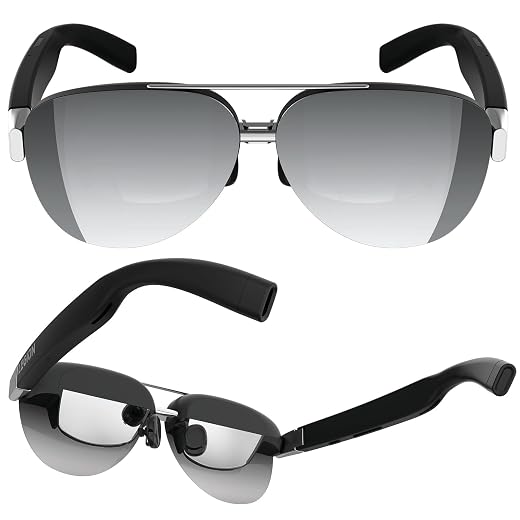
VITURE Pro 2 XR Glasses Breakdown: Build Quality, Software, and Longevity
The VITURE Pro 2 XR wearable display packs dual Sony Micro-OLED panels into a compact, sunglass-style frame that projects a virtual 146-inch 120Hz display directly before your eyes. Our technical breakdown shows that while its optical clarity and independent diopter dials deliver an impressive personal viewing space, its day-to-day practicality relies heavily on host device…

As Amazon Associates, we earn from qualifying purchases. This means we may receive a small commission at no extra cost to you if you click through and make a purchase.
The VITURE Pro 2 XR wearable display packs dual Sony Micro-OLED panels into a compact, sunglass-style frame that projects a virtual 146-inch 120Hz display directly before your eyes. Our technical breakdown shows that while its optical clarity and independent diopter dials deliver an impressive personal viewing space, its day-to-day practicality relies heavily on host device DisplayPort support and realistic expectations regarding wearable hardware longevity.
This headset suits remote professionals, frequent flyers, and handheld gamers seeking a private multi-monitor setup or a massive theater screen without carrying a heavy portable monitor. However, users needing native astigmatism correction or direct connectivity with standard HDMI gaming consoles without adapters should look elsewhere. Exploring broader hardware comparisons in our viture pro 2 xr/ar glasses coverage provides additional context on where this headset fits among contemporary smart eyewear.
VITURE Pro 2 XR spec sheet
| Model Number | V1273 |
|---|---|
| Display Panel | Sony Micro-OLED (1920 × 1080) |
| Virtual Display Size | 146 inches (50-degree Field of View) |
| Refresh Rate & Brightness | 120Hz / 1600 nits peak brightness |
| Myopia Adjustment Range | Built-in twin dials, 0 to -5.00D per eye |
| Item Weight | 63 g |
| Chassis Dimensions | 6.68 x 5.91 x 1.97 inches |
| Connectivity Interface | USB-C (DisplayPort Alternate Mode) |
| Included In The Box | Glasses case, cloth, lens shade, 3 swappable nose pads, USB-C cable |
| Manufacturer Warranty | 1 Year |
Every field from the listing (26)
| 1 | Human Interface Input, Dial |
|---|---|
| 2 | Controller Type, Button Control |
| 3 | Color, Black |
| 4 | Connectivity Technology, USB-C |
| 5 | Screen Size, 146 inches |
| 6 | Display Type, Sony Micro-OLED |
| 7 | Resolution, 1920 × 1080 |
| 9 | Item Weight, 63 g |
| 10 | Item Dimensions, 6.68 x 5.91 x 1.97 inches |
| 11 | Item Dimensions D x W x H, 6.68"D x 5.91"W x 1.97"H |
| 12 | Brand, VITURE |
| 13 | Model Name, V1273 |
| 14 | Age Range Description, Adult |
| 15 | Model Number, V1273 |
| 16 | Built-In Media, Glasses Case & Glasses Cloth, Lens Shade, Swappable Nose Pads x 3, USB-C to USB-C Cable, VITURE Pro 2 XR Glasses |
| 17 | Warranty Description, 1 Year |
| 18 | Wearable Computer Type, Smart Glasses |
| 19 | Unit Count, 1 Count |
| 20 | UPC, 850087100014 |
| 21 | Manufacturer, VITURE Inc. |
| 22 | Best Sellers Rank, #1 in Video Display Glasses |
| 23 | ASIN, B0H824YXJH |
| 24 | Customer Reviews, 4.4 4.4 out of 5 stars (221) 4.4 out of 5 stars |
| 25 | Warranty Type, Limited |
| 27 | Age Range (Description), Adult |
| 28 | Included Components, Glasses Case & Glasses Cloth, Lens Shade, Swappable Nose Pads x 3, USB-C to USB-C Cable, VITURE Pro 2 XR Glasses See more |
Quoted from the product listing. We did not measure these figures.
01Display Quality and Optical Alignment
Display sharpness stands out as the primary metric for wearable screens, and the viture pro xr specs make a compelling case through UltraClarity 3.0 optics. By pairing 1920 × 1080 Sony Micro-OLED displays with tuned birdbath prisms, the headset produces a virtual 146-inch image with a 50-degree field of view. Text remains legible from the screen center out toward the peripheral corners, preventing the blurry edges that often compromise productivity in wearable monitors. Calibrating color reproduction directly within the Micro-OLED hardware rather than relying on external correction chips helps preserve natural tones and contrast without adding processing latency.
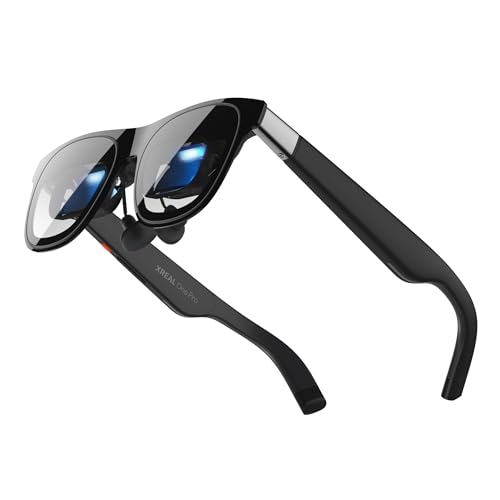
A core design feature is the viture pro myopia adjustment system, which uses independent rotary dials mounted on the upper frame. These dials adjust spherical focus between 0 and -5.00 diopters for each eye, allowing many nearsighted users to skip corrective contact lenses or custom prescription clip-ons entirely. However, the mechanism only compensates for spherical focal depth. If your prescription includes cylindrical correction for astigmatism, these dials will not resolve rotational distortion, meaning subtle ghosting on fine text can remain. While competing devices like the x real one pro glasses often require dedicated magnetic prescription inserts for any vision correction, the built-in dials on this model trade astigmatism handling for immediate mechanical adjustability.
Luminance reaches 1600 nits peak brightness, ensuring that high-contrast media and productivity windows remain clear under moderate ambient lighting. For brightly lit spaces or outdoor commutes, clipping on the included lens shade blocks external reflections to retain dark black levels. Furthermore, the optical assembly holds an SGS A+ Eye Care Certification, which reflects steady flicker performance and blue-light moderation during lengthy sessions. Provided you position the swappable nose pads correctly to align your pupils with the optical exit window, visual fatigue remains minimal across continuous media viewing.
02Frame Durability and Hardware Reliability
Wearable displays face unique mechanical stresses, and evaluating viture pro 2 reliability means looking closely at the chassis construction. At 63 grams, the frame is 20 percent lighter than its predecessor, featuring a 16 percent thinner frame and a 39 percent thinner hinge design. While this reduction substantially improves weight distribution on the nose bridge during multi-hour flights, shaving down hinge material concentrates rotational torque at the pivot points. Users who spread the arms aggressively when donning or removing the glasses place direct mechanical tension on these slimmer hinge pins, making two-handed handling an important preventive habit.
Thermal management is another critical factor in wearable electronics. Because micro-displays and drive logic sit close to the user’s face, heat generated during high-brightness 120Hz playback naturally transfers along the right temple arm. While the updated temple material helps distribute clamping pressure across the skull, long sessions can generate a noticeable warm zone against the side of the head. Taking advantage of the three included swappable nose pads allows you to elevate or extend the frame standoff distance, improving passive airflow across the brow while dialing in proper alignment.
Physical controls and adjustment mechanisms introduce additional long-term wear surfaces. The frame features tactile button controls for adjusting brightness, volume, and 3D display modes without relying on software menus. While these buttons feel responsive, the moving dials for diopter focusing contain internal miniature gears that move the optical prisms. These internal sleds maintain calibration well under normal use, but frequent back-and-forth adjustments among multiple users could introduce mechanical wear over several years. Utilizing the provided hard-shell travel case protects these moving parts from bag compression and particulate contamination.
03Device Compatibility and Connection Stability
A seamless tethered experience requires verifying viture pro 2 compatibility across your hardware setup before buying. The glasses rely exclusively on DisplayPort Alternate Mode over USB-C to receive video and draw operating power. They offer straightforward plug-and-play mirroring with modern USB-C host devices, including the iPhone 15, 16, and 17 series, newer MacBooks, DisplayPort-capable Windows laptops, and select Android smartphones. However, host devices limited to standard USB data transfer without DisplayPort signaling will fail to output a signal, requiring specialized external conversion hardware.
Gaming performance highlights both the potential and the limits of the hardware. Using the viture pro xr for gaming leverages the 120Hz refresh rate and low Micro-OLED pixel response to deliver fluid, ghost-free gameplay on portable PCs and mobile devices. Yet, popular gaming systems like the Nintendo Switch cannot drive the glasses directly through a passive USB-C cable because the console requires an active docking protocol and dedicated power injection. Users wanting to play Switch games or connect to legacy HDMI video sources must purchase separate accessories such as the Mobile Dock. When comparing connection setups across devices like the viture luma xr glasses, evaluating cable and adapter overhead remains an essential buying consideration.
Cable integrity represents a frequent failure point in tethered eyewear, as constant head turning bends and pulls the connection. The glasses use a detachable USB-C to USB-C cable that locks into an angled port at the temple tip. Employing a modular, detachable cable provides a substantial reliability benefit over permanently wired headsets, since a strained or damaged wire can be replaced without replacing the glasses. Nevertheless, users should avoid sharp tugs against desk edges or airplane armrests, which can damage the internal contact pins in the temple port over time.
04Software Stability and SpaceWalker Usability
Unlocking the full functionality of the hardware requires installing the viture pro spacewalker app, which is available on iOS, Android, macOS, and Windows. SpaceWalker transforms the glasses from a basic mirrored monitor into a spatial workstation with multiple virtual displays, 3D/VR media playback, and pinned spatial screens. On compatible iPhone models, the app enables spatial video playback, allowing you to view dimensional recordings natively. Having multiple floating browser tabs or spreadsheets arranged horizontally creates a functional multi-screen workspace in tight environments like train seats or hotel desks.
Nevertheless, software-driven spatial tracking relies on internal inertial sensors that can drift over extended periods. Because the glasses do not employ external tracking cameras, gradual gyroscopic drift can cause pinned virtual screens to slide slightly out of center, requiring periodic recalibration via an on-screen shortcut. Running multiple virtual monitors also imposes an increased processing load on your laptop or smartphone, drawing down host battery reserves faster and engaging system cooling fans sooner than standard passive mirroring.
The integrated software platform also includes real-time 2D-to-3D conversion powered by AI algorithms. This feature analyzes standard two-dimensional video streams and separates foreground elements from backgrounds to simulate stereoscopic depth. While this works smoothly on slower cinematic content and high-definition streaming, fast-action sequences or complex camera pans can produce depth artifacts and unnatural perspective shifts. When weighing this feature in a viture pro 2 review, 2D-to-3D conversion serves as an entertaining secondary feature rather than an everyday replacement for native multi-screen work.
05Warranty Coverage and Failure Prevention
The viture pro 2 warranty provides 1 year of manufacturer coverage against defects in materials and assembly. For a high-precision wearable combining miniature optical prisms, micro-displays, and mechanical adjustment dials, a single-year warranty is typical for consumer hardware but demands careful ownership. The warranty policy specifically covers electronic malfunctions and factory defects, while excluding damage from liquid spills, drops, crushed frames, or scratched optics caused by improper handling.
Preventing hardware issues over multi-year ownership requires standard maintenance practices. The birdbath prism glass is sensitive to micro-scratches, meaning you should clean the lenses exclusively with the included microfiber cloth rather than clothing fabrics or paper towels. Furthermore, sweat and skin oils can degrade nose pad silicone and temple coatings over time, so wiping down the contact surfaces after extended sessions prevents cosmetic and material wear. Storing the glasses in their protective case when not in use shields the delicate 39% thinner hinges from unintended crushing forces in backpacks.
The verdict
VITURE Pro 2 XR
8.8/10
Buyer score
Very positive
Average star rating left by Amazon buyers, doubled to a 10-point scale. It is not a score we gave the product.
The VITURE Pro 2 XR establishes itself as a capable, well-engineered personal display by addressing the primary weaknesses of earlier smart glasses. Its 63-gram chassis, edge-to-edge optical clarity, and integrated diopter adjustment dials deliver a comfortable and crisp viewing experience for productivity and entertainment. When connected to a compatible DisplayPort USB-C host device, the 120Hz Sony Micro-OLED panels provide vibrant visuals that transform mobile computing into a private, expansive setup.
Deciding if the viture pro xr is worth it ultimately hinges on your existing hardware and vision needs. The thinner hinges and micro-mechanical adjustment dials demand disciplined handling, while the 1-year warranty provides standard rather than extended protection. If your devices support DisplayPort over USB-C natively and you do not require astigmatism correction, these glasses represent a refined, highly functional wearable display that easily justifies a spot in a mobile tech kit.
Pros
- Independent myopia adjustment dials up to -5.00D
- Sharp 120Hz Sony Micro-OLED with 1600 nits brightness
- Lightweight 63g frame with redesigned slim hinges
- Detachable USB-C cable prevents total unit failure
- SpaceWalker app enables multi-screen virtual workspace
Cons
- Diopter dials lack correction for astigmatism
- Direct video output requires host DisplayPort support
- Single-year limited warranty offers basic coverage
Buy it if
- You need a portable, private 146-inch 120Hz display for travel, mobile computing, or gaming from a compatible USB-C laptop, iPad, or smartphone.
- You have mild-to-moderate nearsightedness up to -5.00D and want to view a sharp screen without buying custom prescription inserts or wearing contact lenses.
- You want a lightweight 63-gram display with Sony Micro-OLED color accuracy and edge-to-edge text clarity.
- You plan to use the SpaceWalker multi-screen productivity workspace on a compatible laptop or smartphone.
Skip it if
- You have significant astigmatism that requires cylindrical lens correction for clear viewing.
- You want to play Nintendo Switch or HDMI console games on the go without buying extra dock accessories or adapters.
- You need a rugged, water-resistant display for active physical environments where the glasses might take impacts.
See it on AmazonAffiliate link. Price and stock change at Amazon, not here.
Questions buyers ask
Does the VITURE Pro 2 XR require prescription inserts for vision correction?
Not for standard nearsightedness. The glasses feature independent mechanical dials that adjust focal depth from 0 to -5.00D for each eye, allowing many nearsighted individuals to use them without contacts or lens inserts. However, the dials do not correct for astigmatism, so users with significant cylindrical error may still experience slight blurriness on text.
How does the 120Hz refresh rate impact portable gaming?
The 120Hz refresh rate ensures smooth motion and low display latency, reducing motion blur during fast-paced gaming on compatible handheld PCs, laptops, and smartphones. To utilize 120Hz, your connected host device must support 120Hz video output over its USB-C DisplayPort connection.
Can you connect the glasses directly to a Nintendo Switch or HDMI source?
No, the glasses cannot run directly off a Nintendo Switch or standard HDMI output using only the included USB-C cable. The Switch requires a docking handshake and external power, while HDMI requires signal conversion, meaning you must connect through an optional accessory like the Mobile Dock or an appropriate powered adapter.
What does the 1-year warranty cover on the VITURE Pro 2 XR?
The 1-year limited warranty covers manufacturing defects in internal circuitry, optical assemblies, display panels, and chassis hardware under normal operational use. It does not cover accidental drop damage, cracked lenses, hinge strain from improper handling, water exposure, or cosmetic scratching.
Does the SpaceWalker app require a powerful computer to run multiple virtual monitors?
Standard screen mirroring requires minimal computing resources, but rendering multiple floating virtual monitors through SpaceWalker increases CPU and GPU utilization. While contemporary laptops handle the multi-screen workspace well, older or lower-powered machines may experience higher battery drain and louder cooling fans during multi-display sessions.
How the ratings split
Share of Amazon ratings at each star level, as shown on the listing.
How this review was put together
- Specs are quoted from the Amazon listing, not measured in a lab.
- The score is the average star rating left by Amazon buyers, doubled to a 10-point scale.
- Prices were read from the listing when this page was last built and move without notice.
- Buyer quotes are reproduced word for word, with the name and date shown.
199 reviews · 1,445 rated products · 87 brands tracked
We earn a commission when you buy through our Amazon links. That never changes a score, because we do not set the scores.